Installing OBIEE 11.1.1.7.0 fails when starting the managed server – b1_server1

Posted by Steve Racanovic | Posted in | Posted on 11:49 AM

0


I'm trying to install OBIEE 11.1.1.7.0 and the managed OBIEE server – b1_server1 – was always failing causing the install to fail. After several attempts and double checking all the system parameters it was still continually getting stuck and unable to start the managed server. The only error I could find is this:

Stopping Derby Server...
Starting AdminServer
  Starting the domain ...
progress in calculate progress1
Executing Task: Starting Managed Server: bi_server1
oracle.as.install.bi.wls.ServerLifeCycleException: Failed to achieve state RUNNING in 3600seconds.   The server is currently in state STARTING
 at oracle.as.install.bi.wls.ServerLifeCycle.waitForManagedWLSServerState(ServerLifeCycle.java:119)
 at oracle.as.install.bi.wls.ServerLifeCycle.startServerSynchronous(ServerLifeCycle.java:59)
 at oracle.as.install.bi.biconfig.standard.StartStopManagedServer.doExecute(StartStopManagedServer.java:55)
 at oracle.as.install.bi.biconfig.standard.AbstractProvisioningTask.execute(AbstractProvisioningTask.java:70)
 at oracle.as.install.bi.biconfig.standard.StandardProvisionTaskList.execute(StandardProvisionTaskList.java:66)
 at oracle.as.install.bi.biconfig.BIConfigMain.doExecute(BIConfigMain.java:113)
 at oracle.as.install.engine.modules.configuration.client.ConfigAction.execute(ConfigAction.java:375)
 at oracle.as.install.engine.modules.configuration.action.TaskPerformer.run(TaskPerformer.java:88)
 at oracle.as.install.engine.modules.configuration.action.TaskPerformer.startConfigAction(TaskPerformer.java:105)
 at oracle.as.install.engine.modules.configuration.action.ActionRequest.perform(ActionRequest.java:15)
 at oracle.as.install.engine.modules.configuration.action.RequestQueue.perform(RequestQueue.java:96)
 at oracle.as.install.engine.modules.configuration.standard.StandardConfigActionManager.start(StandardConfigActionManager.java:186)
 at oracle.as.install.engine.modules.configuration.boot.ConfigurationExtension.kickstart(ConfigurationExtension.java:81)
 at oracle.as.install.engine.modules.configuration.ConfigurationModule.run(ConfigurationModule.java:86)
 at java.lang.Thread.run(Thread.java:662)


One time when it was stuck trying to start the managed server, I decided to checked the entropy and noticed that it was low.

[root@beast-wls-au ~]# cat /proc/sys/kernel/random/entropy_avail
157
[root@beast-wls-au ~]# cat /proc/sys/kernel/random/entropy_avail
141
[root@beast-wls-au ~]# cat /proc/sys/kernel/random/entropy_avail
132
[root@beast-wls-au ~]# cat /proc/sys/kernel/random/entropy_avail
183
[root@beast-wls-au ~]# cat /proc/sys/kernel/random/entropy_avail
173
[root@beast-wls-au ~]# cat /proc/sys/kernel/random/entropy_avail
149

As soon as I ran rngd to increase entropy pool, the managed server started and continued to install.


[root@beast-wls-au ~]# rngd -r /dev/urandom -o /dev/random -f -t 1 &
[root@beast-wls-au ~]# 
[root@beast-wls-au ~]# 
[root@beast-wls-au ~]# cat /proc/sys/kernel/random/entropy_avail 
3526
[root@beast-wls-au ~]# cat /proc/sys/kernel/random/entropy_avail 
3605
[root@beast-wls-au ~]# 


I'll have to look into an entropy generator to avoid this issue in the future.

I installed OBIEE 11.1.1.7.0 on OEL6_u6 which sit inside OVS 3.3.2

Receiving 'startWebLogic.sh: 1: eval: Syntax error: Unterminated quoted string Process exited.' in JDev when starting the Integrated Weblogic Server.

Posted by Steve Racanovic | Posted in | Posted on 3:40 PM

0

I'm using Linux Mint 16, and when I try to start the Integrated Weblogic Server (Run -> Start Server Instance) in JDeveloper I get this error:

*** Using port 7101 ***
/home/steve/.jdeveloper/system11.1.1.6.38.62.29/DefaultDomain/bin/startWebLogic.sh
[waiting for the server to complete its initialization...]
/home/steve/.jdeveloper/system11.1.1.6.38.62.29/DefaultDomain/bin/startWebLogic.sh: 1: eval: Syntax error: Unterminated quoted string
Process exited.


To workaround this, I changed the sha-bang in startWebLogic.sh script to run bash. i.e. #!/bin/bash

You also need to do the same for stopWebLogic.sh script to stop instance later.

Failed to locate the Google Cloud Messaging for Android Library file named "gcm.jar". (oracle.adfmf.framework.dt.deploy.android.deployers.ValidatePreferencesDeployer)

Posted by Steve Racanovic | Posted in | Posted on 3:27 PM

0

Using JDev 11.1.2.4.0 I tried deploying a simple app to the emulator when I received the following error:

[02:46:21 PM] Deployment cancelled.
[02:46:21 PM] ----  Deployment incomplete  ----.
[02:46:21 PM] Failed to locate the Google Cloud Messaging for Android Library file named "gcm.jar". (oracle.adfmf.framework.dt.deploy.android.deployers.ValidatePreferencesDeployer)


I then installed GCM (which now seems to be deprecated) from Andriod SDK Manager and it worked.


How to create an OCI connection in Jdev - Database Navigator

Posted by Steve Racanovic | Posted in , | Posted on 12:02 PM

0

I have been trying to create an OCI connection in the database navigator using Jdev 11.1.2.3. Following these docs:

http://docs.oracle.com/cd/E35521_01/user.111230/e17455/connect_work_databases.htm#OJDUG5131
http://docs.oracle.com/cd/E35521_01/user.111230/e17455/connect_work_databases.htm#OJDUG2432

I'm on a 64 bit platform. So the first thing I do is set JDev to use 64bit JDK by editing the jdev.conf file i.e.
...
# Directive SetJavaHome is not required by default, except for the base
# install, since the launcher will determine the JAVA_HOME.  On Windows
# it looks in ..\..\jdk, on UNIX it first looks in ../../jdk. If no JDK
# is found there, it looks in the PATH.
#
#SetJavaHome D:\Oracle\Jdev\111230-prod\jdk160_24
SetJavaHome C:\Program Files\Java\jdk1.6.0_39
...

I'll also add the parameters for JDBC driver and path to the OCI dll's.

 #For JDBC for OCI
AddVMOption -Doracle.jdbc.library=D:\Oracle\JDBC\instantclient\x86-64\11.1.0.7.0\ojdbc6.jar
AddNativeCodePath D:\Oracle\JDBC\instantclient\x86-64\11.1.0.7.0

When I start JDev, I receive a warning for the parameter AddNativeCodePath. And I'm unable to connect.

[sracanov@SRACANOV-AU D]$ jdev -verbose
WARNING: Unknown directive: AddNativeCodePath
savedArg0 = D:\Oracle\JDev\111230-prod\jdeveloper\jdev\bin\jdev.exe
VM to launch C:\Program Files\Java\jdk1.6.0_39\jre\bin\server\jvm.dll
Restarting the launcher with the 64bit version
Reading exe header from jvm.dll, Machine=8664
Jvm is 64bit
Checking toplevel for D:\Oracle\JDev\111230-prod\jdeveloper\jdev\bin\..\..\ide\bin\launcher.dll = 0
About to relaunch with command line: D:\Oracle\JDev\111230-prod\jdeveloper\jdev\bin\jdev64.exe -verbose
WARNING: Unknown directive: AddNativeCodePath
 ...


It seems AddNativeCodePath is not recognised as a parameter. So I've comment out the line and start it by passing the library in that path environment variable.

[sracanov@SRACANOV-AU D]$ set path=D:\Oracle\JDBC\instantclient\x86-64\11.1.0.7.0;%path%

[sracanov@SRACANOV-AU D]$ jdev -verbose
savedArg0 = D:\Oracle\JDev\111230-prod\jdeveloper\jdev\bin\jdev.exe
VM to launch C:\Program Files\Java\jdk1.6.0_39\jre\bin\server\jvm.dll
Restarting the launcher with the 64bit version
Reading exe header from jvm.dll, Machine=8664
Jvm is 64bit
Checking toplevel for D:\Oracle\JDev\111230-prod\jdeveloper\jdev\bin\..\..\ide\bin\launcher.dll = 0
About to relaunch with command line: D:\Oracle\JDev\111230-prod\jdeveloper\jdev\bin\jdev64.exe -verbose
savedArg0 = D:\Oracle\JDev\111230-prod\jdeveloper\jdev\bin\jdev64.exe
VM to launch C:\Program Files\Java\jdk1.6.0_39\jre\bin\server\jvm.dll
JNI Option: -Xbootclasspath/a:C:\Program Files\Java\jdk1.6.0_39\lib\tools.jar;C:\Program Files\Java\jdk1.6.0_39\lib\dt.jar
JNI Option: -Dsun.java2d.noddraw=true
JNI Option: -Dnetbeans.home=../../netbeans/platform/
JNI Option: -Dnetbeans.logger.console=true
JNI Option: -Dexcluded.modules=org.eclipse.osgi
JNI Option: -Dide.cluster.dirs=../../netbeans/netbinox/:../../netbeans/bridge/:../../
JNI Option: -Xmx800M
JNI Option: -Xms128M
JNI Option: -Xverify:none
JNI Option: -Doracle.ide.extension.HooksProcessingMode=LAZY
JNI Option: -Dorg.eclipse.equinox.simpleconfigurator.configUrl=file:bundles.info
JNI Option: -Dosgi.bundles=file:../ide/lib/oracle.ide.osgi.jar@3:start
JNI Option: -Dosgi.bundles.defaultStartLevel=1
JNI Option: -Dosgi.configuration.cascaded=false
JNI Option: -Dosgi.noShutdown=true
JNI Option: -Dorg.osgi.framework.bootdelegation=*
JNI Option: -Dosgi.parentClassloader=app
JNI Option: -Xbootclasspath/p:../../rdbms/jlib/ojdi.jar
JNI Option: -Dosgi.classloader.singleThreadLoads=true
JNI Option: -Dosgi.bundlefile.limit=2000
JNI Option: -Xbootclasspath/a:../../../oracle_common/modules/oracle.nlsrtl_11.1.0/orai18n-collation.jar
JNI Option: -Xbootclasspath/a:../../../oracle_common/modules/oracle.nlsrtl_11.1.0/orai18n-mapping.jar
JNI Option: -Xbootclasspath/a:../../../oracle_common/modules/oracle.nlsrtl_11.1.0/orai18n-servlet.jar
JNI Option: -Xbootclasspath/a:../../../oracle_common/modules/oracle.nlsrtl_11.1.0/orai18n-utility.jar
JNI Option: -Xbootclasspath/a:../../../oracle_common/modules/oracle.nlsrtl_11.1.0/orai18n.jar
JNI Option: -Xbootclasspath/a:../../../oracle_common/modules/oracle.xdk_11.1.0/xmlparserv2.jar
JNI Option: -Djavax.xml.parsers.DocumentBuilderFactory=oracle.xml.jaxp.JXDocumentBuilderFactory
JNI Option: -Djavax.xml.parsers.SAXParserFactory=oracle.xml.jaxp.JXSAXParserFactory
JNI Option: -Dorg.xml.sax.driver=oracle.xml.parser.v2.SAXParser
JNI Option: -Dide.feedback-server=ide.us.oracle.com
JNI Option: -Xbootclasspath/a:../../ide/lib/xml-factory.jar
JNI Option: -Djavax.xml.transform.TransformerFactory=oracle.ide.xml.SwitchableTransformerFactory
JNI Option: -XX:MaxPermSize=288M
JNI Option: -Xbootclasspath/p:../lib/lwawt.jar
JNI Option: -Xbootclasspath/p:../lib/apt-expose.jar
JNI Option: -Dsun.awt.keepWorkingSetOnMinimize=true
JNI Option: -XX:+HeapDumpOnOutOfMemoryError
JNI Option: -Doracle.jdeveloper.webservice.showAllOwsmPolicyTypes=false
JNI Option: -Doracle.jdeveloper.webservice.hidePropertyOverride=false
JNI Option: -Dsun.awt.disablegrab=true
JNI Option: -Xbootclasspath/p:../../rdbms/jlib/ojdi.jar
JNI Option: -Dide.patches.dir=jdev/lib/patches
JNI Option: -Doracle.jdbc.library=D:\Oracle\JDBC\instantclient\x86-64\11.1.0.7.0\ojdbc6.jar
JNI Option: -Dide.startingArg0=D:\Oracle\JDev\111230-prod\jdeveloper\jdev\bin\jdev64.exe
JNI Option: -Dide.startingArg1=-verbose
JNI Option: -Dide.launcherProcessId=5428

...


I've used an instance client here which you can read about the setup here.

NT_STATUS_ACCESS_DENIED listing

Posted by Steve Racanovic | Posted in | Posted on 11:07 AM

0

My samba server stop working the other day and which left me stump and unable to connect.

[oracle@beast /]$  smbclient -L //sracanov-au3/My.Contents
Password:
Domain=[SRACANOV-AU3] OS=[Unix] Server=[Samba 3.0.33-3.39.el5_8]

        Sharename       Type      Comment
        ---------       ----      -------
        My.Contents     Disk      My Files
        IPC$            IPC       IPC Service (Samba Server Version 3.0.33-3.39.el5_8)
        oracle          Disk      Home Directories
Domain=[SRACANOV-AU3] OS=[Unix] Server=[Samba 3.0.33-3.39.el5_8]

        Server               Comment
        ---------            -------

        Workgroup            Master
        ---------            -------
        AU-ORACLE            EDJONES
[oracle@beast /]$ smbclient //sracanov-au3/My.Contents -Uoracle%password
Domain=[SRACANOV-AU3] OS=[Unix] Server=[Samba 3.0.33-3.39.el5_8]
smb: \> dir
NT_STATUS_ACCESS_DENIED listing \*

                58681 blocks of size 16777216. 33764 blocks available
smb: \>

After thoroughly checking the configuration files again and user details I was still in the same place. I eventually found the issue was in SELinux, and once I'd disable it, it worked again.

[root@sracanov-au3 My.Contents]# setsebool -P smbd_disable_trans 1
[root@sracanov-au3 My.Contents]# service smb restart
Shutting down SMB services:                                [  OK  ]
Shutting down NMB services:                                [  OK  ]
Starting SMB services:                                     [  OK  ]
Starting NMB services:                                     [  OK  ]
[root@sracanov-au3 My.Contents]#

[oracle@beast /]$ smbclient //sracanov-au3/My.Contents -Uoracle%password
Domain=[SRACANOV-AU3] OS=[Unix] Server=[Samba 3.0.33-3.39.el5_8]
smb: \> dir
  .                                   D        0  Fri Apr 13 12:36:46 2012
  ..                                  D        0  Thu Apr 12 10:09:40 2012
  My.Software                         D        0  Tue May  1 10:46:18 2012
  My.Projects                         D        0  Fri Apr 13 11:35:45 2012
  My.Technical.Docs                   D        0  Fri Apr 13 12:36:44 2012
  My.Registry                         D        0  Fri Apr 13 11:23:37 2012
  My.VMWare.Images                    D        0  Thu Apr 12 11:00:59 2012
  My.Thunderbird                      D        0  Fri Apr 13 11:22:39 2012
  My.Music                            D        0  Fri Apr 13 11:35:58 2012
  My.Bookmarks                        D        0  Fri Apr 13 12:36:46 2012
  My.Docs                             D        0  Fri Apr 13 10:30:31 2012
  My.Pictures                         D        0  Fri Apr 13 12:36:45 2012
  My.Backups                          D        0  Tue May  1 15:59:25 2012

                58681 blocks of size 16777216. 33764 blocks available
smb: \>

A Connection Example of JDBC THIN, THICK or SQLPLUS using Oracle Instant Client

Posted by Steve Racanovic | Posted in | Posted on 12:10 PM

0

First, download the instant client you which to use from - http://www.oracle.com/technetwork/database/features/instant-client/index-097480.html

The following steps demonstrate how to use it with simple connection.

1. I downloaded and extracted the following zips file;

- instantclient-basic-win-x86-64-11.1.0.7.0.zip
- instantclient-sqlplus-win-x86-64-11.1.0.7.0.zip

to: D:\Oracle\JDBC\instantclient\x86-64\11.1.0.7.0


[sracanov@SRACANOV-AU D]$ ll
 Volume in drive D is Data
 Volume Serial Number is 12FC-9B4B

 Directory of D:\Oracle\JDBC\instantclient\x86-64\11.1.0.7.0

07/02/2012  01:47 PM              .
07/02/2012  01:47 PM              ..
29/10/2008  07:09 AM            14,336 adrci.exe
29/10/2008  07:09 AM             4,648 adrci.sym
29/10/2008  07:09 AM               335 BASIC_README
29/10/2008  07:09 AM            47,104 genezi.exe
29/10/2008  07:09 AM            26,272 genezi.sym
12/01/2006  11:36 PM               342 glogin.sql
15/10/2008  07:11 AM         1,060,864 mfc71.dll
15/10/2008  07:11 AM           348,160 msvcr71.dll
29/10/2008  07:06 AM           659,968 oci.dll
29/10/2008  07:06 AM           426,200 oci.sym
07/10/2008  11:58 PM           132,608 ocijdbc11.dll
07/10/2008  11:58 PM            22,712 ocijdbc11.sym
26/10/2008  01:10 PM           468,480 ociw32.dll
26/10/2008  01:10 PM            73,024 ociw32.sym
07/10/2008  11:00 PM         1,890,262 ojdbc5.jar
07/10/2008  11:00 PM         1,988,193 ojdbc6.jar
14/10/2008  11:47 PM         1,527,296 orannzsbb11.dll
14/10/2008  11:47 PM           382,728 orannzsbb11.sym
27/10/2008  01:41 PM         1,330,176 oraocci11.dll
29/10/2008  07:09 AM           421,472 oraocci11.sym
29/10/2008  07:08 AM       126,414,336 oraociei11.dll
29/10/2008  07:08 AM         7,200,336 oraociei11.sym
29/10/2008  07:09 AM           426,496 orasql11.dll
29/10/2008  07:09 AM            35,744 orasql11.sym
02/10/2008  11:24 PM         1,685,504 Orasqlplusic11.dll
02/10/2008  11:24 PM           757,760 sqlplus.exe
29/10/2008  07:10 AM           135,976 sqlplus.sym
29/10/2008  07:10 AM               339 SQLPLUS_README
29/10/2008  07:09 AM              vc71
07/02/2012  01:47 PM              vc8
              28 File(s)    147,481,671 bytes
               4 Dir(s)  41,876,062,208 bytes free


2. Use sqlplus.exe and connect to the database.


[sracanov@SRACANOV-AU D]$ sqlplus scott/tiger@(DESCRIPTION=(ADDRESS=(PROTOCOL=tcp)(HOST=sracanov-au3.au.oracle.com)(PORT=1521))(CONNECT_DATA=(SERVICE_NAME=linux11gr2.au.oracle.com)))

SQL*Plus: Release 11.1.0.7.0 - Production on Wed Mar 14 11:10:17 2012

Copyright (c) 1982, 2008, Oracle.  All rights reserved.


Connected to:
Oracle Database 11g Enterprise Edition Release 11.2.0.3.0 - 64bit Production
With the Partitioning, OLAP, Data Mining and Real Application Testing options

SQL> exit
Disconnected from Oracle Database 11g Enterprise Edition Release 11.2.0.3.0 - 64bit Production
With the Partitioning, OLAP, Data Mining and Real Application Testing options

[sracanov@SRACANOV-AU D]$

This is how my database listener looks like:


[oracle@sracanov-au3 dbhome_1]$ lsnrctl status

LSNRCTL for Linux: Version 11.2.0.3.0 - Production on 14-MAR-2012 11:17:49

Copyright (c) 1991, 2011, Oracle.  All rights reserved.

Connecting to (ADDRESS=(PROTOCOL=tcp)(HOST=)(PORT=1521))
STATUS of the LISTENER
------------------------
Alias                     LISTENER
Version                   TNSLSNR for Linux: Version 11.2.0.3.0 - Production
Start Date                13-MAR-2012 10:22:16
Uptime                    1 days 0 hr. 49 min. 33 sec
Trace Level               off
Security                  ON: Local OS Authentication
SNMP                      OFF
Listener Log File         /u01/app/oracle/product/11.2.0/dbhome_1/log/diag/tnslsnr/sracanov-au3/listener/alert/log.xml
Listening Endpoints Summary...
  (DESCRIPTION=(ADDRESS=(PROTOCOL=tcp)(HOST=sracanov-au3.au.oracle.com)(PORT=1521)))
Services Summary...
Service "linux11gr2.au.oracle.com" has 1 instance(s).
  Instance "linux11gr2", status READY, has 1 handler(s) for this service...
Service "linux11gr2XDB.au.oracle.com" has 1 instance(s).
  Instance "linux11gr2", status READY, has 1 handler(s) for this service...
The command completed successfully
[oracle@sracanov-au3 dbhome_1]$


3. Download the simple standalone java client from Doc 467804.1 - How To Determine The Exact JDBC Driver Version (9.x - 11.x) For Standalone Programs (Doc ID 467804.1)


[sracanov@SRACANOV-AU D]$ cd /d C:\Users\sracanov\Downloads

[sracanov@SRACANOV-AU C]$ ll
 Volume in drive C is System
 Volume Serial Number is 3E06-1C2F

 Directory of C:\Users\sracanov\Downloads

07/02/2012  11:47 AM              .
07/02/2012  11:47 AM              ..
07/02/2012  11:45 AM             3,401 JDBCInfo.java
               1 File(s)          3,401 bytes
               2 Dir(s)  146,445,778,944 bytes free

[sracanov@SRACANOV-AU C]$ java -version
java version "1.6.0_30"
Java(TM) SE Runtime Environment (build 1.6.0_30-b12)
Java HotSpot(TM) 64-Bit Server VM (build 20.5-b03, mixed mode)

[sracanov@SRACANOV-AU C]$

There are 2 crucial points here:
A) - I'am using JDK 1.6, so I must use ojdbc6.jar driver.
B) - I am using 64bit JDK. My platform is 64bit. As per the files downloaded *win-x86-64-11.1.0.7.0*. (If platform is 64bit, use 64bit JDK and Client. This needs to be correct for OCI to work. Due to dll's. Thin will run with 32bit).

My platform:


[sracanov@SRACANOV-AU C]$ systeminfo | findstr /B /C:"OS Name" /C:"System Type"
OS Name:                   Microsoft Windows 7 Professional
System Type:               x64-based PC

If you dont have the correct JDK as per your platform, you can download it from here - http://www.oracle.com/technetwork/java/javase/downloads/index.html

4. Now compile and run using JDBC THIN to connect.


[sracanov@SRACANOV-AU C]$ javac -cp .;D:\Oracle\JDBC\instantclient\x86-64\11.1.0.7.0\ojdbc6.jar JDBCInfo.java

[sracanov@SRACANOV-AU C]$ java -cp .;D:\Oracle\JDBC\instantclient\x86-64\11.1.0.7.0\ojdbc6.jar JDBCInfo jdbc:oracle:thin:scott/tiger@(DESCRIPTION=(ADDRESS=(PROTOCOL=tcp)(PORT=1521)
(HOST=sracanov-au3.au.oracle.com))(CONNECT_DATA=(SERVICE_NAME=linux11gr2.au.oracle.com)))

Database
==============
Oracle Database 11g Enterprise Edition Release 11.2.0.3.0 - 64bit Production
With the Partitioning, OLAP, Data Mining and Real Application Testing options

JDBC
==============
Oracle JDBC driver: 11.1.0.7.0-Production

Connection URL
==============
jdbc:oracle:thin:scott/tiger@(DESCRIPTION=(ADDRESS=(PROTOCOL=tcp)(PORT=1521)(HOST=sracanov-au3.au.oracle.com))(CONNECT_DATA=(SERVICE_NAME=linux11gr2.au.oracle.com)))

JVM
===
Sun Microsystems Inc.
Java HotSpot(TM) 64-Bit Server VM
20.5-b03
1.6.0_30

LOCALE
===========
en_AU

CLASSPATH
=========
.
D:\Oracle\JDBC\instantclient\x86-64\11.1.0.7.0\ojdbc6.jar

LIBRARYPATH
===========
C:\Program Files\Java\jdk1.6.0_30\bin
C:\windows\Sun\Java\bin
C:\windows\system32
C:\windows
.
C:\windows\SYSTEM_BIN
C:\windows\SYSTEM_EXE
C:\Program Files\Windows Resource Kits\Tools
C:\windows\SYSTEM_EXE\unixutils\bin
C:\windows\SYSTEM_EXE\unixutils\usr\local\wbin
C:\Program Files\WinSCP3
C:\Program Files\cvsnt
C:\Program Files\GNU\WinCvs 2.0\
C:\Program Files\GnuWin32\bin
C:\Program Files\Java\jdk1.6.0_30\bin
C:\Program Files (x86)\apache-ant-1.7.0\bin
\bin
\bin
C:\windows
C:\windows\system32
.

[sracanov@SRACANOV-AU C]$

5. Now to use JDBC OCI to connect.


[sracanov@SRACANOV-AU C]$ set path=D:\Oracle\JDBC\instantclient\x86-64\11.1.0.7.0;%path%
[sracanov@SRACANOV-AU C]$ java -cp .;D:\Oracle\JDBC\instantclient\x86-64\11.1.0.7.0\ojdbc6.jar JDBCInfo jdbc:oracle:oci:scott/tiger@(DESCRIPTION=(ADDRESS=(PROTOCOL=tcp)(PORT=1521)(
HOST=sracanov-au3.au.oracle.com))(CONNECT_DATA=(SERVICE_NAME=linux11gr2.au.oracle.com)))

Database
==============
Oracle Database 11g Enterprise Edition Release 11.2.0.3.0 - 64bit Production
With the Partitioning, OLAP, Data Mining and Real Application Testing options

JDBC
==============
Oracle JDBC driver: 11.1.0.7.0-Production

Connection URL
==============
jdbc:oracle:oci:scott/tiger@(DESCRIPTION=(ADDRESS=(PROTOCOL=tcp)(PORT=1521)(HOST=sracanov-au3.au.oracle.com))(CONNECT_DATA=(SERVICE_NAME=linux11gr2.au.oracle.com)))

JVM
===
Sun Microsystems Inc.
Java HotSpot(TM) 64-Bit Server VM
20.5-b03
1.6.0_30

LOCALE
===========
en_AU

CLASSPATH
=========
.
D:\Oracle\JDBC\instantclient\x86-64\11.1.0.7.0\ojdbc6.jar

LIBRARYPATH
===========
C:\Program Files\Java\jdk1.6.0_30\bin
C:\windows\Sun\Java\bin
C:\windows\system32
C:\windows
D:\Oracle\JDBC\instantclient\x86-64\11.1.0.7.0
.
C:\windows\SYSTEM_BIN
C:\windows\SYSTEM_EXE
C:\Program Files\Windows Resource Kits\Tools
C:\windows\SYSTEM_EXE\unixutils\bin
C:\windows\SYSTEM_EXE\unixutils\usr\local\wbin
C:\Program Files\WinSCP3
C:\Program Files\cvsnt
C:\Program Files\GNU\WinCvs 2.0\
C:\Program Files\GnuWin32\bin
C:\Program Files\Java\jdk1.6.0_30\bin
C:\Program Files (x86)\apache-ant-1.7.0\bin
\bin
\bin
C:\windows
C:\windows\system32
.

[sracanov@SRACANOV-AU C]$

NOTE:

- If I was using 32bit JDK:

[sracanov@SRACANOV-AU C]$ set path=C:\Program Files (x86)\Java\jdk1.6.0_26\bin

[sracanov@SRACANOV-AU C]$ java -version
java version "1.6.0_26"
Java(TM) SE Runtime Environment (build 1.6.0_26-b03)
Java HotSpot(TM) Client VM (build 20.1-b02, mixed mode, sharing)

[sracanov@SRACANOV-AU C]$ java -cp .;D:\Oracle\JDBC\instantclient\x86-64\11.1.0.7.0\ojdbc6.jar JDBCInfo jdbc:oracle:thin:scott/tiger@(DESCRIPTION=(ADDRESS=(PROTOCOL=tcp)(PORT=1521)
(HOST=sracanov-au3.au.oracle.com))(CONNECT_DATA=(SERVICE_NAME=linux11gr2.au.oracle.com)))

Database
==============
Oracle Database 11g Enterprise Edition Release 11.2.0.3.0 - 64bit Production
With the Partitioning, OLAP, Data Mining and Real Application Testing options

JDBC
==============
Oracle JDBC driver: 11.1.0.7.0-Production

Connection URL
==============
jdbc:oracle:thin:scott/tiger@(DESCRIPTION=(ADDRESS=(PROTOCOL=tcp)(PORT=1521)(HOST=sracanov-au3.au.oracle.com))(CONNECT_DATA=(SERVICE_NAME=linux11gr2.au.oracle.com)))

JVM
===
Sun Microsystems Inc.
Java HotSpot(TM) Client VM
20.1-b02
1.6.0_26

LOCALE
===========
en_AU

CLASSPATH
=========
.
D:\Oracle\JDBC\instantclient\x86-64\11.1.0.7.0\ojdbc6.jar

LIBRARYPATH
===========
C:\Program Files (x86)\Java\jdk1.6.0_26\bin
C:\windows\Sun\Java\bin
C:\windows\system32
C:\windows
C:\Program Files (x86)\Java\jdk1.6.0_26\bin
.

[sracanov@SRACANOV-AU C]$
[sracanov@SRACANOV-AU C]$
[sracanov@SRACANOV-AU C]$ set path=D:\Oracle\JDBC\instantclient\x86-64\11.1.0.7.0;C:\Program Files (x86)\Java\jdk1.6.0_26\bin

[sracanov@SRACANOV-AU C]$ java -cp .;D:\Oracle\JDBC\instantclient\x86-64\11.1.0.7.0\ojdbc6.jar JDBCInfo jdbc:oracle:oci:scott/tiger@(DESCRIPTION=(ADDRESS=(PROTOCOL=tcp)(PORT=1521)(
HOST=sracanov-au3.au.oracle.com))(CONNECT_DATA=(SERVICE_NAME=linux11gr2.au.oracle.com)))
Exception in thread "main" java.lang.UnsatisfiedLinkError: D:\Oracle\JDBC\instantclient\x86-64\11.1.0.7.0\ocijdbc11.dll: Can't find dependent libraries
        at java.lang.ClassLoader$NativeLibrary.load(Native Method)
        at java.lang.ClassLoader.loadLibrary0(ClassLoader.java:1807)
        at java.lang.ClassLoader.loadLibrary(ClassLoader.java:1732)
        at java.lang.Runtime.loadLibrary0(Runtime.java:823)
        at java.lang.System.loadLibrary(System.java:1028)
        at oracle.jdbc.driver.T2CConnection$1.run(T2CConnection.java:3178)
        at java.security.AccessController.doPrivileged(Native Method)
        at oracle.jdbc.driver.T2CConnection.loadNativeLibrary(T2CConnection.java:3174)
        at oracle.jdbc.driver.T2CConnection.logon(T2CConnection.java:233)
        at oracle.jdbc.driver.PhysicalConnection.(PhysicalConnection.java:508)
        at oracle.jdbc.driver.T2CConnection.(T2CConnection.java:133)
        at oracle.jdbc.driver.T2CDriverExtension.getConnection(T2CDriverExtension.java:53)
        at oracle.jdbc.driver.OracleDriver.connect(OracleDriver.java:510)
        at oracle.jdbc.pool.OracleDataSource.getPhysicalConnection(OracleDataSource.java:275)
        at oracle.jdbc.pool.OracleDataSource.getConnection(OracleDataSource.java:206)
        at oracle.jdbc.pool.OracleDataSource.getConnection(OracleDataSource.java:156)
        at JDBCInfo.main(JDBCInfo.java:58)

[sracanov@SRACANOV-AU C]$

- Thin works fine.

- OCI will run into dependent libraries issue on the platform. So you need to use the correct JDK.

- Set the envionment variable for your library on the system used. http://www.oracle.com/technetwork/database/features/instant-client/index-100365.html

"Set the library loading path in your environment to the directory in Step 2 ("instantclient"). On many UNIX platforms, LD_LIBRARY_PATH is the appropriate environment variable. On Windows, PATH should be used."

Manually applying a JDBC patch for a Custom OC4J.

Posted by Steve Racanovic | Posted in , | Posted on 4:04 PM

0

If you have followed doc 420303.1 to upgrade your JDBC driver and found this driver has issues where you need to apply a patch for it. You may want to follow this example to apply the one off patch.

[oracle@beast JDBC_UPGRADE]$ pwd
/home/u01/app/oracle/product/1013AS_blue/j2ee/JDBC_UPGRADE
[oracle@beast JDBC_UPGRADE]$ ll
total 104
drwxr-xr-x  2 oracle oinstall  4096 Feb 21 11:25 applib
drwxr-x---  9 oracle oinstall  4096 Feb 21 11:26 application-deployments
drwxr-xr-x  2 oracle oinstall  4096 Feb 21 11:25 applications
drwxr-xr-x  3 oracle oinstall  4096 Feb 21 11:31 config
drwxr-xr-x  4 oracle oinstall  4096 Feb 21 11:25 connectors
drwxr-xr-x  3 oracle oinstall  4096 Feb 21 11:26 log
-rw-r--r--  1 oracle oinstall 26445 Feb 21  2012 p13403295_10205_Generic.zip
drwxr-xr-x  3 oracle oinstall  4096 Feb 21 11:26 persistence
drwxr-x---  3 oracle oinstall  4096 Feb 21 11:31 shared-lib
drwxr-x---  3 oracle oinstall  4096 Feb 21 11:26 tldcache
[oracle@beast JDBC_UPGRADE]$ unzip -d patches p13403295_10205_Generic.zip > /dev/null
[oracle@beast JDBC_UPGRADE]$ ll
total 112
drwxr-xr-x  2 oracle oinstall  4096 Feb 21 11:25 applib
drwxr-x---  9 oracle oinstall  4096 Feb 21 11:26 application-deployments
drwxr-xr-x  2 oracle oinstall  4096 Feb 21 11:25 applications
drwxr-xr-x  3 oracle oinstall  4096 Feb 21 12:07 config
drwxr-xr-x  4 oracle oinstall  4096 Feb 21 11:25 connectors
drwxr-xr-x  3 oracle oinstall  4096 Feb 21 11:26 log
-rw-r--r--  1 oracle oinstall 26445 Feb 21  2012 p13403295_10205_Generic.zip
drwxr-xr-x  3 oracle oinstall  4096 Feb 21 12:12 patches
drwxr-xr-x  3 oracle oinstall  4096 Feb 21 11:26 persistence
drwxr-x---  3 oracle oinstall  4096 Feb 21 11:31 shared-lib
drwxr-x---  3 oracle oinstall  4096 Feb 21 11:26 tldcache
[oracle@beast JDBC_UPGRADE]$
[oracle@beast JDBC_UPGRADE]$ cd shared-lib/oracle.jdbc/10.2.0.5.0/
[oracle@beast 10.2.0.5.0]$ ll
total 1544
-rw-r-----  1 oracle oinstall 1569316 Feb 21 11:31 ojdbc14.jar
[oracle@beast 10.2.0.5.0]$ cp ojdbc14.jar ojdbc14.p13403295.jar
[oracle@beast 10.2.0.5.0]$ ll
total 3088
-rw-r-----  1 oracle oinstall 1569316 Feb 21 11:31 ojdbc14.jar
-rw-r-----  1 oracle oinstall 1569316 Feb 21 11:35 ojdbc14.p13403295.jar
[oracle@beast 10.2.0.5.0]$ jar uvf ojdbc14.p13403295.jar ../../../patches/13403295/files/jdbc/lib/ojdbc14.jar/*
adding: ../../../patches/13403295/files/jdbc/lib/ojdbc14.jar/oracle/(in = 0) (out= 0)(stored 0%)
adding: ../../../patches/13403295/files/jdbc/lib/ojdbc14.jar/oracle/net/(in = 0) (out= 0)(stored 0%)
adding: ../../../patches/13403295/files/jdbc/lib/ojdbc14.jar/oracle/net/ns/(in = 0) (out= 0)(stored 0%)
adding:
 
../../../patches/13403295/files/jdbc/lib/ojdbc14.jar/oracle/net/ns/NetException.class(in
 = 4557) (out= 1969)(deflated 56%)
[oracle@beast 10.2.0.5.0]$ ll
total 3088
-rw-r-----  1 oracle oinstall 1569316 Feb 21 11:31 ojdbc14.jar
-rw-r--r--  1 oracle oinstall 1572093 Feb 21 11:39 ojdbc14.p13403295.jar
[oracle@beast 10.2.0.5.0]$ cd ../../../config
[oracle@beast config]$ cp server.xml server.xml.old.1
[oracle@beast config]$ opmnctl stopproc process-type=JDBC_UPGRADE
opmnctl: stopping opmn managed processes...
[oracle@beast config]$ grep -l ojdbc14.jar server.xml | xargs sed -i 's/ojdbc14.jar/ojdbc14.p13403295.jar/g'
[oracle@beast config]$ opmnctl startproc process-type=JDBC_UPGRADE
opmnctl: starting opmn managed processes...
[oracle@beast config]$ cd ..
[oracle@beast JDBC_UPGRADE]$ rm p13403295_10205_Generic.zip
[oracle@beast JDBC_UPGRADE]$ 

Note: 


1. The jar command will update the driver jar with the patches. If your using another driver i.e. ojdbc5.jar, then ensure you grab the classes from the ojdbc5.jar directory i.e. ../../../patches/13403295/files/jdbc/lib/ojdbc5.jar/*

2. In server.xml we simply make the following change:
[oracle@beast config]$ diff server.xml server.xml.old.1
125c125
<               <code-source path="ojdbc14.p13403295.jar"/>
---
>               <code-source path="ojdbc14.jar"/>
[oracle@beast config]$ 
 
Once the oc4j instance has started up again, it will use the patched jar - ojdbc14.p13403295.jar. We can simply switch back to original if needed.

Building sudo - make[1]: *** [visudo] Error 1

Posted by Steve Racanovic | Posted in | Posted on 2:20 PM

0

I needed to build sudo today and when I started building it, I received this fatal error:

-bash-3.00# echo $PATH
/usr/sbin:/usr/bin:/sbin:/bin:/usr/sfw/bin:/usr/ccs/bin:/usr/local/bin
-bash-3.00# make
for d in compat common  plugins/sudoers src include doc plugins/sample plugins/sample_group; \
    do (cd $d && exec make all) && continue; \
    exit $?; \
done
make[1]: Entering directory `/export/home/oracle/sudo-1.8.4/compat'
make[1]: Nothing to be done for `all'.
make[1]: Leaving directory `/export/home/oracle/sudo-1.8.4/compat'
make[1]: Entering directory `/export/home/oracle/sudo-1.8.4/common'
make[1]: Nothing to be done for `all'.
make[1]: Leaving directory `/export/home/oracle/sudo-1.8.4/common'
make[1]: Entering directory `/export/home/oracle/sudo-1.8.4/plugins/sudoers'
/bin/bash ../../libtool --mode=link gcc -o visudo visudo.o goodpath.o find_path.o error.o  libparsesudoers.la ../../common/libcommon.la ../../compat/libreplace.la  -lsocket -lnsl
libtool: link: gcc -o visudo visudo.o goodpath.o find_path.o error.o  ./.libs/libparsesudoers.a ../../common/.libs/libcommon.a ../../compat/.libs/libreplace.a -lsocket -lnsl
Undefined                       first referenced
 symbol                             in file
libintl_textdomain                  visudo.o
libintl_bindtextdomain              visudo.o
libintl_dgettext                    visudo.o
ld: fatal: Symbol referencing errors. No output written to visudo
collect2: ld returned 1 exit status
make[1]: *** [visudo] Error 1
make[1]: Leaving directory `/export/home/oracle/sudo-1.8.4/plugins/sudoers'
make: *** [all] Error 2
-bash-3.00# pwd
/export/home/oracle/sudo-1.8.4

After changing the path as follows, it worked:

-bash-3.00# export PATH=/usr/sbin:/usr/bin:/sbin:/bin:/usr/ccs/bin:/usr/ccs/lib:/usr/include:/usr/sfw/bin:/usr/local/sbin:/usr/local/bin

-bash-3.00# make

for d in compat common  plugins/sudoers src include doc plugins/sample plugins/sample_group; \

    do (cd $d && exec make all) && continue; \

    exit $?; \

done

-bash-3.00# make install

for d in compat common  plugins/sudoers src include doc; \

    do (cd $d && exec make pre-install) && continue; \

    exit $?; \

done

for d in compat common  plugins/sudoers src include doc; \

    do (cd $d && exec make install) && continue; \

    exit $?; \

done

/bin/bash ../../mkinstalldirs /usr/local/libexec \

    /usr/local/sbin /usr/local/bin \

    /etc /usr/local/share/doc/sudo \

    `echo /var/lib/sudo|sed 's,/[^/]*$,,'`

/bin/bash ../../install-sh -c -d -O 0 -G 0 -m 0700 /var/lib/sudo

if [ X".so" != X"" ]; then \

    /bin/bash ../../install-sh -c -b~ -O 0 -G 0 -m 0755 .libs/sudoers.so /usr/local/libexec; \

fi

/bin/bash ../../install-sh -c -b~ -O 0 -G 0 -M 0111 sudoreplay /usr/local/bin/sudoreplay

/bin/bash ../../install-sh -c -b~ -O 0 -G 0 -M 0111 visudo /usr/local/sbin/visudo

/bin/bash ../../install-sh -c -d -O 0 -G 0 -m 0750 \

    /etc/sudoers.d

test -r /etc/sudoers || \

    /bin/bash ../../install-sh -c -O 0 -G 0 -m 0440 \

        sudoers /etc/sudoers

#/bin/bash ../../install-sh -c -O 0 -G 0 -m 0555 ./sudoers2ldif /usr/local/share/doc/sudo

/bin/bash ../mkinstalldirs /usr/local/bin \

    /usr/local/libexec

/bin/bash ../install-sh -c -b~ -O 0 -G 0 -M 04111 sudo /usr/local/bin/sudo

rm -f /usr/local/bin/sudoedit

ln /usr/local/bin/sudo /usr/local/bin/sudoedit

if [ -f sesh ]; then /bin/bash ../install-sh -c -b~ -O 0 -G 0 -M 0111 sesh /usr/local/libexec/sesh; fi

if [ -f .libs/libsudo_noexec.so ]; then /bin/bash ../install-sh -c -b~ -O 0 -G 0 -m 0755 .libs/libsudo_noexec.so /usr/local/libexec/sudo_noexec.so; fi

/bin/bash ../mkinstalldirs /usr/local/include

/bin/bash ../install-sh -c -O 0 -G 0 -m 0444 ./sudo_plugin.h /usr/local/include

/bin/bash ../mkinstalldirs /usr/local/share/doc/sudo \

    /usr/local/man/man1m /usr/local/man/man4

mkdir /usr/local/man

mkdir /usr/local/man/man1m

mkdir /usr/local/man/man4

for f in ../ChangeLog ../README  ../NEWS ./HISTORY ./CONTRIBUTORS  ./LICENSE ./TROUBLESHOOTING ./UPGRADE  ./sample.*; do /bin/bash ../install-sh -c -O 0 -G 0 -m 0444 $f /usr/local/share/doc/sudo; done

#for f in ../README.LDAP ./schema.*; do /bin/bash ../install-sh -c -O 0 -G 0 -m 0444 $f /usr/local/share/doc/sudo; done

/bin/bash ../install-sh -c -O 0 -G 0 -m 0444 ./sudo.man /usr/local/man/man1m/sudo.1m

ln /usr/local/man/man1m/sudo.1m /usr/local/man/man1m/sudoedit.1m

/bin/bash ../install-sh -c -O 0 -G 0 -m 0444 ./sudo_plugin.man /usr/local/man/man1m/sudo_plugin.1m

/bin/bash ../install-sh -c -O 0 -G 0 -m 0444 ./sudoreplay.man /usr/local/man/man1m/sudoreplay.1m

/bin/bash ../install-sh -c -O 0 -G 0 -m 0444 ./visudo.man /usr/local/man/man1m/visudo.1m

/bin/bash ../install-sh -c -O 0 -G 0 -m 0444 ./sudoers.man /usr/local/man/man4/sudoers.4

#/bin/bash ../install-sh -c -O 0 -G 0 -m 0444 ./sudoers.ldap.man /usr/local/man/man4/sudoers.ldap.4

-bash-3.00# which sudo

/usr/local/bin/sudo

-bash-3.00# which visudo

/usr/local/sbin/visudo

-bash-3.00#

Reloading jspx page from a commandLink

Posted by Steve Racanovic | Posted in | Posted on 2:23 PM

0

A simple example to reload a jspx page from a commandLink. [Jdev 11.1.1.4.0]

1. Run testpage.jspx.


2. Click in Reload Page link.


Using '-jarsasdbobjects -prependjarnames' parameters and calling the loaded class from a Java Stored Procedure

Posted by Steve Racanovic | Posted in | Posted on 12:08 PM

0

An example using loadjava/dropjava with '-jarsasdbobjects -prependjarnames' parameters and trying to access the class in the jar from a java stored procedure.

[oracle@sracanov-au2 ~]$ cat > HelloWorld1.java
public class HelloWorld1 {
   public static void main(String[] args){
       System.out.println(new HelloWorld1());
   }
   public String toString(){
       return "Hello World 1";
   }
   public static String getHello(){
       return "Hello World 1 !!!";
   }
}
Quit
[oracle@sracanov-au2 ~]$ javac HelloWorld1.java
[oracle@sracanov-au2 ~]$ java HelloWorld1
Hello World 1
[oracle@sracanov-au2 ~]$ loadjava -u scott/tiger -jarsasdbobjects -prependjarnames HelloWorld1.java
[oracle@sracanov-au2 ~]$ cat > java_objects.sql
COL object_name format a30
COL object_type format a15
SELECT object_name, object_type, status FROM user_objects WHERE object_type IN ('JAVA SOURCE', 'JAVA CLASS', 'JAVA RESOURCE') ORDER BY object_type, object_name;
Quit
[oracle@sracanov-au2 ~]$ sqlplus scott/tiger

SQL*Plus: Release 11.2.0.2.0 Production on Tue Sep 6 14:38:01 2011

Copyright (c) 1982, 2010, Oracle.  All rights reserved.

Connected to:

Oracle Database 11g Enterprise Edition Release 11.2.0.2.0 - Production

With the Partitioning, OLAP, Data Mining and Real Application Testing options

SQL> @java_objects.sql

OBJECT_NAME                    OBJECT_TYPE     STATUS

------------------------------ --------------- -------

HelloWorld1                    JAVA CLASS      INVALID
HelloWorld1                    JAVA SOURCE     INVALID

SQL> CREATE OR REPLACE FUNCTION HW RETURN VARCHAR2 as LANGUAGE JAVA NAME 'HelloWorld1.getHello() return String';

 2  /

Function created.

SQL>  select HW() from dual;

HW()

--------------------------------------------------------------------------------

Hello World 1 !!!

SQL> @java_objects.sql

OBJECT_NAME                    OBJECT_TYPE     STATUS

------------------------------ --------------- -------

HelloWorld1                    JAVA CLASS      VALID
HelloWorld1                    JAVA SOURCE     VALID

SQL> exec dbms_java.dropjava('HelloWorld1');

PL/SQL procedure successfully completed.

SQL> @java_objects.sql

no rows selected

SQL> exit

Disconnected from Oracle Database 11g Enterprise Edition Release 11.2.0.2.0 - Production

With the Partitioning, OLAP, Data Mining and Real Application Testing options

[oracle@sracanov-au2 ~]$ loadjava -u scott/tiger HelloWorld1.java
[oracle@sracanov-au2 ~]$ sqlplus scott/tiger

SQL*Plus: Release 11.2.0.2.0 Production on Wed Sep 7 13:18:44 2011

Copyright (c) 1982, 2010, Oracle.  All rights reserved.

Connected to:

Oracle Database 11g Enterprise Edition Release 11.2.0.2.0 - Production

With the Partitioning, OLAP, Data Mining and Real Application Testing options

SQL> @java_objects.sql

OBJECT_NAME                    OBJECT_TYPE     STATUS

------------------------------ --------------- -------

HelloWorld1                    JAVA CLASS      INVALID
HelloWorld1                    JAVA SOURCE     INVALID

SQL> CREATE OR REPLACE FUNCTION HW RETURN VARCHAR2 as LANGUAGE JAVA NAME 'HelloWorld1.getHello() return String';

 2  /

Function created.

SQL> select HW() from dual;

HW()

--------------------------------------------------------------------------------

Hello World 1 !!!

SQL> @java_objects.sql

OBJECT_NAME                    OBJECT_TYPE     STATUS

------------------------------ --------------- -------

HelloWorld1                    JAVA CLASS      VALID
HelloWorld1                    JAVA SOURCE     VALID

SQL>

[oracle@sracanov-au2 ~]$ mkdir Test
[oracle@sracanov-au2 ~]$ cp HelloWorld1.java HelloWorld2.java
[oracle@sracanov-au2 ~]$ sed -i 's/1/2/g' HelloWorld2.java
[oracle@sracanov-au2 ~]$ sed '1i\package Test;' HelloWorld2.java > Test/HelloWorld2.java
[oracle@sracanov-au2 ~]$ rm HelloWorld2.java
[oracle@sracanov-au2 ~]$ javac -cp .:./Test Test/HelloWorld2.java
[oracle@sracanov-au2 ~]$ java -cp .:./Test Test/HelloWorld2
Hello World 2
[oracle@sracanov-au2 ~]$ loadjava -u scott/tiger -jarsasdbobjects -prependjarnames Test/HelloWorld2.java
[oracle@sracanov-au2 ~]$ sqlplus scott/tiger

SQL*Plus: Release 11.2.0.2.0 Production on Wed Sep 7 14:07:30 2011

Copyright (c) 1982, 2010, Oracle.  All rights reserved.

Connected to:

Oracle Database 11g Enterprise Edition Release 11.2.0.2.0 - Production

With the Partitioning, OLAP, Data Mining and Real Application Testing options

SQL> CREATE OR REPLACE FUNCTION HW RETURN VARCHAR2 as LANGUAGE JAVA NAME 'Test.HelloWorld2.getHello() return String';

 2  /

Function created.

SQL> select HW() from dual;

HW2()

--------------------------------------------------------------------------------

Hello World 2 !!!

SQL> @java_objects.sql

OBJECT_NAME                    OBJECT_TYPE     STATUS

------------------------------ --------------- -------

HelloWorld1                    JAVA CLASS      VALID
Test/HelloWorld2               JAVA CLASS      VALID
HelloWorld1                    JAVA SOURCE     VALID
Test/HelloWorld2               JAVA SOURCE     VALID

SQL> exec dbms_java.dropjava('Test/HelloWorld2');

PL/SQL procedure successfully completed.

SQL> @java_objects.sql

OBJECT_NAME                    OBJECT_TYPE     STATUS

------------------------------ --------------- -------

HelloWorld1                    JAVA CLASS      VALID
HelloWorld1                    JAVA SOURCE     VALID

SQL> exec dbms_java.dropjava('HelloWorld1');

PL/SQL procedure successfully completed.

SQL> exit

Disconnected from Oracle Database 11g Enterprise Edition Release 11.2.0.2.0 - Production

With the Partitioning, OLAP, Data Mining and Real Application Testing options

[oracle@sracanov-au2 ~]$ cat > Manifest.txt
Main-Class: Test.HelloWorld2
Quit
[oracle@sracanov-au2 ~]$ jar cvfm Test.jar Manifest.txt ./Test/*class
adding: META-INF/ (in=0) (out=0) (stored 0%)
adding: META-INF/MANIFEST.MF (in=29) (out=31) (deflated -6%)
adding: Test/HelloWorld2.class (in=594) (out=355) (deflated 40%)
Total:
------
(in = 623) (out = 738) (deflated -18%)
[oracle@sracanov-au2 ~]$ java -jar Test.jar
Hello World 2
[oracle@sracanov-au2 ~]$ loadjava -u scott/tiger Test.jar
[oracle@sracanov-au2 ~]$ sqlplus scott/tiger

SQL*Plus: Release 11.2.0.2.0 Production on Thu Sep 8 10:02:16 2011

Copyright (c) 1982, 2010, Oracle.  All rights reserved.

Connected to:

Oracle Database 11g Enterprise Edition Release 11.2.0.2.0 - Production

With the Partitioning, OLAP, Data Mining and Real Application Testing options

SQL> @java_objects

OBJECT_NAME                    OBJECT_TYPE     STATUS

------------------------------ --------------- -------

Test/HelloWorld2               JAVA CLASS      INVALID
META-INF/MANIFEST.MF           JAVA RESOURCE   VALID

SQL> CREATE OR REPLACE FUNCTION HW RETURN VARCHAR2 as LANGUAGE JAVA NAME 'Test/HelloWorld2.getHello() return String';

  2  /

Function created.

SQL> select HW() from dual;

HW()

--------------------------------------------------------------------------------

Hello World 2 !!!

SQL> exit

Disconnected from Oracle Database 11g Enterprise Edition Release 11.2.0.2.0 - Production

With the Partitioning, OLAP, Data Mining and Real Application Testing options

[oracle@sracanov-au2 ~]$ dropjava -u scott/tiger Test.jar
[oracle@sracanov-au2 ~]$ loadjava -u scott/tiger -jarsasdbobjects -prependjarnames Test.jar
[oracle@sracanov-au2 ~]$ sqlplus scott/tiger

SQL*Plus: Release 11.2.0.2.0 Production on Mon Sep 12 10:33:50 2011

Copyright (c) 1982, 2010, Oracle.  All rights reserved.

Connected to:

Oracle Database 11g Enterprise Edition Release 11.2.0.2.0 - Production

With the Partitioning, OLAP, Data Mining and Real Application Testing options

SQL> @java_objects

OBJECT_NAME                    OBJECT_TYPE     STATUS

------------------------------ --------------- -------

Test.jar///Test/HelloWorld2    JAVA CLASS      INVALID
/233d8437_MANIFESTMF           JAVA RESOURCE   VALID

SQL> CREATE OR REPLACE FUNCTION HW RETURN VARCHAR2 as LANGUAGE JAVA NAME 'Test.jar///Test/HelloWorld2.getHello() return String';

  2  /

Function created.

SQL> select HW() from dual;

HW()

--------------------------------------------------------------------------------

Hello World 2 !!!

SQL>


Note: I also used the parameters to load an individual class here which is not necessary. So '-jarsasdbobjects -prependjarnames' or 'loadjava' does not do any parsing on the file type.i.e.

[oracle@sracanov-au2 ~]$ cat > somefile
blah blah
Quit
[oracle@sracanov-au2 ~]$ loadjava -u scott/tiger -jarsasdbobjects -prependjarnames somefile
[oracle@sracanov-au2 ~]$


How to find the version of ADF libraries installed on WLS 11g

Posted by Steve Racanovic | Posted in | Posted on 9:48 AM

1

If I log into the WLS console I can see the ADF runtime libraries are installed. i.e. adf.oracle.domain(...) However I don't know which version of ADF is installed.


From the command line, I can run the following to find the version details:

[oracle@sracanov-au4 ~]$ cd $ORACLE_HOME
[oracle@sracanov-au4 10.3.4.0]$ find . -name adf-share-support.jar -print
./oracle_common/modules/oracle.adf.share_11.1.1/adf-share-support.jar
[oracle@sracanov-au4 10.3.4.0]$ mkdir ~/check-adf
[oracle@sracanov-au4 10.3.4.0]$ cp ./oracle_common/modules/oracle.adf.share_11.1.1/adf-share-support.jar ~/check-adf
[oracle@sracanov-au4 10.3.4.0]$ cd ~/check-adf
[oracle@sracanov-au4 check-adf]$ jar -xf adf-share-support.jar
[oracle@sracanov-au4 check-adf]$ cat META-INF/MANIFEST.MF
Manifest-Version: 1.0
Ant-Version: Apache Ant 1.7.0RC1
Created-By: 17.0-b17 (Sun Microsystems Inc.)
Oracle-Version: 11.1.1.4.37.59.23
Oracle-Label: JDEVADF_11.1.1.4.0_GENERIC_101227.1736.5923
Oracle-Builder: Official Builder
Oracle-BuildSystem: Linux - java - 1.6.0_21-b51
Oracle-BuildTimestamp: 2010-12-27 08:47:35 -0800

Inserting large XMLTYPE

Posted by Steve Racanovic | Posted in | Posted on 10:34 AM

0

When inserting large XMLTYPE, I am left with the following error:


java.sql.SQLException: ORA-01461: can bind a LONG value only for insert into a LONG column

at oracle.jdbc.driver.DatabaseError.throwSqlException(DatabaseError.java:113)
at oracle.jdbc.driver.T4CTTIoer.processError(T4CTTIoer.java:331)
at oracle.jdbc.driver.T4CTTIoer.processError(T4CTTIoer.java:288)
at oracle.jdbc.driver.T4C8Oall.receive(T4C8Oall.java:754)
at oracle.jdbc.driver.T4CPreparedStatement.doOall8(T4CPreparedStatement.java:219)
at oracle.jdbc.driver.T4CPreparedStatement.executeForRows(T4CPreparedStatement.java:972)
at oracle.jdbc.driver.OracleStatement.doExecuteWithTimeout(OracleStatement.java:1192)
at oracle.jdbc.driver.OraclePreparedStatement.executeInternal(OraclePreparedStatement.java:3415)
at oracle.jdbc.driver.OraclePreparedStatement.executeQuery(OraclePreparedStatement.java:3460)
at InsertXML.insertXMLType(InsertXML.java:47)
at InsertXML.main(InsertXML.java:93)

I found 2 ways to get around this problem.

1. XMLType are opaque types, so I should be using oracle.xdb.XMLType. So my code should look something like:

XMLType xml;
byte[] byteBuffer = xmlDetails.toString().getBytes();
InputStream is = new ByteArrayInputStream(byteBuffer);
xml = XMLType.createXML(connection,is);
pstmt.setObject(1,xml);


2. In Oracle JDBC 11.2.0.2. (Not implemented in 11.2.0.1) and using JDK 1.6 (utilising JDBC 4.0) we can use SQLXML Type - java.sql.SQLXML

http://download.oracle.com/docs/cd/E11882_01/java.112/e16548/jdbcvers.htm#BABGHBCC

So the code should look something like:

SQLXML x = conn.createSQLXML();
x.setString(xmlDetails.toString());
pstmt.setSQLXML(1, x);


The second option here is preferred and moving forward.

Configuring OC4J HTTP Debug Logs.

Posted by Steve Racanovic | Posted in | Posted on 10:57 AM

0

When I try the following http debug parameters in opmn for my oc4j instance I get no logs after restarting instance:


...


...


...

http://download-west.oracle.com/docs/cd/B32110_01/web.1013/b28950/sysprops.htm#CHDFCCBF

http://download-west.oracle.com/docs/cd/B32110_01/web.1013/b28950/sysprops.htm#CHDBDBII

This is because the logging level has not been set. So I now add "oracle.oc4j.trace.finest=com.evermind.server.http" and restart the instance and then I see the logging.

...


...


...

Increasing Xmx on Jdev

Posted by Steve Racanovic | Posted in | Posted on 10:19 AM

0

I am trying to increase the Xmx value to 1500M on JDev. However when I do so, I get the "Error occurred during initialization of VM Could not reserve enough space for object heap" error. I am on Windows XP and have 4GB of RAM. And have plenty of available RAM.


[sracanov@sracanov-au D]$ jdev -verbose
savedArg0 = D:\Oracle\jdev\111130-prod\jdeveloper\jdev\bin\jdev.exe
VM to launch D:\Oracle\jdev\111130-prod\jdk160_18\jre\bin\client\jvm.dll
Restarting the launcher with the 64bit version
Reading exe header from jvm.dll, Machine=14c
JNI Option: -Xmx1500M
JNI Option: -Xverify:none
JNI Option: -XX:MaxPermSize=256M
JNI Option: -Xbootclasspath/p:../lib/lwawt.jar
JNI Option: -Dsun.awt.keepWorkingSetOnMinimize=true
JNI Option: -Dsun.java2d.noddraw=true
JNI Option: -XX:+HeapDumpOnOutOfMemoryError
JNI Option: -Doracle.jdeveloper.webservice.showAllOwsmPolicyTypes=false
JNI Option: -Doracle.jdeveloper.webservice.hidePropertyOverride=false
JNI Option: -Dsun.awt.disablegrab=true
JNI Option: -Dide.startingArg0=D:\Oracle\jdev\111130-prod\jdeveloper\jdev\bin\jdev.exe
JNI Option: -Dide.startingArg1=-verbose
JNI Option: -Dide.launcherProcessId=2516
JNI Option: -Dide.config_pathname=D:\Oracle\jdev\111130-prod\jdeveloper\jdev\bin\jdev.conf
JNI Option: -Dide.startingcwd=D:\Oracle\jdev\111130-prod\jdeveloper\jdev\bin
JNI Option: -Dide.shell.enableFileTypeAssociation=D:\Oracle\jdev\111130-prod\jdeveloper\jdev\bin\jdev.exe
JNI Option: -Dide.pref.dir.base=C:\Documents and Settings\sracanov\Application Data
JNI Option: -Dide.work.dir.base=D:\My Contents
JNI Option: -Djava.class.path=..\..\ide\lib\ide-boot.jar
JVM path is D:\Oracle\jdev\111130-prod\jdk160_18\jre\bin\client\jvm.dll
Error occurred during initialization of VM
Could not reserve enough space for object heap

Sun JDK needs a contiguous address space to allocate memory.
On the other hand, JRockit does not need a contiguous address space.

So, if I use JRockit as JDK, and then run JDeveloper with -Xmx1500M it works.

[sracanov@sracanov-au D]$ jdev -verbose
savedArg0 = D:\Oracle\jdev\111130-prod\jdeveloper\jdev\bin\jdev.exe
VM to launch D:\Oracle\appserver\owls\10.3.1.0\jrockit_160_05_R27.6.2-20\jre\bin\jrockit\jvm.dll
Restarting the launcher with the 64bit version
Reading exe header from jvm.dll, Machine=14c
JNI Option: -Xmx1500M
JNI Option: -Xverify:none
JNI Option: -XX:MaxPermSize=256M
JNI Option: -Xbootclasspath/p:../lib/lwawt.jar
JNI Option: -Dsun.awt.keepWorkingSetOnMinimize=true
JNI Option: -Dsun.java2d.noddraw=true
JNI Option: -XX:+HeapDumpOnOutOfMemoryError
JNI Option: -Doracle.jdeveloper.webservice.showAllOwsmPolicyTypes=false
JNI Option: -Doracle.jdeveloper.webservice.hidePropertyOverride=false
JNI Option: -Dsun.awt.disablegrab=true
JNI Option: -Dide.startingArg0=D:\Oracle\jdev\111130-prod\jdeveloper\jdev\bin\jdev.exe
JNI Option: -Dide.startingArg1=-verbose
JNI Option: -Dide.launcherProcessId=2400
JNI Option: -Dide.config_pathname=D:\Oracle\jdev\111130-prod\jdeveloper\jdev\bin\jdev.conf
JNI Option: -Dide.startingcwd=D:\Oracle\jdev\111130-prod\jdeveloper\jdev\bin
JNI Option: -Dide.shell.enableFileTypeAssociation=D:\Oracle\jdev\111130-prod\jdeveloper\jdev\bin\jdev.exe
JNI Option: -Dide.pref.dir.base=C:\Documents and Settings\sracanov\Application Data
JNI Option: -Dide.work.dir.base=D:\My Contents
JNI Option: -Djava.class.path=..\..\ide\lib\ide-boot.jar
JVM path is D:\Oracle\appserver\owls\10.3.1.0\jrockit_160_05_R27.6.2-20\jre\bin\jrockit\jvm.dll
[WARN ] -XX:MaxPermSize=256M is not a valid VM option. Ignoring
[WARN ] -XX:+HeapDumpOnOutOfMemoryError is not a valid VM option. Ignoring
log4j:WARN No appenders could be found for logger (org.apache.commons.httpclient.HttpClient).
log4j:WARN Please initialize the log4j system properly.

Relevant Links:

http://bugs.sun.com/bugdatabase/view_bug.do?bug_id=4358809
http://java.sun.com/docs/hotspot/HotSpotFAQ.html#gc_heap_32bit
http://blogs.oracle.com/jrockit/2008/09/how_to_get_almost_3_gb_heap_on_windows.html

Returning values from Nested Tables using JDBC

Posted by Steve Racanovic | Posted in | Posted on 1:25 PM

0

When running a select statement in sqlplus on a nested tables we get the results returned. However the same can not be said when running the same statement through JDBC. He is an example of returning values from a nested table with JDBC.

1. Here's how the sql script looks like to create the type and tables.


drop table person;
drop type nested_addresses;
drop type address;

create or replace type address as object(
street varchar2(50),
city varchar2(20),
postcode varchar2(8),
state varchar(8))
/

create or replace type nested_addresses as table of address
/

create table person (
firstname varchar(20),
lastname varchar(20),
address_list nested_addresses
) nested table address_list store as person_addresses
/

insert into person values ('Fred','Flinstone', nested_addresses(address('345 Cave Stone Road', 'Bedrock', 'BR345','BR'),address('1313 Cobblestone Way', 'Bedville', 'BV1313','BV')))
/

commit
/

2. If I now run the select statement we can see the results:

scott@orcl> set head on feedback on
scott@orcl> set pages 999
scott@orcl> set linesize 120
scott@orcl> col firsname format a20
scott@orcl> col lastname format a20
scott@orcl> col address_list format a50
scott@orcl> select firstname, lastname, address_list from person;

FIRSTNAME LASTNAME ADDRESS_LIST(STREET, CITY, POSTCODE, STATE)
-------------------- -------------------- --------------------------------------------------
Fred Flinstone NESTED_ADDRESSES(ADDRESS('345 Cave Stone Road', 'B
edrock', 'BR345', 'BR'), ADDRESS('1313 Cobblestone
Way', 'Bedville', 'BV1313', 'BV'))


1 row selected.


3. However if I now run the same select query, through a java client using JDBC we will get null values returned.

import java.sql.*;

public class Person {
public static void main(String[] args) throws SQLException, ClassNotFoundException {

// connection parameters
String dbUrl = "jdbc:oracle:thin:@sracanov-au2.au.oracle.com:1522:orcl";
String dbUser = "scott";
String dbPass = "tiger";

// load the driver
Class.forName("oracle.jdbc.driver.OracleDriver");

// create connection
Connection con = DriverManager.getConnection(dbUrl, dbUser, dbPass);

// query the table
Statement s = con.createStatement();
String query = "select firstname, lastname, address_list from person";
ResultSet res = s.executeQuery(query);

// look at the result set
res.next();
System.out.println("First Name: " + res.getString(1));
System.out.println("Last Name: " + res.getString(2));
System.out.println("Address: " + res.getString(3));

// close connection
con.close();
}
}

[sracanov@sracanov-au C]$ java -version
java version "1.6.0_16"
Java(TM) SE Runtime Environment (build 1.6.0_16-b01)
Java HotSpot(TM) Client VM (build 14.2-b01, mixed mode, sharing)

[sracanov@sracanov-au C]$ javac -cp .;"D:\My Contents\My Software\Oracle\JDBC\Drivers\11.2.0.1.0\ojdbc6.jar" Person.java

[sracanov@sracanov-au C]$ java -cp .;"D:\My Contents\My Software\Oracle\JDBC\Drivers\11.2.0.1.0\ojdbc6.jar" Person
First Name: Fred
Last Name: Flinstone
Address: null


This is because we need to get a collection of objects and handle them in java by returning arrays elements. The correct way to return this is:


import java.sql.*;

public class Person1 {
public static void main(String[] args) throws SQLException,
ClassNotFoundException {

// connection parameters
String dbUrl = "jdbc:oracle:thin:@sracanov-au2.au.oracle.com:1522:orcl";
String dbUser = "scott";
String dbPass = "tiger";

// load the driver
Class.forName("oracle.jdbc.driver.OracleDriver");

// create connection
Connection con = DriverManager.getConnection(dbUrl, dbUser, dbPass);

// query the table
Statement s = con.createStatement();
String query = "select firstname, lastname, address_list from person";
ResultSet res = s.executeQuery(query);

// look at the result set
while (res.next()) {
int addresscounter=1;
System.out.println("First Name: " + res.getString(1));
System.out.println("Last Name: " + res.getString(2));
Array array = res.getArray(3);
Object[] address_list = (Object[]) array.getArray();
for (int i = 0; i < address_list.length; i++) {
Struct address = (Struct) address_list[i];
Object[] attrib = address.getAttributes();
for (int j = 0; j < attrib.length; j++) {
System.out.println("Address " + addresscounter + ": " + attrib[j]);
}
addresscounter++;
}
}

// close connection
con.close();
}
}

[sracanov@sracanov-au C]$ javac -cp .;"D:\My Contents\My Software\Oracle\JDBC\Drivers\11.2.0.1.0\ojdbc6.jar" Person1.java

[sracanov@sracanov-au C]$ java -cp .;"D:\My Contents\My Software\Oracle\JDBC\Drivers\11.2.0.1.0\ojdbc6.jar" Person1
First Name: Fred
Last Name: Flinstone
Address 1: 345 Cave Stone Road
Address 1: Bedrock
Address 1: BR345
Address 1: BR
Address 2: 1313 Cobblestone Way
Address 2: Bedville
Address 2: BV1313
Address 2: BV


http://download.oracle.com/docs/cd/E11882_01/java.112/e10589/oraarr.htm#i1059642

Tracing the Bind Values

Posted by Steve Racanovic | Posted in , | Posted on 11:52 AM

0

Created a simple example of how you can isolate and trace the bind variables for the records inserted and understand what to look for in the trace file.

The table here consists of 3 columns. A varchar2, number and timestamp.

The jdev 11113 workspace for this example is here.

When running the application, this following results are displayed:


=============
Java Vendor is ... Sun Microsystems Inc.

Java Version is  1.6.0_18

=============
Database Product Name is ... Oracle

Database Product Version is  Oracle Database 10g Enterprise Edition Release 10.2.0.1.0 - Production
With the Partitioning, OLAP and Data Mining options

=============
JDBC Driver Name is ........ Oracle JDBC driver

JDBC Driver Version is ..... 11.1.0.7.0-Production

=============
Dropping/Creating table...

 execSQL() returning: 0 for SQL=DROP TABLE SCOTT.BIND_TEST

 execSQL() returning: 0 for SQL=CREATE TABLE SCOTT.BIND_TEST (VARCHAR_FIELD VARCHAR2(50), NO_FIELD NUMBER(2), TIMESTAMP_FIELD TIMESTAMP)
Preparing stmt: INSERT INTO SCOTT.BIND_TEST (VARCHAR_FIELD, NO_FIELD, TIMESTAMP_FIELD) VALUES (?, ?, ?)
Inserting ...
Inserting Complete...
DISPLAY...
test_string_0.8433509446104999 0 2010-05-17 11:35:46.328
test_string_0.32801143775147246 1 2010-05-17 11:35:46.5
test_string_0.6936132181788695 2 2010-05-17 11:35:46.515
test_string_0.4458248593661084 3 2010-05-17 11:35:46.515
test_string_0.8349244238371425 4 2010-05-17 11:35:46.515
test_string_0.014215120763115707 5 2010-05-17 11:35:46.515
test_string_0.7895349187550287 6 2010-05-17 11:35:46.515
test_string_0.33693148690955965 7 2010-05-17 11:35:46.531
test_string_0.60803516417148 8 2010-05-17 11:35:46.531
test_string_0.5201490476224547 9 2010-05-17 11:35:46.531

Show Trace File...
TRACE FILE NAME : /u01/programs/oracle/product/10.2.0/db_1/admin/orcl/udump/orcl_ora_16541.trc


Open the trace file I can see the following:

...
PARSING IN CURSOR #8 len=90 dep=0 uid=5 oct=2 lid=5 tim=1244198234987514 hv=896770016 ad='2b9e3258'
INSERT INTO SCOTT.BIND_TEST (VARCHAR_FIELD, NO_FIELD, TIMESTAMP_FIELD) VALUES (:1, :2, :3)
END OF STMT
PARSE #8:c=2000,e=2579,p=0,cr=0,cu=0,mis=1,r=0,dep=0,og=1,tim=1244198234987507
=====================
PARSING IN CURSOR #12 len=227 dep=1 uid=0 oct=3 lid=0 tim=1244198235054488 hv=2190775527 ad='2f56e994'
select u.name,o.name, t.update$, t.insert$, t.delete$, t.enabled  from obj$ o,user$ u,trigger$ t  where t.baseobject=:1 and t.obj#=o.obj# and o.owner#=u.user#  and bitand(property,16)=0 and bitand(property,8)=0  order by o.obj#
END OF STMT
PARSE #12:c=3000,e=2745,p=0,cr=0,cu=0,mis=1,r=0,dep=1,og=4,tim=1244198235054480
BINDS #12:
kkscoacd
 Bind#0
  oacdty=02 mxl=22(22) mxlc=00 mal=00 scl=00 pre=00
  oacflg=00 fl2=0001 frm=00 csi=00 siz=24 off=0
  kxsbbbfp=b7234fe8  bln=22  avl=04  flg=05
  value=150767
EXEC #12:c=5999,e=73474,p=0,cr=0,cu=0,mis=1,r=0,dep=1,og=4,tim=1244198235128125
FETCH #12:c=0,e=59,p=0,cr=1,cu=0,mis=0,r=0,dep=1,og=4,tim=1244198235128225
STAT #12 id=1 cnt=0 pid=0 pos=1 obj=0 op='SORT ORDER BY (cr=1 pr=0 pw=0 time=103 us)'
STAT #12 id=2 cnt=0 pid=1 pos=1 obj=0 op='NESTED LOOPS  (cr=1 pr=0 pw=0 time=77 us)'
STAT #12 id=3 cnt=0 pid=2 pos=1 obj=0 op='NESTED LOOPS  (cr=1 pr=0 pw=0 time=69 us)'
STAT #12 id=4 cnt=0 pid=3 pos=1 obj=81 op='TABLE ACCESS BY INDEX ROWID TRIGGER$ (cr=1 pr=0 pw=0 time=64 us)'
STAT #12 id=5 cnt=0 pid=4 pos=1 obj=125 op='INDEX RANGE SCAN I_TRIGGER1 (cr=1 pr=0 pw=0 time=35 us)'
STAT #12 id=6 cnt=0 pid=3 pos=2 obj=18 op='TABLE ACCESS BY INDEX ROWID OBJ$ (cr=0 pr=0 pw=0 time=0 us)'
STAT #12 id=7 cnt=0 pid=6 pos=1 obj=36 op='INDEX UNIQUE SCAN I_OBJ1 (cr=0 pr=0 pw=0 time=0 us)'
STAT #12 id=8 cnt=0 pid=2 pos=2 obj=22 op='TABLE ACCESS CLUSTER USER$ (cr=0 pr=0 pw=0 time=0 us)'
STAT #12 id=9 cnt=0 pid=8 pos=1 obj=11 op='INDEX UNIQUE SCAN I_USER# (cr=0 pr=0 pw=0 time=0 us)'
BINDS #8:
kkscoacd
 Bind#0
  oacdty=01 mxl=32(30) mxlc=00 mal=00 scl=00 pre=00
  oacflg=03 fl2=1000010 frm=01 csi=31 siz=68 off=0
  kxsbbbfp=b722aaec  bln=32  avl=30  flg=05
  value="test_string_0.8433509446104999"
 Bind#1
  oacdty=02 mxl=22(22) mxlc=00 mal=00 scl=00 pre=00
  oacflg=03 fl2=1000000 frm=01 csi=31 siz=0 off=32
  kxsbbbfp=b722ab0c  bln=22  avl=01  flg=01
  value=0
 Bind#2
  oacdty=180 mxl=11(11) mxlc=00 mal=00 scl=00 pre=00
  oacflg=03 fl2=1000000 frm=01 csi=31 siz=0 off=56
  kxsbbbfp=b722ab24  bln=11  avl=11  flg=01
  value=
Dump of memory from 0xB722AB24 to 0xB722AB2F
B722AB20          11056E78 132F240C 0000E28C      [xn...$/.....]
EXEC #8:c=12998,e=101172,p=0,cr=2,cu=21,mis=1,r=1,dep=0,og=1,tim=1244198235152633
XCTEND rlbk=0, rd_only=0
...


Here you can see the first insert query references "CURSOR #8" that will bind to "BINDS #8:" which shows the binding values:

value="test_string_0.8433509446104999"
value=0
value=

Timestamp is in hex format. You will to convert that yourself to find the value.

http://wiki.oracle.com/page/Structure+of+an+Extended+SQL+Trace+file

Creating a Custom ADF .JSPX Login Page

Posted by Steve Racanovic | Posted in | Posted on 9:22 AM

0

Note for myself to create a simple custom ADF login page with jspx.

Create a new workspace by following the example shown here:

http://www.oracle.com/technology/products/jdev/11/cuecards111/adf_set_29/ccset29_ALL.html

Once completing this, then go through the follow link http://download.oracle.com/docs/cd/E15523_01/web.1111/b31974/adding_security.htm#BABDEICH to create the custom jspx page and backing bean to login into the application.

The finished login will look something like this.


Download completed workspace from here.

Using Oracle 11.2g Data Encryption and Integrity Connection Pool in OAS10g

Posted by Steve Racanovic | Posted in , | Posted on 12:03 PM

0

I haven't had the chance to write something for a while now. I was recently working on new feature with oracle advanced security data encryption and integrity using a JDBC connection pool. So I'll write my steps up of how I went about configuring this in OAS 10g.

This setup allows for data encryption and integrity without the overhead of SSL.

I used the following products to configure the steps detailed here:

* Oracle Application Server 10.1.3.2.0
* JDev 10.1.3.4.0
* JDBC 11.2.0.1.0
* Oracle Database 11.2


I am referencing these documentation for further details:

Oracle® Database Advanced Security Administrator's Guide 11g Release 2 (11.2)
Configuring Network Data Encryption and Integrity for Oracle Servers and Clients
http://download.oracle.com/docs/cd/E11882_01/network.112/e10746/asoconfg.htm#insertedID0

Oracle® Database JDBC Developer's Guide, 11g Release 2 (11.2)
Support for Data Encryption and Integrity
http://download.oracle.com/docs/cd/E11882_01/java.112/e10589/clntsec.htm#EHAFHEIG

Here are my complete steps:

1. First follow the steps to configure the database: - http://download.oracle.com/docs/cd/E11882_01/network.112/e10746/asoconfg.htm#i1006517

Depending on your selection, your 'sqlnet.ora' file should look something like this when finished:

# sqlnet.ora Network Configuration File: /home/u01/app/oracle/product/11.2.0/db_1/network/admin/sqlnet.ora
# Generated by Oracle configuration tools.

SQLNET.CRYPTO_CHECKSUM_TYPES_SERVER= (MD5)

SQLNET.ENCRYPTION_SERVER = required

NAMES.DIRECTORY_PATH= (TNSNAMES, EZCONNECT)

SQLNET.CRYPTO_SEED = 'example123456'

SQLNET.ENCRYPTION_TYPES_SERVER= (RC4_256)

ADR_BASE = /home/u01/app/oracle

SQLNET.CRYPTO_CHECKSUM_SERVER = required
Once the steps have been completed, restart the listener and wait for the service to come back up.
[oracle@beast admin]$ lsnrctl stop

LSNRCTL for Linux: Version 11.2.0.1.0 - Production on 20-APR-2010 06:39:08

Copyright (c) 1991, 2009, Oracle. All rights reserved.

Connecting to (DESCRIPTION=(ADDRESS=(PROTOCOL=IPC)(KEY=EXTPROC1523)))
The command completed successfully
[oracle@beast admin]$ lsnrctl start

LSNRCTL for Linux: Version 11.2.0.1.0 - Production on 20-APR-2010 06:39:11

Copyright (c) 1991, 2009, Oracle. All rights reserved.

Starting /home/u01/app/oracle/product/11.2.0/db_1/bin/tnslsnr: please wait...

TNSLSNR for Linux: Version 11.2.0.1.0 - Production
System parameter file is /home/u01/app/oracle/product/11.2.0/db_1/network/admin/listener.ora
Log messages written to /home/u01/app/oracle/diag/tnslsnr/beast/listener/alert/log.xml
Listening on: (DESCRIPTION=(ADDRESS=(PROTOCOL=ipc)(KEY=EXTPROC1523)))
Listening on: (DESCRIPTION=(ADDRESS=(PROTOCOL=tcp)(HOST=beast.au.oracle.com)(PORT=1523)))

Connecting to (DESCRIPTION=(ADDRESS=(PROTOCOL=IPC)(KEY=EXTPROC1523)))
STATUS of the LISTENER
------------------------
Alias LISTENER
Version TNSLSNR for Linux: Version 11.2.0.1.0 - Production
Start Date 20-APR-2010 06:39:11
Uptime 0 days 0 hr. 0 min. 0 sec
Trace Level off
Security ON: Local OS Authentication
SNMP OFF
Listener Parameter File /home/u01/app/oracle/product/11.2.0/db_1/network/admin/listener.ora
Listener Log File /home/u01/app/oracle/diag/tnslsnr/beast/listener/alert/log.xml
Listening Endpoints Summary...
(DESCRIPTION=(ADDRESS=(PROTOCOL=ipc)(KEY=EXTPROC1523)))
(DESCRIPTION=(ADDRESS=(PROTOCOL=tcp)(HOST=beast.au.oracle.com)(PORT=1523)))
The listener supports no services
The command completed successfully
[oracle@beast admin]$ lsnrctl status

LSNRCTL for Linux: Version 11.2.0.1.0 - Production on 20-APR-2010 06:39:17

Copyright (c) 1991, 2009, Oracle. All rights reserved.

Connecting to (DESCRIPTION=(ADDRESS=(PROTOCOL=IPC)(KEY=EXTPROC1523)))
STATUS of the LISTENER
------------------------
Alias LISTENER
Version TNSLSNR for Linux: Version 11.2.0.1.0 - Production
Start Date 20-APR-2010 06:39:11
Uptime 0 days 0 hr. 0 min. 5 sec
Trace Level off
Security ON: Local OS Authentication
SNMP OFF
Listener Parameter File /home/u01/app/oracle/product/11.2.0/db_1/network/admin/listener.ora
Listener Log File /home/u01/app/oracle/diag/tnslsnr/beast/listener/alert/log.xml
Listening Endpoints Summary...
(DESCRIPTION=(ADDRESS=(PROTOCOL=ipc)(KEY=EXTPROC1523)))
(DESCRIPTION=(ADDRESS=(PROTOCOL=tcp)(HOST=beast.au.oracle.com)(PORT=1523)))
The listener supports no services
The command completed successfully
[oracle@beast admin]$ lsnrctl status

LSNRCTL for Linux: Version 11.2.0.1.0 - Production on 20-APR-2010 06:40:24

Copyright (c) 1991, 2009, Oracle. All rights reserved.

Connecting to (DESCRIPTION=(ADDRESS=(PROTOCOL=IPC)(KEY=EXTPROC1523)))
STATUS of the LISTENER
------------------------
Alias LISTENER
Version TNSLSNR for Linux: Version 11.2.0.1.0 - Production
Start Date 20-APR-2010 06:39:11
Uptime 0 days 0 hr. 1 min. 12 sec
Trace Level off
Security ON: Local OS Authentication
SNMP OFF
Listener Parameter File /home/u01/app/oracle/product/11.2.0/db_1/network/admin/listener.ora
Listener Log File /home/u01/app/oracle/diag/tnslsnr/beast/listener/alert/log.xml
Listening Endpoints Summary...
(DESCRIPTION=(ADDRESS=(PROTOCOL=ipc)(KEY=EXTPROC1523)))
(DESCRIPTION=(ADDRESS=(PROTOCOL=tcp)(HOST=beast.au.oracle.com)(PORT=1523)))
Services Summary...
Service "linux11gr2" has 1 instance(s).
Instance "linux11gr2", status READY, has 1 handler(s) for this service...
Service "linux11gr2XDB" has 1 instance(s).
Instance "linux11gr2", status READY, has 1 handler(s) for this service...
The command completed successfully

2. Download JDBC driver 11.2.0.1.0. You can get the driver from here. http://www.oracle.com/technology/software/tech/java/sqlj_jdbc/index.html
Since OAS comes with JDK 1.5_06 by default, I'll used the 'ojdbc5.jar'.

3. In My Oracle Support, review document 420303.1 - How to Use The Latest Thin JDBC Driver Across All Applications For a 10.1.3.x OAS Container

Based on that document, here are the steps how I upgraded the driver and verified it updated correctly:

4. I created a new instance called JDBC112010

> createinstance -instanceName JDBC112010

5. I started the new instance and checked to make sure it was up.

> opmnctl startproc process-type=JDBC112010
opmnctl: starting opmn managed processes...

> opmnctl status

Processes in Instance: web.sracanov-au.au.oracle.com
---------------------------------+--------------------+---------+---------
ias-component | process-type | pid | status
---------------------------------+--------------------+---------+---------
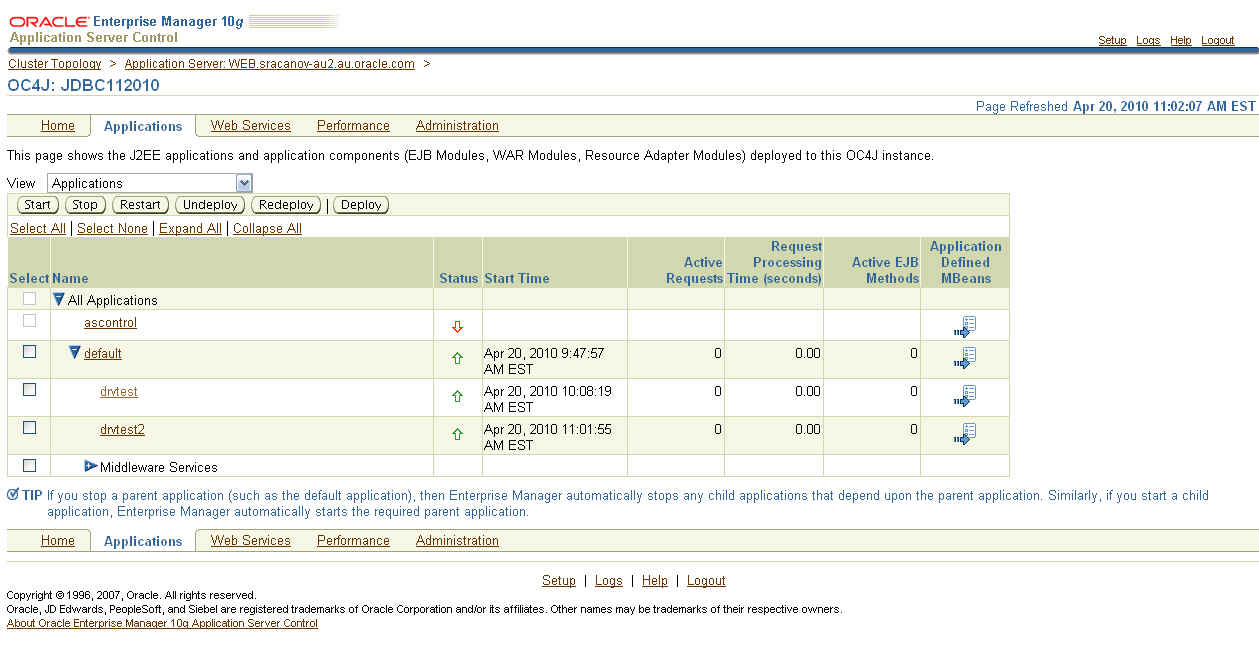
OC4JGroup:default_group | OC4J:JDBC112010 | 5124 | Alive
...

6. I then deploy the following application 'drvtest.ear'

7. I accessed and ran the application from URL - 'http://<server>:<port>/drvtest/dbdetails.jsp'

I completed my database details and clicked on the 'Submit' button.


The current JDBC details are displayed:

=============
JDBC Driver Name is ........ Oracle JDBC driver
JDBC Driver Version is ..... 10.1.0.5.0
JDBC Driver Major Version is 10
JDBC Driver Minor Version is 1
=============

8. I then continued to followed Doc ID 420303.1 to upgrade the JDBC Driver.

In point 7 of the document, I entered

Shared Library Name : oracle.jdbc
Shared Library Version : 11.2.0.1.0


NOTE: The name must be 'oracle.jdbc'

9. In point 15 of the document, I first created a backup of 'system-applications.xml'. I then entered


NOTE: The name must be 'oracle.jdbc'. The version details must match version enter in step 8.

10. After restarting the instance, I then accessed the test application again. 'http://<server>:<port>/drvtest/dbdetails.jsp'

I completed my database details and clicked on the 'Submit' button.

This is the results I received

=============
JDBC Driver Name is ........ Oracle JDBC driver
JDBC Driver Version is ..... 11.2.0.1.0
JDBC Driver Major Version is 11
JDBC Driver Minor Version is 2
=============


I can now see and confirm the JDBC Driver upgrade worked successfully.

11. Then created the datasource. You can do this following document 456270.1 - Creating a datasource in Application Server Control (ASC)/Enterprise Manager (EM) for 10.1.3.X

Here is how my connection pool looks like in 'data-sources.xml':


NOTE: You must use a managed datasource with oracle.jdbc.OracleDriver factory class. Can not use native data source. The pool properties there do not implement the encryption properties from oracle.jdbc.OracleConnection interface.

The XXX_TYPES should match the setting as configure in the database. Step 1


12. Download and deploy this application EAR file 'drvtest2.ear' which you will then connect to this connection pool.


Access the URL 'http://<server>:<port>/drvtest2/dbdetails.jsp' and enter the JNDI of the pool and click 'Submit'.


Your results should look something like:

System Information

JDK Details

=============
JDK Vendor is ... Sun Microsystems Inc.
JDK Version is ... 1.5.0_06
=============

JDBC Driver Details

=============
JDBC Driver Name is ........ Oracle JDBC driver
JDBC Driver Version is ..... 11.2.0.1.0
JDBC Driver Major Version is 11
JDBC Driver Minor Version is 2
=============

Database Details

=============
Database Product Name is ... Oracle
Database Product Version is Oracle Database 11g Enterprise Edition Release 11.2.0.1.0 - 64bit Production
With the Partitioning, OLAP, Data Mining and Real Application Testing options

Secure Algorithm Details

=============
Encryption algorithm is: RC4_256
Data Integrity algorithm is: MD5


Now I can see the encryption & data integrity algorithm used in this connection. You can further download a tool like wireshark - http://www.wireshark.org/ and run it on the application server to monitor this connection pool and confirm the message are encrypted and unreadable.


You can download the JDev workspace from here