Configuring OC4J HTTP Debug Logs.

Posted by Steve Racanovic | Posted in | Posted on 10:57 AM

0

When I try the following http debug parameters in opmn for my oc4j instance I get no logs after restarting instance:


...


...


...

http://download-west.oracle.com/docs/cd/B32110_01/web.1013/b28950/sysprops.htm#CHDFCCBF

http://download-west.oracle.com/docs/cd/B32110_01/web.1013/b28950/sysprops.htm#CHDBDBII

This is because the logging level has not been set. So I now add "oracle.oc4j.trace.finest=com.evermind.server.http" and restart the instance and then I see the logging.

...


...


...

Increasing Xmx on Jdev

Posted by Steve Racanovic | Posted in | Posted on 10:19 AM

0

I am trying to increase the Xmx value to 1500M on JDev. However when I do so, I get the "Error occurred during initialization of VM Could not reserve enough space for object heap" error. I am on Windows XP and have 4GB of RAM. And have plenty of available RAM.


[sracanov@sracanov-au D]$ jdev -verbose
savedArg0 = D:\Oracle\jdev\111130-prod\jdeveloper\jdev\bin\jdev.exe
VM to launch D:\Oracle\jdev\111130-prod\jdk160_18\jre\bin\client\jvm.dll
Restarting the launcher with the 64bit version
Reading exe header from jvm.dll, Machine=14c
JNI Option: -Xmx1500M
JNI Option: -Xverify:none
JNI Option: -XX:MaxPermSize=256M
JNI Option: -Xbootclasspath/p:../lib/lwawt.jar
JNI Option: -Dsun.awt.keepWorkingSetOnMinimize=true
JNI Option: -Dsun.java2d.noddraw=true
JNI Option: -XX:+HeapDumpOnOutOfMemoryError
JNI Option: -Doracle.jdeveloper.webservice.showAllOwsmPolicyTypes=false
JNI Option: -Doracle.jdeveloper.webservice.hidePropertyOverride=false
JNI Option: -Dsun.awt.disablegrab=true
JNI Option: -Dide.startingArg0=D:\Oracle\jdev\111130-prod\jdeveloper\jdev\bin\jdev.exe
JNI Option: -Dide.startingArg1=-verbose
JNI Option: -Dide.launcherProcessId=2516
JNI Option: -Dide.config_pathname=D:\Oracle\jdev\111130-prod\jdeveloper\jdev\bin\jdev.conf
JNI Option: -Dide.startingcwd=D:\Oracle\jdev\111130-prod\jdeveloper\jdev\bin
JNI Option: -Dide.shell.enableFileTypeAssociation=D:\Oracle\jdev\111130-prod\jdeveloper\jdev\bin\jdev.exe
JNI Option: -Dide.pref.dir.base=C:\Documents and Settings\sracanov\Application Data
JNI Option: -Dide.work.dir.base=D:\My Contents
JNI Option: -Djava.class.path=..\..\ide\lib\ide-boot.jar
JVM path is D:\Oracle\jdev\111130-prod\jdk160_18\jre\bin\client\jvm.dll
Error occurred during initialization of VM
Could not reserve enough space for object heap

Sun JDK needs a contiguous address space to allocate memory.
On the other hand, JRockit does not need a contiguous address space.

So, if I use JRockit as JDK, and then run JDeveloper with -Xmx1500M it works.

[sracanov@sracanov-au D]$ jdev -verbose
savedArg0 = D:\Oracle\jdev\111130-prod\jdeveloper\jdev\bin\jdev.exe
VM to launch D:\Oracle\appserver\owls\10.3.1.0\jrockit_160_05_R27.6.2-20\jre\bin\jrockit\jvm.dll
Restarting the launcher with the 64bit version
Reading exe header from jvm.dll, Machine=14c
JNI Option: -Xmx1500M
JNI Option: -Xverify:none
JNI Option: -XX:MaxPermSize=256M
JNI Option: -Xbootclasspath/p:../lib/lwawt.jar
JNI Option: -Dsun.awt.keepWorkingSetOnMinimize=true
JNI Option: -Dsun.java2d.noddraw=true
JNI Option: -XX:+HeapDumpOnOutOfMemoryError
JNI Option: -Doracle.jdeveloper.webservice.showAllOwsmPolicyTypes=false
JNI Option: -Doracle.jdeveloper.webservice.hidePropertyOverride=false
JNI Option: -Dsun.awt.disablegrab=true
JNI Option: -Dide.startingArg0=D:\Oracle\jdev\111130-prod\jdeveloper\jdev\bin\jdev.exe
JNI Option: -Dide.startingArg1=-verbose
JNI Option: -Dide.launcherProcessId=2400
JNI Option: -Dide.config_pathname=D:\Oracle\jdev\111130-prod\jdeveloper\jdev\bin\jdev.conf
JNI Option: -Dide.startingcwd=D:\Oracle\jdev\111130-prod\jdeveloper\jdev\bin
JNI Option: -Dide.shell.enableFileTypeAssociation=D:\Oracle\jdev\111130-prod\jdeveloper\jdev\bin\jdev.exe
JNI Option: -Dide.pref.dir.base=C:\Documents and Settings\sracanov\Application Data
JNI Option: -Dide.work.dir.base=D:\My Contents
JNI Option: -Djava.class.path=..\..\ide\lib\ide-boot.jar
JVM path is D:\Oracle\appserver\owls\10.3.1.0\jrockit_160_05_R27.6.2-20\jre\bin\jrockit\jvm.dll
[WARN ] -XX:MaxPermSize=256M is not a valid VM option. Ignoring
[WARN ] -XX:+HeapDumpOnOutOfMemoryError is not a valid VM option. Ignoring
log4j:WARN No appenders could be found for logger (org.apache.commons.httpclient.HttpClient).
log4j:WARN Please initialize the log4j system properly.

Relevant Links:

http://bugs.sun.com/bugdatabase/view_bug.do?bug_id=4358809
http://java.sun.com/docs/hotspot/HotSpotFAQ.html#gc_heap_32bit
http://blogs.oracle.com/jrockit/2008/09/how_to_get_almost_3_gb_heap_on_windows.html

Returning values from Nested Tables using JDBC

Posted by Steve Racanovic | Posted in | Posted on 1:25 PM

0

When running a select statement in sqlplus on a nested tables we get the results returned. However the same can not be said when running the same statement through JDBC. He is an example of returning values from a nested table with JDBC.

1. Here's how the sql script looks like to create the type and tables.


drop table person;
drop type nested_addresses;
drop type address;

create or replace type address as object(
street varchar2(50),
city varchar2(20),
postcode varchar2(8),
state varchar(8))
/

create or replace type nested_addresses as table of address
/

create table person (
firstname varchar(20),
lastname varchar(20),
address_list nested_addresses
) nested table address_list store as person_addresses
/

insert into person values ('Fred','Flinstone', nested_addresses(address('345 Cave Stone Road', 'Bedrock', 'BR345','BR'),address('1313 Cobblestone Way', 'Bedville', 'BV1313','BV')))
/

commit
/

2. If I now run the select statement we can see the results:

scott@orcl> set head on feedback on
scott@orcl> set pages 999
scott@orcl> set linesize 120
scott@orcl> col firsname format a20
scott@orcl> col lastname format a20
scott@orcl> col address_list format a50
scott@orcl> select firstname, lastname, address_list from person;

FIRSTNAME LASTNAME ADDRESS_LIST(STREET, CITY, POSTCODE, STATE)
-------------------- -------------------- --------------------------------------------------
Fred Flinstone NESTED_ADDRESSES(ADDRESS('345 Cave Stone Road', 'B
edrock', 'BR345', 'BR'), ADDRESS('1313 Cobblestone
Way', 'Bedville', 'BV1313', 'BV'))


1 row selected.


3. However if I now run the same select query, through a java client using JDBC we will get null values returned.

import java.sql.*;

public class Person {
public static void main(String[] args) throws SQLException, ClassNotFoundException {

// connection parameters
String dbUrl = "jdbc:oracle:thin:@sracanov-au2.au.oracle.com:1522:orcl";
String dbUser = "scott";
String dbPass = "tiger";

// load the driver
Class.forName("oracle.jdbc.driver.OracleDriver");

// create connection
Connection con = DriverManager.getConnection(dbUrl, dbUser, dbPass);

// query the table
Statement s = con.createStatement();
String query = "select firstname, lastname, address_list from person";
ResultSet res = s.executeQuery(query);

// look at the result set
res.next();
System.out.println("First Name: " + res.getString(1));
System.out.println("Last Name: " + res.getString(2));
System.out.println("Address: " + res.getString(3));

// close connection
con.close();
}
}

[sracanov@sracanov-au C]$ java -version
java version "1.6.0_16"
Java(TM) SE Runtime Environment (build 1.6.0_16-b01)
Java HotSpot(TM) Client VM (build 14.2-b01, mixed mode, sharing)

[sracanov@sracanov-au C]$ javac -cp .;"D:\My Contents\My Software\Oracle\JDBC\Drivers\11.2.0.1.0\ojdbc6.jar" Person.java

[sracanov@sracanov-au C]$ java -cp .;"D:\My Contents\My Software\Oracle\JDBC\Drivers\11.2.0.1.0\ojdbc6.jar" Person
First Name: Fred
Last Name: Flinstone
Address: null


This is because we need to get a collection of objects and handle them in java by returning arrays elements. The correct way to return this is:


import java.sql.*;

public class Person1 {
public static void main(String[] args) throws SQLException,
ClassNotFoundException {

// connection parameters
String dbUrl = "jdbc:oracle:thin:@sracanov-au2.au.oracle.com:1522:orcl";
String dbUser = "scott";
String dbPass = "tiger";

// load the driver
Class.forName("oracle.jdbc.driver.OracleDriver");

// create connection
Connection con = DriverManager.getConnection(dbUrl, dbUser, dbPass);

// query the table
Statement s = con.createStatement();
String query = "select firstname, lastname, address_list from person";
ResultSet res = s.executeQuery(query);

// look at the result set
while (res.next()) {
int addresscounter=1;
System.out.println("First Name: " + res.getString(1));
System.out.println("Last Name: " + res.getString(2));
Array array = res.getArray(3);
Object[] address_list = (Object[]) array.getArray();
for (int i = 0; i < address_list.length; i++) {
Struct address = (Struct) address_list[i];
Object[] attrib = address.getAttributes();
for (int j = 0; j < attrib.length; j++) {
System.out.println("Address " + addresscounter + ": " + attrib[j]);
}
addresscounter++;
}
}

// close connection
con.close();
}
}

[sracanov@sracanov-au C]$ javac -cp .;"D:\My Contents\My Software\Oracle\JDBC\Drivers\11.2.0.1.0\ojdbc6.jar" Person1.java

[sracanov@sracanov-au C]$ java -cp .;"D:\My Contents\My Software\Oracle\JDBC\Drivers\11.2.0.1.0\ojdbc6.jar" Person1
First Name: Fred
Last Name: Flinstone
Address 1: 345 Cave Stone Road
Address 1: Bedrock
Address 1: BR345
Address 1: BR
Address 2: 1313 Cobblestone Way
Address 2: Bedville
Address 2: BV1313
Address 2: BV


http://download.oracle.com/docs/cd/E11882_01/java.112/e10589/oraarr.htm#i1059642

Tracing the Bind Values

Posted by Steve Racanovic | Posted in , | Posted on 11:52 AM

0

Created a simple example of how you can isolate and trace the bind variables for the records inserted and understand what to look for in the trace file.

The table here consists of 3 columns. A varchar2, number and timestamp.

The jdev 11113 workspace for this example is here.

When running the application, this following results are displayed:


=============
Java Vendor is ... Sun Microsystems Inc.

Java Version is  1.6.0_18

=============
Database Product Name is ... Oracle

Database Product Version is  Oracle Database 10g Enterprise Edition Release 10.2.0.1.0 - Production
With the Partitioning, OLAP and Data Mining options

=============
JDBC Driver Name is ........ Oracle JDBC driver

JDBC Driver Version is ..... 11.1.0.7.0-Production

=============
Dropping/Creating table...

 execSQL() returning: 0 for SQL=DROP TABLE SCOTT.BIND_TEST

 execSQL() returning: 0 for SQL=CREATE TABLE SCOTT.BIND_TEST (VARCHAR_FIELD VARCHAR2(50), NO_FIELD NUMBER(2), TIMESTAMP_FIELD TIMESTAMP)
Preparing stmt: INSERT INTO SCOTT.BIND_TEST (VARCHAR_FIELD, NO_FIELD, TIMESTAMP_FIELD) VALUES (?, ?, ?)
Inserting ...
Inserting Complete...
DISPLAY...
test_string_0.8433509446104999 0 2010-05-17 11:35:46.328
test_string_0.32801143775147246 1 2010-05-17 11:35:46.5
test_string_0.6936132181788695 2 2010-05-17 11:35:46.515
test_string_0.4458248593661084 3 2010-05-17 11:35:46.515
test_string_0.8349244238371425 4 2010-05-17 11:35:46.515
test_string_0.014215120763115707 5 2010-05-17 11:35:46.515
test_string_0.7895349187550287 6 2010-05-17 11:35:46.515
test_string_0.33693148690955965 7 2010-05-17 11:35:46.531
test_string_0.60803516417148 8 2010-05-17 11:35:46.531
test_string_0.5201490476224547 9 2010-05-17 11:35:46.531

Show Trace File...
TRACE FILE NAME : /u01/programs/oracle/product/10.2.0/db_1/admin/orcl/udump/orcl_ora_16541.trc


Open the trace file I can see the following:

...
PARSING IN CURSOR #8 len=90 dep=0 uid=5 oct=2 lid=5 tim=1244198234987514 hv=896770016 ad='2b9e3258'
INSERT INTO SCOTT.BIND_TEST (VARCHAR_FIELD, NO_FIELD, TIMESTAMP_FIELD) VALUES (:1, :2, :3)
END OF STMT
PARSE #8:c=2000,e=2579,p=0,cr=0,cu=0,mis=1,r=0,dep=0,og=1,tim=1244198234987507
=====================
PARSING IN CURSOR #12 len=227 dep=1 uid=0 oct=3 lid=0 tim=1244198235054488 hv=2190775527 ad='2f56e994'
select u.name,o.name, t.update$, t.insert$, t.delete$, t.enabled  from obj$ o,user$ u,trigger$ t  where t.baseobject=:1 and t.obj#=o.obj# and o.owner#=u.user#  and bitand(property,16)=0 and bitand(property,8)=0  order by o.obj#
END OF STMT
PARSE #12:c=3000,e=2745,p=0,cr=0,cu=0,mis=1,r=0,dep=1,og=4,tim=1244198235054480
BINDS #12:
kkscoacd
 Bind#0
  oacdty=02 mxl=22(22) mxlc=00 mal=00 scl=00 pre=00
  oacflg=00 fl2=0001 frm=00 csi=00 siz=24 off=0
  kxsbbbfp=b7234fe8  bln=22  avl=04  flg=05
  value=150767
EXEC #12:c=5999,e=73474,p=0,cr=0,cu=0,mis=1,r=0,dep=1,og=4,tim=1244198235128125
FETCH #12:c=0,e=59,p=0,cr=1,cu=0,mis=0,r=0,dep=1,og=4,tim=1244198235128225
STAT #12 id=1 cnt=0 pid=0 pos=1 obj=0 op='SORT ORDER BY (cr=1 pr=0 pw=0 time=103 us)'
STAT #12 id=2 cnt=0 pid=1 pos=1 obj=0 op='NESTED LOOPS  (cr=1 pr=0 pw=0 time=77 us)'
STAT #12 id=3 cnt=0 pid=2 pos=1 obj=0 op='NESTED LOOPS  (cr=1 pr=0 pw=0 time=69 us)'
STAT #12 id=4 cnt=0 pid=3 pos=1 obj=81 op='TABLE ACCESS BY INDEX ROWID TRIGGER$ (cr=1 pr=0 pw=0 time=64 us)'
STAT #12 id=5 cnt=0 pid=4 pos=1 obj=125 op='INDEX RANGE SCAN I_TRIGGER1 (cr=1 pr=0 pw=0 time=35 us)'
STAT #12 id=6 cnt=0 pid=3 pos=2 obj=18 op='TABLE ACCESS BY INDEX ROWID OBJ$ (cr=0 pr=0 pw=0 time=0 us)'
STAT #12 id=7 cnt=0 pid=6 pos=1 obj=36 op='INDEX UNIQUE SCAN I_OBJ1 (cr=0 pr=0 pw=0 time=0 us)'
STAT #12 id=8 cnt=0 pid=2 pos=2 obj=22 op='TABLE ACCESS CLUSTER USER$ (cr=0 pr=0 pw=0 time=0 us)'
STAT #12 id=9 cnt=0 pid=8 pos=1 obj=11 op='INDEX UNIQUE SCAN I_USER# (cr=0 pr=0 pw=0 time=0 us)'
BINDS #8:
kkscoacd
 Bind#0
  oacdty=01 mxl=32(30) mxlc=00 mal=00 scl=00 pre=00
  oacflg=03 fl2=1000010 frm=01 csi=31 siz=68 off=0
  kxsbbbfp=b722aaec  bln=32  avl=30  flg=05
  value="test_string_0.8433509446104999"
 Bind#1
  oacdty=02 mxl=22(22) mxlc=00 mal=00 scl=00 pre=00
  oacflg=03 fl2=1000000 frm=01 csi=31 siz=0 off=32
  kxsbbbfp=b722ab0c  bln=22  avl=01  flg=01
  value=0
 Bind#2
  oacdty=180 mxl=11(11) mxlc=00 mal=00 scl=00 pre=00
  oacflg=03 fl2=1000000 frm=01 csi=31 siz=0 off=56
  kxsbbbfp=b722ab24  bln=11  avl=11  flg=01
  value=
Dump of memory from 0xB722AB24 to 0xB722AB2F
B722AB20          11056E78 132F240C 0000E28C      [xn...$/.....]
EXEC #8:c=12998,e=101172,p=0,cr=2,cu=21,mis=1,r=1,dep=0,og=1,tim=1244198235152633
XCTEND rlbk=0, rd_only=0
...


Here you can see the first insert query references "CURSOR #8" that will bind to "BINDS #8:" which shows the binding values:

value="test_string_0.8433509446104999"
value=0
value=

Timestamp is in hex format. You will to convert that yourself to find the value.

http://wiki.oracle.com/page/Structure+of+an+Extended+SQL+Trace+file

Creating a Custom ADF .JSPX Login Page

Posted by Steve Racanovic | Posted in | Posted on 9:22 AM

0

Note for myself to create a simple custom ADF login page with jspx.

Create a new workspace by following the example shown here:

http://www.oracle.com/technology/products/jdev/11/cuecards111/adf_set_29/ccset29_ALL.html

Once completing this, then go through the follow link http://download.oracle.com/docs/cd/E15523_01/web.1111/b31974/adding_security.htm#BABDEICH to create the custom jspx page and backing bean to login into the application.

The finished login will look something like this.


Download completed workspace from here.

Using Oracle 11.2g Data Encryption and Integrity Connection Pool in OAS10g

Posted by Steve Racanovic | Posted in , | Posted on 12:03 PM

0

I haven't had the chance to write something for a while now. I was recently working on new feature with oracle advanced security data encryption and integrity using a JDBC connection pool. So I'll write my steps up of how I went about configuring this in OAS 10g.

This setup allows for data encryption and integrity without the overhead of SSL.

I used the following products to configure the steps detailed here:

* Oracle Application Server 10.1.3.2.0
* JDev 10.1.3.4.0
* JDBC 11.2.0.1.0
* Oracle Database 11.2


I am referencing these documentation for further details:

Oracle® Database Advanced Security Administrator's Guide 11g Release 2 (11.2)
Configuring Network Data Encryption and Integrity for Oracle Servers and Clients
http://download.oracle.com/docs/cd/E11882_01/network.112/e10746/asoconfg.htm#insertedID0

Oracle® Database JDBC Developer's Guide, 11g Release 2 (11.2)
Support for Data Encryption and Integrity
http://download.oracle.com/docs/cd/E11882_01/java.112/e10589/clntsec.htm#EHAFHEIG

Here are my complete steps:

1. First follow the steps to configure the database: - http://download.oracle.com/docs/cd/E11882_01/network.112/e10746/asoconfg.htm#i1006517

Depending on your selection, your 'sqlnet.ora' file should look something like this when finished:

# sqlnet.ora Network Configuration File: /home/u01/app/oracle/product/11.2.0/db_1/network/admin/sqlnet.ora
# Generated by Oracle configuration tools.

SQLNET.CRYPTO_CHECKSUM_TYPES_SERVER= (MD5)

SQLNET.ENCRYPTION_SERVER = required

NAMES.DIRECTORY_PATH= (TNSNAMES, EZCONNECT)

SQLNET.CRYPTO_SEED = 'example123456'

SQLNET.ENCRYPTION_TYPES_SERVER= (RC4_256)

ADR_BASE = /home/u01/app/oracle

SQLNET.CRYPTO_CHECKSUM_SERVER = required
Once the steps have been completed, restart the listener and wait for the service to come back up.
[oracle@beast admin]$ lsnrctl stop

LSNRCTL for Linux: Version 11.2.0.1.0 - Production on 20-APR-2010 06:39:08

Copyright (c) 1991, 2009, Oracle. All rights reserved.

Connecting to (DESCRIPTION=(ADDRESS=(PROTOCOL=IPC)(KEY=EXTPROC1523)))
The command completed successfully
[oracle@beast admin]$ lsnrctl start

LSNRCTL for Linux: Version 11.2.0.1.0 - Production on 20-APR-2010 06:39:11

Copyright (c) 1991, 2009, Oracle. All rights reserved.

Starting /home/u01/app/oracle/product/11.2.0/db_1/bin/tnslsnr: please wait...

TNSLSNR for Linux: Version 11.2.0.1.0 - Production
System parameter file is /home/u01/app/oracle/product/11.2.0/db_1/network/admin/listener.ora
Log messages written to /home/u01/app/oracle/diag/tnslsnr/beast/listener/alert/log.xml
Listening on: (DESCRIPTION=(ADDRESS=(PROTOCOL=ipc)(KEY=EXTPROC1523)))
Listening on: (DESCRIPTION=(ADDRESS=(PROTOCOL=tcp)(HOST=beast.au.oracle.com)(PORT=1523)))

Connecting to (DESCRIPTION=(ADDRESS=(PROTOCOL=IPC)(KEY=EXTPROC1523)))
STATUS of the LISTENER
------------------------
Alias LISTENER
Version TNSLSNR for Linux: Version 11.2.0.1.0 - Production
Start Date 20-APR-2010 06:39:11
Uptime 0 days 0 hr. 0 min. 0 sec
Trace Level off
Security ON: Local OS Authentication
SNMP OFF
Listener Parameter File /home/u01/app/oracle/product/11.2.0/db_1/network/admin/listener.ora
Listener Log File /home/u01/app/oracle/diag/tnslsnr/beast/listener/alert/log.xml
Listening Endpoints Summary...
(DESCRIPTION=(ADDRESS=(PROTOCOL=ipc)(KEY=EXTPROC1523)))
(DESCRIPTION=(ADDRESS=(PROTOCOL=tcp)(HOST=beast.au.oracle.com)(PORT=1523)))
The listener supports no services
The command completed successfully
[oracle@beast admin]$ lsnrctl status

LSNRCTL for Linux: Version 11.2.0.1.0 - Production on 20-APR-2010 06:39:17

Copyright (c) 1991, 2009, Oracle. All rights reserved.

Connecting to (DESCRIPTION=(ADDRESS=(PROTOCOL=IPC)(KEY=EXTPROC1523)))
STATUS of the LISTENER
------------------------
Alias LISTENER
Version TNSLSNR for Linux: Version 11.2.0.1.0 - Production
Start Date 20-APR-2010 06:39:11
Uptime 0 days 0 hr. 0 min. 5 sec
Trace Level off
Security ON: Local OS Authentication
SNMP OFF
Listener Parameter File /home/u01/app/oracle/product/11.2.0/db_1/network/admin/listener.ora
Listener Log File /home/u01/app/oracle/diag/tnslsnr/beast/listener/alert/log.xml
Listening Endpoints Summary...
(DESCRIPTION=(ADDRESS=(PROTOCOL=ipc)(KEY=EXTPROC1523)))
(DESCRIPTION=(ADDRESS=(PROTOCOL=tcp)(HOST=beast.au.oracle.com)(PORT=1523)))
The listener supports no services
The command completed successfully
[oracle@beast admin]$ lsnrctl status

LSNRCTL for Linux: Version 11.2.0.1.0 - Production on 20-APR-2010 06:40:24

Copyright (c) 1991, 2009, Oracle. All rights reserved.

Connecting to (DESCRIPTION=(ADDRESS=(PROTOCOL=IPC)(KEY=EXTPROC1523)))
STATUS of the LISTENER
------------------------
Alias LISTENER
Version TNSLSNR for Linux: Version 11.2.0.1.0 - Production
Start Date 20-APR-2010 06:39:11
Uptime 0 days 0 hr. 1 min. 12 sec
Trace Level off
Security ON: Local OS Authentication
SNMP OFF
Listener Parameter File /home/u01/app/oracle/product/11.2.0/db_1/network/admin/listener.ora
Listener Log File /home/u01/app/oracle/diag/tnslsnr/beast/listener/alert/log.xml
Listening Endpoints Summary...
(DESCRIPTION=(ADDRESS=(PROTOCOL=ipc)(KEY=EXTPROC1523)))
(DESCRIPTION=(ADDRESS=(PROTOCOL=tcp)(HOST=beast.au.oracle.com)(PORT=1523)))
Services Summary...
Service "linux11gr2" has 1 instance(s).
Instance "linux11gr2", status READY, has 1 handler(s) for this service...
Service "linux11gr2XDB" has 1 instance(s).
Instance "linux11gr2", status READY, has 1 handler(s) for this service...
The command completed successfully

2. Download JDBC driver 11.2.0.1.0. You can get the driver from here. http://www.oracle.com/technology/software/tech/java/sqlj_jdbc/index.html
Since OAS comes with JDK 1.5_06 by default, I'll used the 'ojdbc5.jar'.

3. In My Oracle Support, review document 420303.1 - How to Use The Latest Thin JDBC Driver Across All Applications For a 10.1.3.x OAS Container

Based on that document, here are the steps how I upgraded the driver and verified it updated correctly:

4. I created a new instance called JDBC112010

> createinstance -instanceName JDBC112010

5. I started the new instance and checked to make sure it was up.

> opmnctl startproc process-type=JDBC112010
opmnctl: starting opmn managed processes...

> opmnctl status

Processes in Instance: web.sracanov-au.au.oracle.com
---------------------------------+--------------------+---------+---------
ias-component | process-type | pid | status
---------------------------------+--------------------+---------+---------
OC4JGroup:default_group | OC4J:JDBC112010 | 5124 | Alive
...

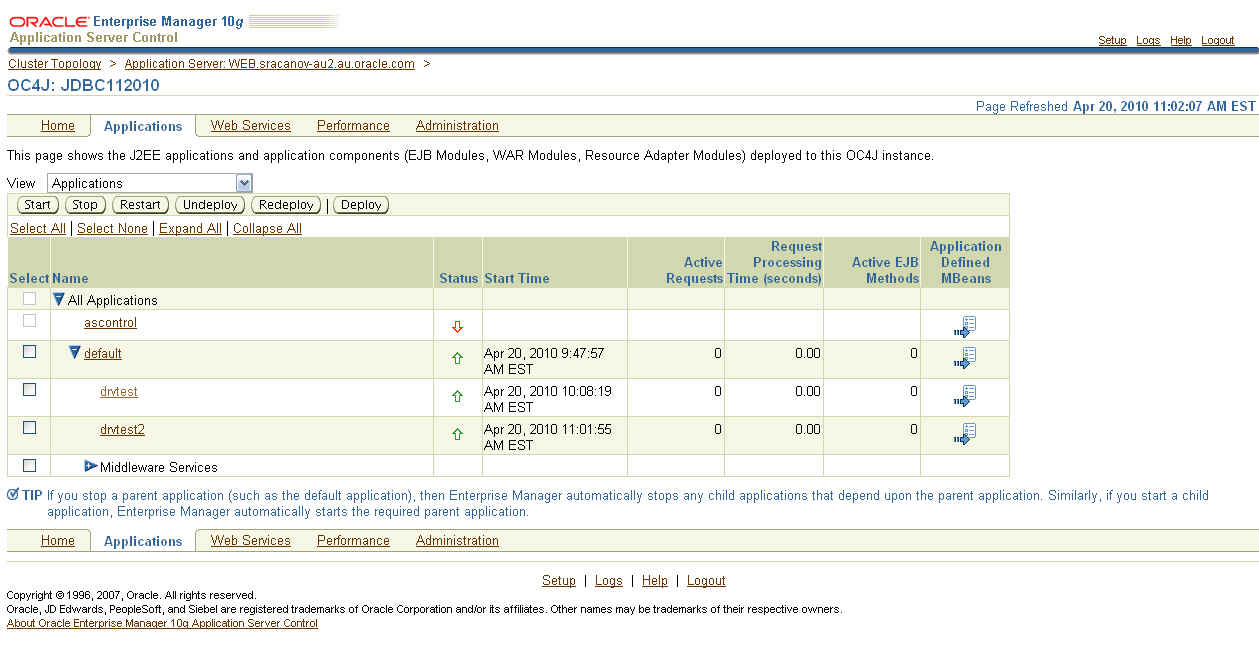
6. I then deploy the following application 'drvtest.ear'

7. I accessed and ran the application from URL - 'http://<server>:<port>/drvtest/dbdetails.jsp'

I completed my database details and clicked on the 'Submit' button.


The current JDBC details are displayed:

=============
JDBC Driver Name is ........ Oracle JDBC driver
JDBC Driver Version is ..... 10.1.0.5.0
JDBC Driver Major Version is 10
JDBC Driver Minor Version is 1
=============

8. I then continued to followed Doc ID 420303.1 to upgrade the JDBC Driver.

In point 7 of the document, I entered

Shared Library Name : oracle.jdbc
Shared Library Version : 11.2.0.1.0


NOTE: The name must be 'oracle.jdbc'

9. In point 15 of the document, I first created a backup of 'system-applications.xml'. I then entered


NOTE: The name must be 'oracle.jdbc'. The version details must match version enter in step 8.

10. After restarting the instance, I then accessed the test application again. 'http://<server>:<port>/drvtest/dbdetails.jsp'

I completed my database details and clicked on the 'Submit' button.

This is the results I received

=============
JDBC Driver Name is ........ Oracle JDBC driver
JDBC Driver Version is ..... 11.2.0.1.0
JDBC Driver Major Version is 11
JDBC Driver Minor Version is 2
=============


I can now see and confirm the JDBC Driver upgrade worked successfully.

11. Then created the datasource. You can do this following document 456270.1 - Creating a datasource in Application Server Control (ASC)/Enterprise Manager (EM) for 10.1.3.X

Here is how my connection pool looks like in 'data-sources.xml':


NOTE: You must use a managed datasource with oracle.jdbc.OracleDriver factory class. Can not use native data source. The pool properties there do not implement the encryption properties from oracle.jdbc.OracleConnection interface.

The XXX_TYPES should match the setting as configure in the database. Step 1


12. Download and deploy this application EAR file 'drvtest2.ear' which you will then connect to this connection pool.


Access the URL 'http://<server>:<port>/drvtest2/dbdetails.jsp' and enter the JNDI of the pool and click 'Submit'.


Your results should look something like:

System Information

JDK Details

=============
JDK Vendor is ... Sun Microsystems Inc.
JDK Version is ... 1.5.0_06
=============

JDBC Driver Details

=============
JDBC Driver Name is ........ Oracle JDBC driver
JDBC Driver Version is ..... 11.2.0.1.0
JDBC Driver Major Version is 11
JDBC Driver Minor Version is 2
=============

Database Details

=============
Database Product Name is ... Oracle
Database Product Version is Oracle Database 11g Enterprise Edition Release 11.2.0.1.0 - 64bit Production
With the Partitioning, OLAP, Data Mining and Real Application Testing options

Secure Algorithm Details

=============
Encryption algorithm is: RC4_256
Data Integrity algorithm is: MD5


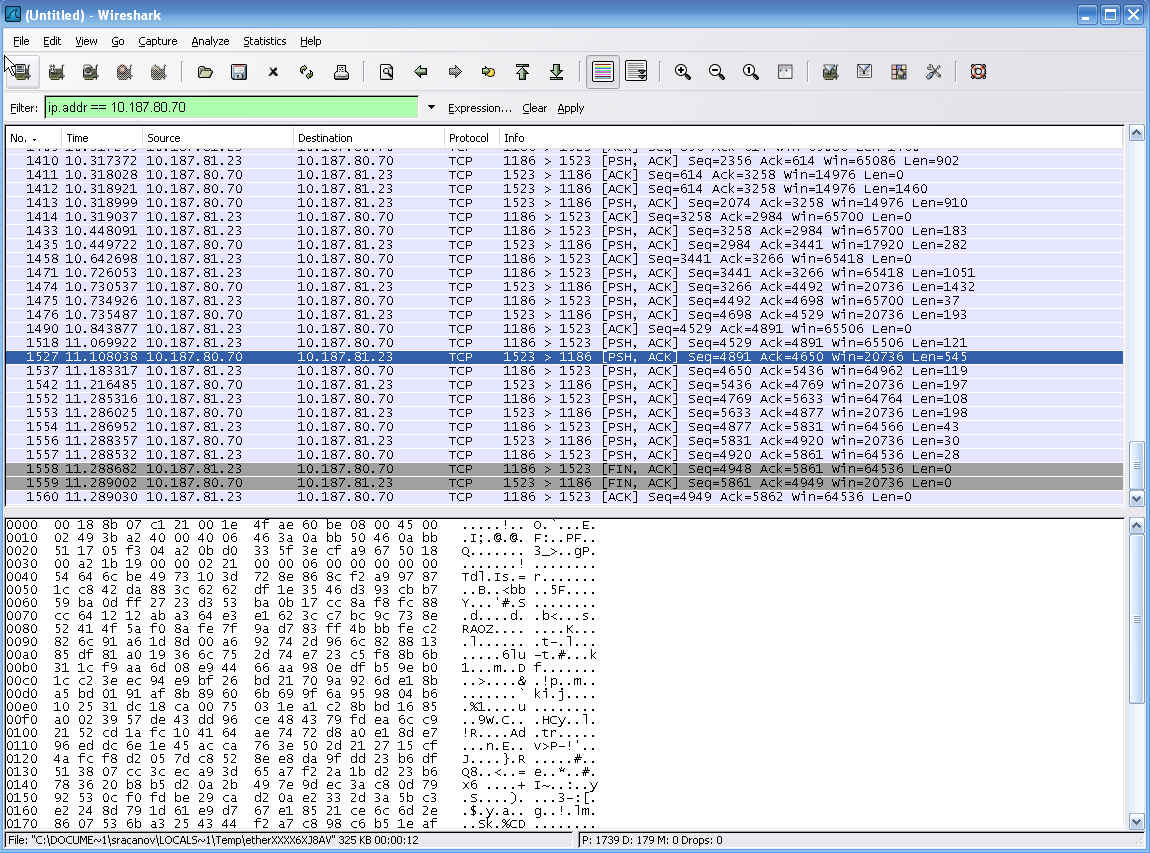
Now I can see the encryption & data integrity algorithm used in this connection. You can further download a tool like wireshark - http://www.wireshark.org/ and run it on the application server to monitor this connection pool and confirm the message are encrypted and unreadable.


You can download the JDev workspace from here

11g Database Webservice Callout Steps

Posted by Steve Racanovic | Posted in , | Posted on 10:02 AM

0

11g Database Webservice Callout Steps

I installed the 11g R2 database last week and though I'd go through notes 469588.1, 428775.1 and 841183.1 on My Oracle Support and jot down my steps for configuring UTL_DBWS and JPublisher to use a java webservice proxy from the database to call external webservices.

This is what I done:

1. Check to see if the database webservice utilities are installed in sys schema, check the status of the java classes and set the OJVM pool size.

a. Check and see if callout utilities are installed:

[oracle@sracanov-au2 dbhome_1]$ sqlplus /nolog

SQL*Plus: Release 11.2.0.1.0 Production on Mon Dec 14 08:04:09 2009

Copyright (c) 1982, 2009, Oracle.  All rights reserved.

SQL> conn sys/ as sysdba
Enter password:
Connected.

SQL> desc sys.utl_dbws
ERROR:
ORA-04043: object sys.utl_dbws does not exist
b. Check the status of the java classes:
SQL> SELECT owner, status, count(*) FROM DBA_OBJECTS WHERE OBJECT_TYPE='JAVA CLASS' GROUP BY owner, status;

OWNER                          STATUS    COUNT(*)
------------------------------ ------- ----------
MDSYS                          VALID          531
SYS                            VALID        20444
EXFSYS                         VALID           47
ORDSYS                         VALID         1898
c. Set the OJVM pool size. I'm setting the size as per note 469588.1. Although the online documentation suggest java_pool_size is set to at least 96 MB and shared_pool_size is set to at least 80 MB. http://download.oracle.com/docs/cd/E11882_01/java.112/e10587/intro.htm#BHCBACII. If this is not set, then loading and resolving java classes (jars) will occur errors:
SQL> show parameter SHARED_POOL_SIZE

NAME                                 TYPE        VALUE
------------------------------------ ----------- ------------------------------
shared_pool_size                     big integer 0
SQL> show parameter JAVA_POOL_SIZE

NAME                                 TYPE        VALUE
------------------------------------ ----------- ------------------------------
java_pool_size                       big integer 0
SQL> alter system set SHARED_POOL_SIZE=132M scope=both;

System altered.

SQL> alter system set JAVA_POOL_SIZE=80M scope=both;

System altered.

SQL> show parameter SHARED_POOL_SIZE

NAME                                 TYPE        VALUE
------------------------------------ ----------- ------------------------------
shared_pool_size                     big integer 132M
SQL> show parameter JAVA_POOL_SIZE

NAME                                 TYPE        VALUE
------------------------------------ ----------- ------------------------------
java_pool_size                       big integer 80M
SQL>
2. Download JPublisher & Database Web Services Callout Utilities

Webpage:
http://www.oracle.com/technetwork/database/features/jdbc/index-091264.html
Download - JPublisher 10g Release 10.2:
http://download.oracle.com/otn/utilities_drivers/jdbc/10201/jpub_102.zip

Webpage:
http://www.oracle.com/technetwork/database/enterprise-edition/index-097123.html
Download - 10.1.3.1 Callout Utility for 10g and 11g RDBMS (ZIP, ~13MB):
http://download.oracle.com/technology/sample_code/tech/java/jsp/dbws-callout-utility-10131.zip

3. Setup the OS environment:
[oracle@sracanov-au2 ~]$ export ORACLE_HOME=/u01/programs/oracle/product/11.2.0/dbhome_1
[oracle@sracanov-au2 ~]$ export JAVA_HOME=$ORACLE_HOME/jdk
[oracle@sracanov-au2 ~]$ export PATH=$ORACLE_HOME/bin:$ORACLE_HOME/OPatch:$ORACLE_HOME/sqlj/bin:$JAVA_HOME/bin:$PATH
[oracle@sracanov-au2 ~]$ export CLASSPATH=$ORACLE_HOME/sqlj/lib/translator.jar:$ORACLE_HOME/sqlj/lib/runtime12.jar:$ORACLE_HOME/sqlj/lib/dbwsa.jar:$ORACLE_HOME/javavm/lib/aurora.zip:$ORACLE_HOME/jdbc/lib/ojdbc5.jar:$ORACLE_HOME/jdk/lib/dt.jar:$ORACLE_HOME/jdk/lib/tools.jar:$ORACLE_HOME/jlib/jssl-1_1.jar:$ORACLE_HOME/jlib/orai18n.jar:$ORACLE_HOME/rdbms/jlib/xdb.jar:$ORACLE_HOME/lib/xsu12.jar:$ORACLE_HOME/jlib/jndi.jar:$ORACLE_HOME/rdbms/jlib/aqapi.jar:$ORACLE_HOME/rdbms/jlib/jmscommon.jar:$ORACLE_HOME/lib/xmlparserv2.jar
I extract the downloaded files in the next setup. You can set the classpath now or later. Doing it now for simplicity.

4. Extract the downloaded files:

a. Take a backup of sqlj folder first:
[oracle@sracanov-au2 ~]$ mv $ORACLE_HOME/sqlj $ORACLE_HOME/sqlj.org
b. Extract Jpub:
[oracle@sracanov-au2 ~]$ unzip jpub_102.zip -d $ORACLE_HOME
Archive:  jpub_102.zip
   creating: /u01/programs/oracle/product/11.2.0/dbhome_1/sqlj/
   creating: /u01/programs/oracle/product/11.2.0/dbhome_1/sqlj/lib/
  inflating: /u01/programs/oracle/product/11.2.0/dbhome_1/sqlj/lib/sqljutl.sql
  inflating: /u01/programs/oracle/product/11.2.0/dbhome_1/sqlj/lib/translator.jar
  inflating: /u01/programs/oracle/product/11.2.0/dbhome_1/sqlj/lib/runtime12.jar
   creating: /u01/programs/oracle/product/11.2.0/dbhome_1/sqlj/bin/
  inflating: /u01/programs/oracle/product/11.2.0/dbhome_1/sqlj/bin/README.txt
  inflating: /u01/programs/oracle/product/11.2.0/dbhome_1/sqlj/bin/jpub.c
  inflating: /u01/programs/oracle/product/11.2.0/dbhome_1/sqlj/bin/jpub
  inflating: /u01/programs/oracle/product/11.2.0/dbhome_1/sqlj/bin/jpub.exe
  inflating: /u01/programs/oracle/product/11.2.0/dbhome_1/sqlj/README.txt
   creating: /u01/programs/oracle/product/11.2.0/dbhome_1/sqlj/demo/
   creating: /u01/programs/oracle/product/11.2.0/dbhome_1/sqlj/demo/jpub/
  inflating: /u01/programs/oracle/product/11.2.0/dbhome_1/sqlj/demo/jpub/Booleans.sql
  inflating: /u01/programs/oracle/product/11.2.0/dbhome_1/sqlj/demo/jpub/Indexby.sql
  inflating: /u01/programs/oracle/product/11.2.0/dbhome_1/sqlj/demo/jpub/Inherit.sql
  inflating: /u01/programs/oracle/product/11.2.0/dbhome_1/sqlj/demo/jpub/MyRationalC.java
  inflating: /u01/programs/oracle/product/11.2.0/dbhome_1/sqlj/demo/jpub/MyRationalO.java
  inflating: /u01/programs/oracle/product/11.2.0/dbhome_1/sqlj/demo/jpub/MyRationalO8i.java
  inflating: /u01/programs/oracle/product/11.2.0/dbhome_1/sqlj/demo/jpub/PlsqlType.sql
  inflating: /u01/programs/oracle/product/11.2.0/dbhome_1/sqlj/demo/jpub/README.txt
  inflating: /u01/programs/oracle/product/11.2.0/dbhome_1/sqlj/demo/jpub/Rational.sql
  inflating: /u01/programs/oracle/product/11.2.0/dbhome_1/sqlj/demo/jpub/TestBooleans.java
  inflating: /u01/programs/oracle/product/11.2.0/dbhome_1/sqlj/demo/jpub/TestCallin.java
  inflating: /u01/programs/oracle/product/11.2.0/dbhome_1/sqlj/demo/jpub/TestIndexby.java
  inflating: /u01/programs/oracle/product/11.2.0/dbhome_1/sqlj/demo/jpub/TestInh.java
  inflating: /u01/programs/oracle/product/11.2.0/dbhome_1/sqlj/demo/jpub/TestInstall.sql
  inflating: /u01/programs/oracle/product/11.2.0/dbhome_1/sqlj/demo/jpub/TestInstallCreateTable.java
  inflating: /u01/programs/oracle/product/11.2.0/dbhome_1/sqlj/demo/jpub/TestInstallJDBC.java
  inflating: /u01/programs/oracle/product/11.2.0/dbhome_1/sqlj/demo/jpub/TestQuery.java
  inflating: /u01/programs/oracle/product/11.2.0/dbhome_1/sqlj/demo/jpub/TestMyRationalC.java
  inflating: /u01/programs/oracle/product/11.2.0/dbhome_1/sqlj/demo/jpub/TestMyRationalO.java
  inflating: /u01/programs/oracle/product/11.2.0/dbhome_1/sqlj/demo/jpub/TestMyRationalO8i.java
  inflating: /u01/programs/oracle/product/11.2.0/dbhome_1/sqlj/demo/jpub/TestPlsqlType.java
  inflating: /u01/programs/oracle/product/11.2.0/dbhome_1/sqlj/demo/jpub/TestRationalO.java
  inflating: /u01/programs/oracle/product/11.2.0/dbhome_1/sqlj/demo/jpub/TestRationalP.java
  inflating: /u01/programs/oracle/product/11.2.0/dbhome_1/sqlj/demo/jpub/WrDbmsUtil.sql
  inflating: /u01/programs/oracle/product/11.2.0/dbhome_1/sqlj/demo/jpub/connect.properties
  inflating: /u01/programs/oracle/product/11.2.0/dbhome_1/sqlj/demo/jpub/jpub.properties
  inflating: /u01/programs/oracle/product/11.2.0/dbhome_1/sqlj/demo/jpub/TemperatureService.wsdl
   creating: /u01/programs/oracle/product/11.2.0/dbhome_1/sqlj/doc/
  inflating: /u01/programs/oracle/product/11.2.0/dbhome_1/sqlj/doc/faq.html
[oracle@sracanov-au2 ~]$
c. Extract Callout Utilities:
[oracle@sracanov-au2 ~]$ unzip dbws-callout-utility-10131.zip sqlj\* -d $ORACLE_HOME
Archive:  dbws-callout-utility-10131.zip
  inflating: /u01/programs/oracle/product/11.2.0/dbhome_1/sqlj/lib/utl_dbws_decl.sql
  inflating: /u01/programs/oracle/product/11.2.0/dbhome_1/sqlj/lib/utl_dbws_body.sql
  inflating: /u01/programs/oracle/product/11.2.0/dbhome_1/sqlj/lib/dbwsclientws.jar
  inflating: /u01/programs/oracle/product/11.2.0/dbhome_1/sqlj/lib/dbwsclientdb102.jar
  inflating: /u01/programs/oracle/product/11.2.0/dbhome_1/sqlj/lib/dbwsclientdb11.jar
  inflating: /u01/programs/oracle/product/11.2.0/dbhome_1/sqlj/lib/dbwsa.jar
  inflating: /u01/programs/oracle/product/11.2.0/dbhome_1/sqlj/lib/dbwsclientdb101.jar
[oracle@sracanov-au2 ~]$ unzip dbws-callout-utility-10131.zip samples\* -d $ORACLE_HOME/sqlj
Archive:  dbws-callout-utility-10131.zip
   creating: /u01/programs/oracle/product/11.2.0/dbhome_1/sqlj/samples/
  inflating: /u01/programs/oracle/product/11.2.0/dbhome_1/sqlj/samples/javacallout.wsdl
  inflating: /u01/programs/oracle/product/11.2.0/dbhome_1/sqlj/samples/test-plsql-dii.sql
  inflating: /u01/programs/oracle/product/11.2.0/dbhome_1/sqlj/samples/javacallout.ear
[oracle@sracanov-au2 ~]$ unzip dbws-callout-utility-10131.zip *.htm -d sqlj/
Archive:  dbws-callout-utility-10131.zip
  inflating: sqlj/10.htm
  inflating: sqlj/11.htm
  inflating: sqlj/README.htm
d. Looking at the extracted files, there is no dbwsclient.jar.

http://download.oracle.com/docs/cd/E11882_01/java.112/e10587/intro.htm#BHCBACII

There is however dbwsclientws.jar. dbwsclientws.jar is the same as dbwsclient.jar. Jpub looks for this file when you run the jpub command. To avoid the error: 'Error loading dbwsclient.jar, please check the database trace file and make sure dbwsclient.jar exists in ORACLE_HOME/sqlj/lib.' when running the jpub command, I'll just make a copy of this file:
[oracle@sracanov-au2 lib]$ ls -al | grep dbwsc
-rw-r--r--  1 oracle oinstall  737386 Jun 18  2008 dbwsclientdb101.jar
-rw-r--r--  1 oracle oinstall  208486 Jun 18  2008 dbwsclientdb102.jar
-rw-r--r--  1 oracle oinstall  214156 Jun 18  2008 dbwsclientdb11.jar
-rw-r--r--  1 oracle oinstall 6716174 Aug  1  2008 dbwsclientws.jar
[oracle@sracanov-au2 lib]$ cp dbwsclientws.jar dbwsclient.jar
[oracle@sracanov-au2 lib]$ ls -al | grep dbwsc
-rw-r--r--  1 oracle oinstall  737386 Jun 18  2008 dbwsclientdb101.jar
-rw-r--r--  1 oracle oinstall  208486 Jun 18  2008 dbwsclientdb102.jar
-rw-r--r--  1 oracle oinstall  214156 Jun 18  2008 dbwsclientdb11.jar
-rw-r--r--  1 oracle oinstall 6716174 Dec 16 06:42 dbwsclient.jar
-rw-r--r--  1 oracle oinstall 6716174 Aug  1  2008 dbwsclientws.jar
[oracle@sracanov-au2 lib]$
I am not sure why they packaged it like this. It seems it was packaged dbwsclient.jar in the previous download version i.e. 10.1.3.0 Callout Utility for 10g RDBMS (ZIP, 6.89MB).

Note that I did not find this step crucial. I could still run jpub and each time I will get that error above 'Error loading dbwsclient.jar,..... It could still proceed without it and it worked fine in my example. However doing this I avoid seeing that error all the time when I run Jpub.

5. Set the execute permission on jpub:
[oracle@sracanov-au2 ~]$ cd $ORACLE_HOME/sqlj/bin
[oracle@sracanov-au2 bin]$ chmod +x jpub
6. I'm using the scott schema in this example. Check the schema has CONNECT, RESOURCE and CREATE PUBLIC SYNONYM grants. This is the minimum permission required. If not, allow for it.
SQL> SELECT grantee, granted_role FROM dba_role_privs where GRANTEE = 'SCOTT';

GRANTEE                        GRANTED_ROLE
------------------------------ ------------------------------
SCOTT                          RESOURCE
SCOTT                          CONNECT

SQL> select * from dba_sys_privs where GRANTEE='SCOTT';

GRANTEE                        PRIVILEGE                                ADM
------------------------------ ---------------------------------------- ---
SCOTT                          UNLIMITED TABLESPACE                     NO

SQL> grant CREATE PUBLIC SYNONYM to scott;
SQL> select * from dba_sys_privs where GRANTEE='SCOTT';

GRANTEE                        PRIVILEGE                                ADM
------------------------------ ---------------------------------------- ---
SCOTT                          UNLIMITED TABLESPACE                     NO
SCOTT                          CREATE PUBLIC SYNONYM                    NO
7. Load the database webservice callout utilities into the scott schema. The jar's are found in $ORACLE_HOME/sqlj/lib folder.
[oracle@sracanov-au2 bin]$ cd $ORACLE_HOME/sqlj/lib
[oracle@sracanov-au2 lib]$ loadjava -u scott/tiger -r -v -f -s -grant public -genmissing dbwsclientws.jar dbwsclientdb11.jar >& loadjava.txt
Check the log and see if it completed successfully. It should look something like:
[oracle@sracanov-au2 lib]$ tail -8 loadjava.txt
Classes Loaded: 4061
Resources Loaded: 81
Sources Loaded: 0
Published Interfaces: 0
Classes generated: 63
Classes skipped: 0
Synonyms Created: 0
Errors: 0
[oracle@sracanov-au2 lib]$
(The values are likely to be different. This depends the on system environment and what already installed).

8. Once the database webservice call out classes have been loaded, I need to run the PL/SQL wrappers that will call theses classes. The scripts are found in $ORACLE_HOME/sqlj/lib folder. Since I installed the jar in scott, scott needs to run these scripts:
[oracle@sracanov-au2 lib]$ sqlplus scott/tiger

SQL*Plus: Release 11.2.0.1.0 Production on Tue Dec 15 11:08:50 2009

Copyright (c) 1982, 2009, Oracle.  All rights reserved.

Connected to:
Oracle Database 11g Enterprise Edition Release 11.2.0.1.0 - Production
With the Partitioning, OLAP, Data Mining and Real Application Testing options

SQL> @utl_dbws_decl.sql

Package created.

SQL> @utl_dbws_body.sql

Package body created.

Grant succeeded.

SQL> desc utl_dbws
PROCEDURE ADD_PARAMETER
 Argument Name                  Type                    In/Out Default?
 ------------------------------ ----------------------- ------ --------
 CALL_HANDLE                    NUMBER                  IN
 XML_NAME                       VARCHAR2                IN
 Q_NAME                         VARCHAR2(4096)          IN
...
...
9. Grant the following classes from the SYS schema to scott. (or whichever schema your using. Ensure the schema name is in capital letters. i.e. 'SCOTT'):
SQL> conn /as sysdba
Connected.
SQL> call dbms_java.grant_permission('SCOTT','SYS:java.lang.RuntimePermission', 'shutdownHooks', '' );
SQL> call dbms_java.grant_permission('SCOTT','SYS:java.util.logging.LoggingPermission', 'control', '' );
SQL> call dbms_java.grant_permission('SCOTT','SYS:java.util.PropertyPermission','http.proxySet','write');
SQL> call dbms_java.grant_permission('SCOTT','SYS:java.util.PropertyPermission','http.proxyHost', 'write');
SQL> call dbms_java.grant_permission('SCOTT','SYS:java.util.PropertyPermission','http.proxyPort', 'write');
SQL> call dbms_java.grant_permission('SCOTT','SYS:java.lang.RuntimePermission','getClassLoader','');
SQL> call dbms_java.grant_permission('SCOTT','SYS:java.net.SocketPermission','*','connect,resolve');
SQL> call dbms_java.grant_permission('SCOTT','SYS:java.util.PropertyPermission','*','read,write');
SQL> call dbms_java.grant_permission('SCOTT','SYS:java.lang.RuntimePermission','setFactory','');
SQL> call dbms_java.grant_permission('SCOTT','SYS:java.lang.RuntimePermission', 'accessClassInPackage.sun.util.calendar','');
EXAMPLE 1:
==========
10. Using the example code from note 841183.1, I will now use the UTL_DBWS package loaded in scott to call the webservice. The PL/SQL is created as follows:

a. Here is the PL/SQL code using UTL_DBWS to call an external webservice:
CREATE OR REPLACE FUNCTION celciusToFahrenheit(temperature NUMBER) RETURN VARCHAR2 AS

service_ scott.utl_dbws.SERVICE;
call_ scott.utl_dbws.CALL;
service_qname scott.utl_dbws.QNAME;
port_qname scott.utl_dbws.QNAME;
response sys.XMLTYPE;
request sys.XMLTYPE;

BEGIN
scott.utl_dbws.set_http_proxy('myproxy.com:80');
service_qname := scott.utl_dbws.to_qname(null, 'CelciusToFahrenheit');
service_      := scott.utl_dbws.create_service(service_qname);
call_         := scott.utl_dbws.create_call(service_);
scott.utl_dbws.set_target_endpoint_address(call_, 'http://webservices.daehosting.com/services/TemperatureConversions.wso');
scott.utl_dbws.set_property( call_, 'OPERATION_STYLE', 'document');
request       := sys.XMLTYPE(''||temperature||'');
response      := scott.utl_dbws.invoke(call_, request);
return response.extract('//CelciusToFahrenheitResult/child::text()', 'xmlns="http://webservices.daehosting.com/temperature"').getstringval();
END;
/
show errors;
b. I have changed line 11 with my proxy server details. If your environment does not use a proxy server leave this line out.
c. Since the database webservice utilities have been installed in 'scott', I have changed all the 'sys' references to webservice utilities to 'scott'
d. Ensure you can access the webservice used in this example: http://webservices.daehosting.com/services/TemperatureConversions.wso
e: Now run the example:
SQL> @celciusToFahrenheit.sql

Function created.

No errors.
SQL> SELECT celciusToFahrenheit(30) from dual;

CELCIUSTOFAHRENHEIT(30)
--------------------------------------------------------------------------------
86

SQL>
EXAMPLE 2:
==========
11. Now using the same webservice, I will use jpub to create and load the java webservice proxy classes to the database.

a. Run the jpub to create and load your java webservice client proxy. Here is the command used:

jpub -u scott/tiger -sysuser sys/welcome1 -proxywsdl=http://webservices.daehosting.com/services/TemperatureConversions.wso?WSDL -endpoint=http://webservices.daehosting.com/services/TemperatureConversions.wso -httpproxy=myproxy.com:80

Note I have specified my proxy again as the last parameter. If your environment does not use a proxy server leave this out.
[oracle@sracanov-au2 dbhome_1]$ cd sqlj
[oracle@sracanov-au2 sqlj]$ mkdir example2
[oracle@sracanov-au2 sqlj]$ cd example2/
[oracle@sracanov-au2 example2]$ jpub -u scott/tiger -sysuser sys/welcome1 -proxywsdl=http://webservices.daehosting.com/services/TemperatureConversions.wso?WSDL -endpoint=http://webservices.daehosting.com/services/TemperatureConversions.wso -httpproxy=myproxy.com:80
tmp/src/genproxy/TemperatureConversionsSoapClientJPub.java
plsql_wrapper.sql
plsql_dropper.sql
plsql_grant.sql
plsql_revoke.sql
Executing plsql_dropper.sql
Executing plsql_wrapper.sql
Executing plsql_grant.sql
Loading plsql_proxy.jar

[oracle@sracanov-au2 example2]$
Note that when using jpub I can avoid coding PL/SQL code. The PL/SQL files can be found in the current local directory where jpub is run from. They have been executed while running the jpub command.
[oracle@sracanov-au2 example2]$ ls -al
total 88
drwxr-xr-x  3 oracle oinstall  4096 Dec 16 07:27 .
drwxr-xr-x  8 oracle oinstall  4096 Dec 15 10:43 ..
-rw-r--r--  1 oracle oinstall    95 Dec 16 07:27 plsql_dropper.sql
-rw-r--r--  1 oracle oinstall   548 Dec 16 07:27 plsql_grant.sql
-rw-r--r--  1 oracle oinstall 26546 Dec 16 07:27 plsql_proxy.jar
-rw-r--r--  1 oracle oinstall   404 Dec 16 07:27 plsql_revoke.sql
-rw-r--r--  1 oracle oinstall  3261 Dec 16 07:27 plsql_wrapper.sql
drwxr-xr-x  4 oracle oinstall  4096 Dec 16 06:43 tmp
b. Now call the web Service as in sqlplus.
SQL> conn scott/tiger
Connected.
SQL> select jpub_plsql_wrapper.celciusToFahrenheit(30) as "Celcius To Fahrenheit(30)" from dual;

Celcius To Fahrenheit(30)
-------------------------
                       86

SQL>
Running jpub has created the java webservice proxy for all the methods available from the webservice:
SQL> select jpub_plsql_wrapper.fahrenheitToCelcius(86) as "Fahrenheit To Celcius(86)" from dual;

Fahrenheit To Celcius(86)
-------------------------
                       30

SQL>
For any further or clarification, see the following documentation:

Oracle® Database JPublisher User's Guide
http://download.oracle.com/docs/cd/B28359_01/java.111/b31226/toc.htm

Database Web Service Callout Utility 10.1.3.1
http://www.oracle.com/technology/sample_code/tech/java/jsp/callout_users_guide.htm