Creating a Custom ADF .JSPX Login Page

Posted by Steve Racanovic | Posted in | Posted on 9:22 AM

0

Note for myself to create a simple custom ADF login page with jspx.

Create a new workspace by following the example shown here:

http://www.oracle.com/technology/products/jdev/11/cuecards111/adf_set_29/ccset29_ALL.html

Once completing this, then go through the follow link http://download.oracle.com/docs/cd/E15523_01/web.1111/b31974/adding_security.htm#BABDEICH to create the custom jspx page and backing bean to login into the application.

The finished login will look something like this.


Download completed workspace from here.

Using Oracle 11.2g Data Encryption and Integrity Connection Pool in OAS10g

Posted by Steve Racanovic | Posted in , | Posted on 12:03 PM

0

I haven't had the chance to write something for a while now. I was recently working on new feature with oracle advanced security data encryption and integrity using a JDBC connection pool. So I'll write my steps up of how I went about configuring this in OAS 10g.

This setup allows for data encryption and integrity without the overhead of SSL.

I used the following products to configure the steps detailed here:

* Oracle Application Server 10.1.3.2.0
* JDev 10.1.3.4.0
* JDBC 11.2.0.1.0
* Oracle Database 11.2


I am referencing these documentation for further details:

Oracle® Database Advanced Security Administrator's Guide 11g Release 2 (11.2)
Configuring Network Data Encryption and Integrity for Oracle Servers and Clients
http://download.oracle.com/docs/cd/E11882_01/network.112/e10746/asoconfg.htm#insertedID0

Oracle® Database JDBC Developer's Guide, 11g Release 2 (11.2)
Support for Data Encryption and Integrity
http://download.oracle.com/docs/cd/E11882_01/java.112/e10589/clntsec.htm#EHAFHEIG

Here are my complete steps:

1. First follow the steps to configure the database: - http://download.oracle.com/docs/cd/E11882_01/network.112/e10746/asoconfg.htm#i1006517

Depending on your selection, your 'sqlnet.ora' file should look something like this when finished:

# sqlnet.ora Network Configuration File: /home/u01/app/oracle/product/11.2.0/db_1/network/admin/sqlnet.ora
# Generated by Oracle configuration tools.

SQLNET.CRYPTO_CHECKSUM_TYPES_SERVER= (MD5)

SQLNET.ENCRYPTION_SERVER = required

NAMES.DIRECTORY_PATH= (TNSNAMES, EZCONNECT)

SQLNET.CRYPTO_SEED = 'example123456'

SQLNET.ENCRYPTION_TYPES_SERVER= (RC4_256)

ADR_BASE = /home/u01/app/oracle

SQLNET.CRYPTO_CHECKSUM_SERVER = required
Once the steps have been completed, restart the listener and wait for the service to come back up.
[oracle@beast admin]$ lsnrctl stop

LSNRCTL for Linux: Version 11.2.0.1.0 - Production on 20-APR-2010 06:39:08

Copyright (c) 1991, 2009, Oracle. All rights reserved.

Connecting to (DESCRIPTION=(ADDRESS=(PROTOCOL=IPC)(KEY=EXTPROC1523)))
The command completed successfully
[oracle@beast admin]$ lsnrctl start

LSNRCTL for Linux: Version 11.2.0.1.0 - Production on 20-APR-2010 06:39:11

Copyright (c) 1991, 2009, Oracle. All rights reserved.

Starting /home/u01/app/oracle/product/11.2.0/db_1/bin/tnslsnr: please wait...

TNSLSNR for Linux: Version 11.2.0.1.0 - Production
System parameter file is /home/u01/app/oracle/product/11.2.0/db_1/network/admin/listener.ora
Log messages written to /home/u01/app/oracle/diag/tnslsnr/beast/listener/alert/log.xml
Listening on: (DESCRIPTION=(ADDRESS=(PROTOCOL=ipc)(KEY=EXTPROC1523)))
Listening on: (DESCRIPTION=(ADDRESS=(PROTOCOL=tcp)(HOST=beast.au.oracle.com)(PORT=1523)))

Connecting to (DESCRIPTION=(ADDRESS=(PROTOCOL=IPC)(KEY=EXTPROC1523)))
STATUS of the LISTENER
------------------------
Alias LISTENER
Version TNSLSNR for Linux: Version 11.2.0.1.0 - Production
Start Date 20-APR-2010 06:39:11
Uptime 0 days 0 hr. 0 min. 0 sec
Trace Level off
Security ON: Local OS Authentication
SNMP OFF
Listener Parameter File /home/u01/app/oracle/product/11.2.0/db_1/network/admin/listener.ora
Listener Log File /home/u01/app/oracle/diag/tnslsnr/beast/listener/alert/log.xml
Listening Endpoints Summary...
(DESCRIPTION=(ADDRESS=(PROTOCOL=ipc)(KEY=EXTPROC1523)))
(DESCRIPTION=(ADDRESS=(PROTOCOL=tcp)(HOST=beast.au.oracle.com)(PORT=1523)))
The listener supports no services
The command completed successfully
[oracle@beast admin]$ lsnrctl status

LSNRCTL for Linux: Version 11.2.0.1.0 - Production on 20-APR-2010 06:39:17

Copyright (c) 1991, 2009, Oracle. All rights reserved.

Connecting to (DESCRIPTION=(ADDRESS=(PROTOCOL=IPC)(KEY=EXTPROC1523)))
STATUS of the LISTENER
------------------------
Alias LISTENER
Version TNSLSNR for Linux: Version 11.2.0.1.0 - Production
Start Date 20-APR-2010 06:39:11
Uptime 0 days 0 hr. 0 min. 5 sec
Trace Level off
Security ON: Local OS Authentication
SNMP OFF
Listener Parameter File /home/u01/app/oracle/product/11.2.0/db_1/network/admin/listener.ora
Listener Log File /home/u01/app/oracle/diag/tnslsnr/beast/listener/alert/log.xml
Listening Endpoints Summary...
(DESCRIPTION=(ADDRESS=(PROTOCOL=ipc)(KEY=EXTPROC1523)))
(DESCRIPTION=(ADDRESS=(PROTOCOL=tcp)(HOST=beast.au.oracle.com)(PORT=1523)))
The listener supports no services
The command completed successfully
[oracle@beast admin]$ lsnrctl status

LSNRCTL for Linux: Version 11.2.0.1.0 - Production on 20-APR-2010 06:40:24

Copyright (c) 1991, 2009, Oracle. All rights reserved.

Connecting to (DESCRIPTION=(ADDRESS=(PROTOCOL=IPC)(KEY=EXTPROC1523)))
STATUS of the LISTENER
------------------------
Alias LISTENER
Version TNSLSNR for Linux: Version 11.2.0.1.0 - Production
Start Date 20-APR-2010 06:39:11
Uptime 0 days 0 hr. 1 min. 12 sec
Trace Level off
Security ON: Local OS Authentication
SNMP OFF
Listener Parameter File /home/u01/app/oracle/product/11.2.0/db_1/network/admin/listener.ora
Listener Log File /home/u01/app/oracle/diag/tnslsnr/beast/listener/alert/log.xml
Listening Endpoints Summary...
(DESCRIPTION=(ADDRESS=(PROTOCOL=ipc)(KEY=EXTPROC1523)))
(DESCRIPTION=(ADDRESS=(PROTOCOL=tcp)(HOST=beast.au.oracle.com)(PORT=1523)))
Services Summary...
Service "linux11gr2" has 1 instance(s).
Instance "linux11gr2", status READY, has 1 handler(s) for this service...
Service "linux11gr2XDB" has 1 instance(s).
Instance "linux11gr2", status READY, has 1 handler(s) for this service...
The command completed successfully

2. Download JDBC driver 11.2.0.1.0. You can get the driver from here. http://www.oracle.com/technology/software/tech/java/sqlj_jdbc/index.html
Since OAS comes with JDK 1.5_06 by default, I'll used the 'ojdbc5.jar'.

3. In My Oracle Support, review document 420303.1 - How to Use The Latest Thin JDBC Driver Across All Applications For a 10.1.3.x OAS Container

Based on that document, here are the steps how I upgraded the driver and verified it updated correctly:

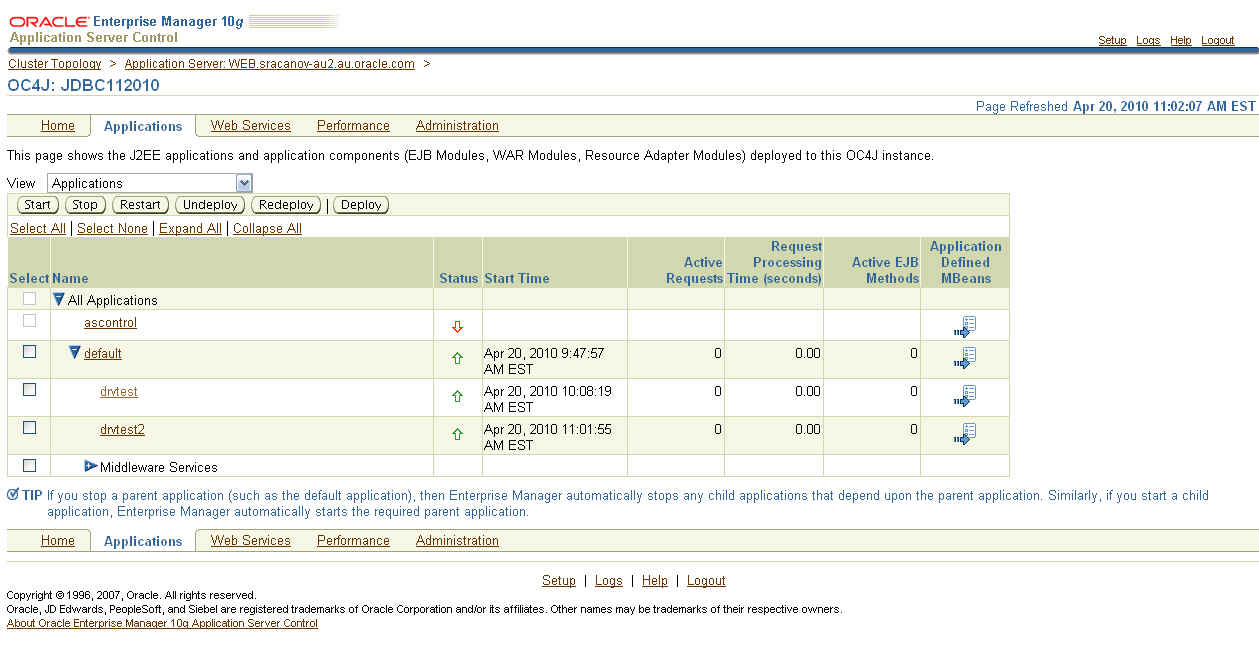
4. I created a new instance called JDBC112010

> createinstance -instanceName JDBC112010

5. I started the new instance and checked to make sure it was up.

> opmnctl startproc process-type=JDBC112010
opmnctl: starting opmn managed processes...

> opmnctl status

Processes in Instance: web.sracanov-au.au.oracle.com
---------------------------------+--------------------+---------+---------
ias-component | process-type | pid | status
---------------------------------+--------------------+---------+---------
OC4JGroup:default_group | OC4J:JDBC112010 | 5124 | Alive
...

6. I then deploy the following application 'drvtest.ear'

7. I accessed and ran the application from URL - 'http://<server>:<port>/drvtest/dbdetails.jsp'

I completed my database details and clicked on the 'Submit' button.


The current JDBC details are displayed:

=============
JDBC Driver Name is ........ Oracle JDBC driver
JDBC Driver Version is ..... 10.1.0.5.0
JDBC Driver Major Version is 10
JDBC Driver Minor Version is 1
=============

8. I then continued to followed Doc ID 420303.1 to upgrade the JDBC Driver.

In point 7 of the document, I entered

Shared Library Name : oracle.jdbc
Shared Library Version : 11.2.0.1.0


NOTE: The name must be 'oracle.jdbc'

9. In point 15 of the document, I first created a backup of 'system-applications.xml'. I then entered


NOTE: The name must be 'oracle.jdbc'. The version details must match version enter in step 8.

10. After restarting the instance, I then accessed the test application again. 'http://<server>:<port>/drvtest/dbdetails.jsp'

I completed my database details and clicked on the 'Submit' button.

This is the results I received

=============
JDBC Driver Name is ........ Oracle JDBC driver
JDBC Driver Version is ..... 11.2.0.1.0
JDBC Driver Major Version is 11
JDBC Driver Minor Version is 2
=============


I can now see and confirm the JDBC Driver upgrade worked successfully.

11. Then created the datasource. You can do this following document 456270.1 - Creating a datasource in Application Server Control (ASC)/Enterprise Manager (EM) for 10.1.3.X

Here is how my connection pool looks like in 'data-sources.xml':


NOTE: You must use a managed datasource with oracle.jdbc.OracleDriver factory class. Can not use native data source. The pool properties there do not implement the encryption properties from oracle.jdbc.OracleConnection interface.

The XXX_TYPES should match the setting as configure in the database. Step 1


12. Download and deploy this application EAR file 'drvtest2.ear' which you will then connect to this connection pool.


Access the URL 'http://<server>:<port>/drvtest2/dbdetails.jsp' and enter the JNDI of the pool and click 'Submit'.


Your results should look something like:

System Information

JDK Details

=============
JDK Vendor is ... Sun Microsystems Inc.
JDK Version is ... 1.5.0_06
=============

JDBC Driver Details

=============
JDBC Driver Name is ........ Oracle JDBC driver
JDBC Driver Version is ..... 11.2.0.1.0
JDBC Driver Major Version is 11
JDBC Driver Minor Version is 2
=============

Database Details

=============
Database Product Name is ... Oracle
Database Product Version is Oracle Database 11g Enterprise Edition Release 11.2.0.1.0 - 64bit Production
With the Partitioning, OLAP, Data Mining and Real Application Testing options

Secure Algorithm Details

=============
Encryption algorithm is: RC4_256
Data Integrity algorithm is: MD5


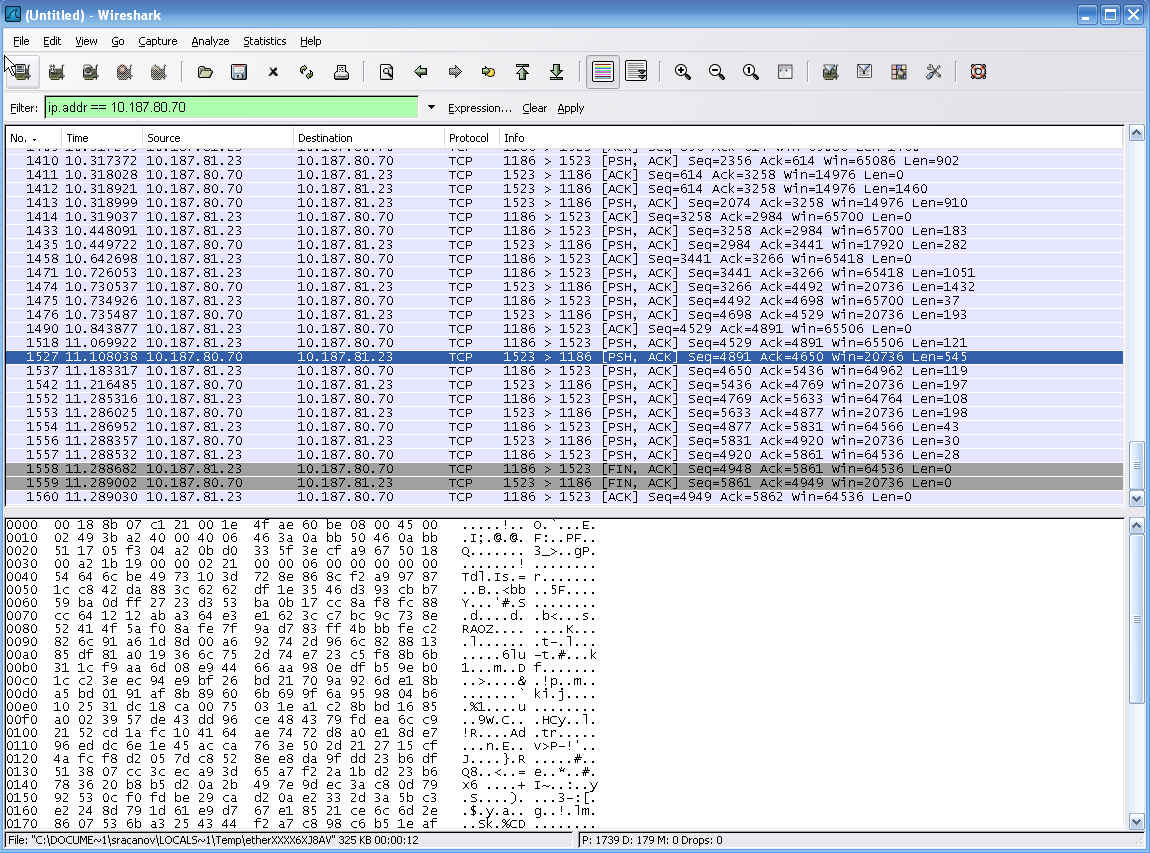
Now I can see the encryption & data integrity algorithm used in this connection. You can further download a tool like wireshark - http://www.wireshark.org/ and run it on the application server to monitor this connection pool and confirm the message are encrypted and unreadable.


You can download the JDev workspace from here

11g Database Webservice Callout Steps

Posted by Steve Racanovic | Posted in , | Posted on 10:02 AM

0

11g Database Webservice Callout Steps

I installed the 11g R2 database last week and though I'd go through notes 469588.1, 428775.1 and 841183.1 on My Oracle Support and jot down my steps for configuring UTL_DBWS and JPublisher to use a java webservice proxy from the database to call external webservices.

This is what I done:

1. Check to see if the database webservice utilities are installed in sys schema, check the status of the java classes and set the OJVM pool size.

a. Check and see if callout utilities are installed:

[oracle@sracanov-au2 dbhome_1]$ sqlplus /nolog

SQL*Plus: Release 11.2.0.1.0 Production on Mon Dec 14 08:04:09 2009

Copyright (c) 1982, 2009, Oracle.  All rights reserved.

SQL> conn sys/ as sysdba
Enter password:
Connected.

SQL> desc sys.utl_dbws
ERROR:
ORA-04043: object sys.utl_dbws does not exist
b. Check the status of the java classes:
SQL> SELECT owner, status, count(*) FROM DBA_OBJECTS WHERE OBJECT_TYPE='JAVA CLASS' GROUP BY owner, status;

OWNER                          STATUS    COUNT(*)
------------------------------ ------- ----------
MDSYS                          VALID          531
SYS                            VALID        20444
EXFSYS                         VALID           47
ORDSYS                         VALID         1898
c. Set the OJVM pool size. I'm setting the size as per note 469588.1. Although the online documentation suggest java_pool_size is set to at least 96 MB and shared_pool_size is set to at least 80 MB. http://download.oracle.com/docs/cd/E11882_01/java.112/e10587/intro.htm#BHCBACII. If this is not set, then loading and resolving java classes (jars) will occur errors:
SQL> show parameter SHARED_POOL_SIZE

NAME                                 TYPE        VALUE
------------------------------------ ----------- ------------------------------
shared_pool_size                     big integer 0
SQL> show parameter JAVA_POOL_SIZE

NAME                                 TYPE        VALUE
------------------------------------ ----------- ------------------------------
java_pool_size                       big integer 0
SQL> alter system set SHARED_POOL_SIZE=132M scope=both;

System altered.

SQL> alter system set JAVA_POOL_SIZE=80M scope=both;

System altered.

SQL> show parameter SHARED_POOL_SIZE

NAME                                 TYPE        VALUE
------------------------------------ ----------- ------------------------------
shared_pool_size                     big integer 132M
SQL> show parameter JAVA_POOL_SIZE

NAME                                 TYPE        VALUE
------------------------------------ ----------- ------------------------------
java_pool_size                       big integer 80M
SQL>
2. Download JPublisher & Database Web Services Callout Utilities

Webpage:
http://www.oracle.com/technetwork/database/features/jdbc/index-091264.html
Download - JPublisher 10g Release 10.2:
http://download.oracle.com/otn/utilities_drivers/jdbc/10201/jpub_102.zip

Webpage:
http://www.oracle.com/technetwork/database/enterprise-edition/index-097123.html
Download - 10.1.3.1 Callout Utility for 10g and 11g RDBMS (ZIP, ~13MB):
http://download.oracle.com/technology/sample_code/tech/java/jsp/dbws-callout-utility-10131.zip

3. Setup the OS environment:
[oracle@sracanov-au2 ~]$ export ORACLE_HOME=/u01/programs/oracle/product/11.2.0/dbhome_1
[oracle@sracanov-au2 ~]$ export JAVA_HOME=$ORACLE_HOME/jdk
[oracle@sracanov-au2 ~]$ export PATH=$ORACLE_HOME/bin:$ORACLE_HOME/OPatch:$ORACLE_HOME/sqlj/bin:$JAVA_HOME/bin:$PATH
[oracle@sracanov-au2 ~]$ export CLASSPATH=$ORACLE_HOME/sqlj/lib/translator.jar:$ORACLE_HOME/sqlj/lib/runtime12.jar:$ORACLE_HOME/sqlj/lib/dbwsa.jar:$ORACLE_HOME/javavm/lib/aurora.zip:$ORACLE_HOME/jdbc/lib/ojdbc5.jar:$ORACLE_HOME/jdk/lib/dt.jar:$ORACLE_HOME/jdk/lib/tools.jar:$ORACLE_HOME/jlib/jssl-1_1.jar:$ORACLE_HOME/jlib/orai18n.jar:$ORACLE_HOME/rdbms/jlib/xdb.jar:$ORACLE_HOME/lib/xsu12.jar:$ORACLE_HOME/jlib/jndi.jar:$ORACLE_HOME/rdbms/jlib/aqapi.jar:$ORACLE_HOME/rdbms/jlib/jmscommon.jar:$ORACLE_HOME/lib/xmlparserv2.jar
I extract the downloaded files in the next setup. You can set the classpath now or later. Doing it now for simplicity.

4. Extract the downloaded files:

a. Take a backup of sqlj folder first:
[oracle@sracanov-au2 ~]$ mv $ORACLE_HOME/sqlj $ORACLE_HOME/sqlj.org
b. Extract Jpub:
[oracle@sracanov-au2 ~]$ unzip jpub_102.zip -d $ORACLE_HOME
Archive:  jpub_102.zip
   creating: /u01/programs/oracle/product/11.2.0/dbhome_1/sqlj/
   creating: /u01/programs/oracle/product/11.2.0/dbhome_1/sqlj/lib/
  inflating: /u01/programs/oracle/product/11.2.0/dbhome_1/sqlj/lib/sqljutl.sql
  inflating: /u01/programs/oracle/product/11.2.0/dbhome_1/sqlj/lib/translator.jar
  inflating: /u01/programs/oracle/product/11.2.0/dbhome_1/sqlj/lib/runtime12.jar
   creating: /u01/programs/oracle/product/11.2.0/dbhome_1/sqlj/bin/
  inflating: /u01/programs/oracle/product/11.2.0/dbhome_1/sqlj/bin/README.txt
  inflating: /u01/programs/oracle/product/11.2.0/dbhome_1/sqlj/bin/jpub.c
  inflating: /u01/programs/oracle/product/11.2.0/dbhome_1/sqlj/bin/jpub
  inflating: /u01/programs/oracle/product/11.2.0/dbhome_1/sqlj/bin/jpub.exe
  inflating: /u01/programs/oracle/product/11.2.0/dbhome_1/sqlj/README.txt
   creating: /u01/programs/oracle/product/11.2.0/dbhome_1/sqlj/demo/
   creating: /u01/programs/oracle/product/11.2.0/dbhome_1/sqlj/demo/jpub/
  inflating: /u01/programs/oracle/product/11.2.0/dbhome_1/sqlj/demo/jpub/Booleans.sql
  inflating: /u01/programs/oracle/product/11.2.0/dbhome_1/sqlj/demo/jpub/Indexby.sql
  inflating: /u01/programs/oracle/product/11.2.0/dbhome_1/sqlj/demo/jpub/Inherit.sql
  inflating: /u01/programs/oracle/product/11.2.0/dbhome_1/sqlj/demo/jpub/MyRationalC.java
  inflating: /u01/programs/oracle/product/11.2.0/dbhome_1/sqlj/demo/jpub/MyRationalO.java
  inflating: /u01/programs/oracle/product/11.2.0/dbhome_1/sqlj/demo/jpub/MyRationalO8i.java
  inflating: /u01/programs/oracle/product/11.2.0/dbhome_1/sqlj/demo/jpub/PlsqlType.sql
  inflating: /u01/programs/oracle/product/11.2.0/dbhome_1/sqlj/demo/jpub/README.txt
  inflating: /u01/programs/oracle/product/11.2.0/dbhome_1/sqlj/demo/jpub/Rational.sql
  inflating: /u01/programs/oracle/product/11.2.0/dbhome_1/sqlj/demo/jpub/TestBooleans.java
  inflating: /u01/programs/oracle/product/11.2.0/dbhome_1/sqlj/demo/jpub/TestCallin.java
  inflating: /u01/programs/oracle/product/11.2.0/dbhome_1/sqlj/demo/jpub/TestIndexby.java
  inflating: /u01/programs/oracle/product/11.2.0/dbhome_1/sqlj/demo/jpub/TestInh.java
  inflating: /u01/programs/oracle/product/11.2.0/dbhome_1/sqlj/demo/jpub/TestInstall.sql
  inflating: /u01/programs/oracle/product/11.2.0/dbhome_1/sqlj/demo/jpub/TestInstallCreateTable.java
  inflating: /u01/programs/oracle/product/11.2.0/dbhome_1/sqlj/demo/jpub/TestInstallJDBC.java
  inflating: /u01/programs/oracle/product/11.2.0/dbhome_1/sqlj/demo/jpub/TestQuery.java
  inflating: /u01/programs/oracle/product/11.2.0/dbhome_1/sqlj/demo/jpub/TestMyRationalC.java
  inflating: /u01/programs/oracle/product/11.2.0/dbhome_1/sqlj/demo/jpub/TestMyRationalO.java
  inflating: /u01/programs/oracle/product/11.2.0/dbhome_1/sqlj/demo/jpub/TestMyRationalO8i.java
  inflating: /u01/programs/oracle/product/11.2.0/dbhome_1/sqlj/demo/jpub/TestPlsqlType.java
  inflating: /u01/programs/oracle/product/11.2.0/dbhome_1/sqlj/demo/jpub/TestRationalO.java
  inflating: /u01/programs/oracle/product/11.2.0/dbhome_1/sqlj/demo/jpub/TestRationalP.java
  inflating: /u01/programs/oracle/product/11.2.0/dbhome_1/sqlj/demo/jpub/WrDbmsUtil.sql
  inflating: /u01/programs/oracle/product/11.2.0/dbhome_1/sqlj/demo/jpub/connect.properties
  inflating: /u01/programs/oracle/product/11.2.0/dbhome_1/sqlj/demo/jpub/jpub.properties
  inflating: /u01/programs/oracle/product/11.2.0/dbhome_1/sqlj/demo/jpub/TemperatureService.wsdl
   creating: /u01/programs/oracle/product/11.2.0/dbhome_1/sqlj/doc/
  inflating: /u01/programs/oracle/product/11.2.0/dbhome_1/sqlj/doc/faq.html
[oracle@sracanov-au2 ~]$
c. Extract Callout Utilities:
[oracle@sracanov-au2 ~]$ unzip dbws-callout-utility-10131.zip sqlj\* -d $ORACLE_HOME
Archive:  dbws-callout-utility-10131.zip
  inflating: /u01/programs/oracle/product/11.2.0/dbhome_1/sqlj/lib/utl_dbws_decl.sql
  inflating: /u01/programs/oracle/product/11.2.0/dbhome_1/sqlj/lib/utl_dbws_body.sql
  inflating: /u01/programs/oracle/product/11.2.0/dbhome_1/sqlj/lib/dbwsclientws.jar
  inflating: /u01/programs/oracle/product/11.2.0/dbhome_1/sqlj/lib/dbwsclientdb102.jar
  inflating: /u01/programs/oracle/product/11.2.0/dbhome_1/sqlj/lib/dbwsclientdb11.jar
  inflating: /u01/programs/oracle/product/11.2.0/dbhome_1/sqlj/lib/dbwsa.jar
  inflating: /u01/programs/oracle/product/11.2.0/dbhome_1/sqlj/lib/dbwsclientdb101.jar
[oracle@sracanov-au2 ~]$ unzip dbws-callout-utility-10131.zip samples\* -d $ORACLE_HOME/sqlj
Archive:  dbws-callout-utility-10131.zip
   creating: /u01/programs/oracle/product/11.2.0/dbhome_1/sqlj/samples/
  inflating: /u01/programs/oracle/product/11.2.0/dbhome_1/sqlj/samples/javacallout.wsdl
  inflating: /u01/programs/oracle/product/11.2.0/dbhome_1/sqlj/samples/test-plsql-dii.sql
  inflating: /u01/programs/oracle/product/11.2.0/dbhome_1/sqlj/samples/javacallout.ear
[oracle@sracanov-au2 ~]$ unzip dbws-callout-utility-10131.zip *.htm -d sqlj/
Archive:  dbws-callout-utility-10131.zip
  inflating: sqlj/10.htm
  inflating: sqlj/11.htm
  inflating: sqlj/README.htm
d. Looking at the extracted files, there is no dbwsclient.jar.

http://download.oracle.com/docs/cd/E11882_01/java.112/e10587/intro.htm#BHCBACII

There is however dbwsclientws.jar. dbwsclientws.jar is the same as dbwsclient.jar. Jpub looks for this file when you run the jpub command. To avoid the error: 'Error loading dbwsclient.jar, please check the database trace file and make sure dbwsclient.jar exists in ORACLE_HOME/sqlj/lib.' when running the jpub command, I'll just make a copy of this file:
[oracle@sracanov-au2 lib]$ ls -al | grep dbwsc
-rw-r--r--  1 oracle oinstall  737386 Jun 18  2008 dbwsclientdb101.jar
-rw-r--r--  1 oracle oinstall  208486 Jun 18  2008 dbwsclientdb102.jar
-rw-r--r--  1 oracle oinstall  214156 Jun 18  2008 dbwsclientdb11.jar
-rw-r--r--  1 oracle oinstall 6716174 Aug  1  2008 dbwsclientws.jar
[oracle@sracanov-au2 lib]$ cp dbwsclientws.jar dbwsclient.jar
[oracle@sracanov-au2 lib]$ ls -al | grep dbwsc
-rw-r--r--  1 oracle oinstall  737386 Jun 18  2008 dbwsclientdb101.jar
-rw-r--r--  1 oracle oinstall  208486 Jun 18  2008 dbwsclientdb102.jar
-rw-r--r--  1 oracle oinstall  214156 Jun 18  2008 dbwsclientdb11.jar
-rw-r--r--  1 oracle oinstall 6716174 Dec 16 06:42 dbwsclient.jar
-rw-r--r--  1 oracle oinstall 6716174 Aug  1  2008 dbwsclientws.jar
[oracle@sracanov-au2 lib]$
I am not sure why they packaged it like this. It seems it was packaged dbwsclient.jar in the previous download version i.e. 10.1.3.0 Callout Utility for 10g RDBMS (ZIP, 6.89MB).

Note that I did not find this step crucial. I could still run jpub and each time I will get that error above 'Error loading dbwsclient.jar,..... It could still proceed without it and it worked fine in my example. However doing this I avoid seeing that error all the time when I run Jpub.

5. Set the execute permission on jpub:
[oracle@sracanov-au2 ~]$ cd $ORACLE_HOME/sqlj/bin
[oracle@sracanov-au2 bin]$ chmod +x jpub
6. I'm using the scott schema in this example. Check the schema has CONNECT, RESOURCE and CREATE PUBLIC SYNONYM grants. This is the minimum permission required. If not, allow for it.
SQL> SELECT grantee, granted_role FROM dba_role_privs where GRANTEE = 'SCOTT';

GRANTEE                        GRANTED_ROLE
------------------------------ ------------------------------
SCOTT                          RESOURCE
SCOTT                          CONNECT

SQL> select * from dba_sys_privs where GRANTEE='SCOTT';

GRANTEE                        PRIVILEGE                                ADM
------------------------------ ---------------------------------------- ---
SCOTT                          UNLIMITED TABLESPACE                     NO

SQL> grant CREATE PUBLIC SYNONYM to scott;
SQL> select * from dba_sys_privs where GRANTEE='SCOTT';

GRANTEE                        PRIVILEGE                                ADM
------------------------------ ---------------------------------------- ---
SCOTT                          UNLIMITED TABLESPACE                     NO
SCOTT                          CREATE PUBLIC SYNONYM                    NO
7. Load the database webservice callout utilities into the scott schema. The jar's are found in $ORACLE_HOME/sqlj/lib folder.
[oracle@sracanov-au2 bin]$ cd $ORACLE_HOME/sqlj/lib
[oracle@sracanov-au2 lib]$ loadjava -u scott/tiger -r -v -f -s -grant public -genmissing dbwsclientws.jar dbwsclientdb11.jar >& loadjava.txt
Check the log and see if it completed successfully. It should look something like:
[oracle@sracanov-au2 lib]$ tail -8 loadjava.txt
Classes Loaded: 4061
Resources Loaded: 81
Sources Loaded: 0
Published Interfaces: 0
Classes generated: 63
Classes skipped: 0
Synonyms Created: 0
Errors: 0
[oracle@sracanov-au2 lib]$
(The values are likely to be different. This depends the on system environment and what already installed).

8. Once the database webservice call out classes have been loaded, I need to run the PL/SQL wrappers that will call theses classes. The scripts are found in $ORACLE_HOME/sqlj/lib folder. Since I installed the jar in scott, scott needs to run these scripts:
[oracle@sracanov-au2 lib]$ sqlplus scott/tiger

SQL*Plus: Release 11.2.0.1.0 Production on Tue Dec 15 11:08:50 2009

Copyright (c) 1982, 2009, Oracle.  All rights reserved.

Connected to:
Oracle Database 11g Enterprise Edition Release 11.2.0.1.0 - Production
With the Partitioning, OLAP, Data Mining and Real Application Testing options

SQL> @utl_dbws_decl.sql

Package created.

SQL> @utl_dbws_body.sql

Package body created.

Grant succeeded.

SQL> desc utl_dbws
PROCEDURE ADD_PARAMETER
 Argument Name                  Type                    In/Out Default?
 ------------------------------ ----------------------- ------ --------
 CALL_HANDLE                    NUMBER                  IN
 XML_NAME                       VARCHAR2                IN
 Q_NAME                         VARCHAR2(4096)          IN
...
...
9. Grant the following classes from the SYS schema to scott. (or whichever schema your using. Ensure the schema name is in capital letters. i.e. 'SCOTT'):
SQL> conn /as sysdba
Connected.
SQL> call dbms_java.grant_permission('SCOTT','SYS:java.lang.RuntimePermission', 'shutdownHooks', '' );
SQL> call dbms_java.grant_permission('SCOTT','SYS:java.util.logging.LoggingPermission', 'control', '' );
SQL> call dbms_java.grant_permission('SCOTT','SYS:java.util.PropertyPermission','http.proxySet','write');
SQL> call dbms_java.grant_permission('SCOTT','SYS:java.util.PropertyPermission','http.proxyHost', 'write');
SQL> call dbms_java.grant_permission('SCOTT','SYS:java.util.PropertyPermission','http.proxyPort', 'write');
SQL> call dbms_java.grant_permission('SCOTT','SYS:java.lang.RuntimePermission','getClassLoader','');
SQL> call dbms_java.grant_permission('SCOTT','SYS:java.net.SocketPermission','*','connect,resolve');
SQL> call dbms_java.grant_permission('SCOTT','SYS:java.util.PropertyPermission','*','read,write');
SQL> call dbms_java.grant_permission('SCOTT','SYS:java.lang.RuntimePermission','setFactory','');
SQL> call dbms_java.grant_permission('SCOTT','SYS:java.lang.RuntimePermission', 'accessClassInPackage.sun.util.calendar','');
EXAMPLE 1:
==========
10. Using the example code from note 841183.1, I will now use the UTL_DBWS package loaded in scott to call the webservice. The PL/SQL is created as follows:

a. Here is the PL/SQL code using UTL_DBWS to call an external webservice:
CREATE OR REPLACE FUNCTION celciusToFahrenheit(temperature NUMBER) RETURN VARCHAR2 AS

service_ scott.utl_dbws.SERVICE;
call_ scott.utl_dbws.CALL;
service_qname scott.utl_dbws.QNAME;
port_qname scott.utl_dbws.QNAME;
response sys.XMLTYPE;
request sys.XMLTYPE;

BEGIN
scott.utl_dbws.set_http_proxy('myproxy.com:80');
service_qname := scott.utl_dbws.to_qname(null, 'CelciusToFahrenheit');
service_      := scott.utl_dbws.create_service(service_qname);
call_         := scott.utl_dbws.create_call(service_);
scott.utl_dbws.set_target_endpoint_address(call_, 'http://webservices.daehosting.com/services/TemperatureConversions.wso');
scott.utl_dbws.set_property( call_, 'OPERATION_STYLE', 'document');
request       := sys.XMLTYPE(''||temperature||'');
response      := scott.utl_dbws.invoke(call_, request);
return response.extract('//CelciusToFahrenheitResult/child::text()', 'xmlns="http://webservices.daehosting.com/temperature"').getstringval();
END;
/
show errors;
b. I have changed line 11 with my proxy server details. If your environment does not use a proxy server leave this line out.
c. Since the database webservice utilities have been installed in 'scott', I have changed all the 'sys' references to webservice utilities to 'scott'
d. Ensure you can access the webservice used in this example: http://webservices.daehosting.com/services/TemperatureConversions.wso
e: Now run the example:
SQL> @celciusToFahrenheit.sql

Function created.

No errors.
SQL> SELECT celciusToFahrenheit(30) from dual;

CELCIUSTOFAHRENHEIT(30)
--------------------------------------------------------------------------------
86

SQL>
EXAMPLE 2:
==========
11. Now using the same webservice, I will use jpub to create and load the java webservice proxy classes to the database.

a. Run the jpub to create and load your java webservice client proxy. Here is the command used:

jpub -u scott/tiger -sysuser sys/welcome1 -proxywsdl=http://webservices.daehosting.com/services/TemperatureConversions.wso?WSDL -endpoint=http://webservices.daehosting.com/services/TemperatureConversions.wso -httpproxy=myproxy.com:80

Note I have specified my proxy again as the last parameter. If your environment does not use a proxy server leave this out.
[oracle@sracanov-au2 dbhome_1]$ cd sqlj
[oracle@sracanov-au2 sqlj]$ mkdir example2
[oracle@sracanov-au2 sqlj]$ cd example2/
[oracle@sracanov-au2 example2]$ jpub -u scott/tiger -sysuser sys/welcome1 -proxywsdl=http://webservices.daehosting.com/services/TemperatureConversions.wso?WSDL -endpoint=http://webservices.daehosting.com/services/TemperatureConversions.wso -httpproxy=myproxy.com:80
tmp/src/genproxy/TemperatureConversionsSoapClientJPub.java
plsql_wrapper.sql
plsql_dropper.sql
plsql_grant.sql
plsql_revoke.sql
Executing plsql_dropper.sql
Executing plsql_wrapper.sql
Executing plsql_grant.sql
Loading plsql_proxy.jar

[oracle@sracanov-au2 example2]$
Note that when using jpub I can avoid coding PL/SQL code. The PL/SQL files can be found in the current local directory where jpub is run from. They have been executed while running the jpub command.
[oracle@sracanov-au2 example2]$ ls -al
total 88
drwxr-xr-x  3 oracle oinstall  4096 Dec 16 07:27 .
drwxr-xr-x  8 oracle oinstall  4096 Dec 15 10:43 ..
-rw-r--r--  1 oracle oinstall    95 Dec 16 07:27 plsql_dropper.sql
-rw-r--r--  1 oracle oinstall   548 Dec 16 07:27 plsql_grant.sql
-rw-r--r--  1 oracle oinstall 26546 Dec 16 07:27 plsql_proxy.jar
-rw-r--r--  1 oracle oinstall   404 Dec 16 07:27 plsql_revoke.sql
-rw-r--r--  1 oracle oinstall  3261 Dec 16 07:27 plsql_wrapper.sql
drwxr-xr-x  4 oracle oinstall  4096 Dec 16 06:43 tmp
b. Now call the web Service as in sqlplus.
SQL> conn scott/tiger
Connected.
SQL> select jpub_plsql_wrapper.celciusToFahrenheit(30) as "Celcius To Fahrenheit(30)" from dual;

Celcius To Fahrenheit(30)
-------------------------
                       86

SQL>
Running jpub has created the java webservice proxy for all the methods available from the webservice:
SQL> select jpub_plsql_wrapper.fahrenheitToCelcius(86) as "Fahrenheit To Celcius(86)" from dual;

Fahrenheit To Celcius(86)
-------------------------
                       30

SQL>
For any further or clarification, see the following documentation:

Oracle® Database JPublisher User's Guide
http://download.oracle.com/docs/cd/B28359_01/java.111/b31226/toc.htm

Database Web Service Callout Utility 10.1.3.1
http://www.oracle.com/technology/sample_code/tech/java/jsp/callout_users_guide.htm

Example of using JDBC Timezone

Posted by Steve Racanovic | Posted in | Posted on 11:46 AM

0

Recently I was working on a timezone issue there the values returned on the daylight saving change over where incorrect. Here is the example and steps to reproduce this problem.

There sql script looks like:

connect / as sysdba

drop user timezoneuser cascade;

grant connect,resource to timezoneuser identified by timezoneuser;

connect timezoneuser/timezoneuser

create table jdbc_test (
sequence_id number(2),
cbt timestamp,
cbt_utc timestamp);

alter session set NLS_DATE_FORMAT = 'MM/DD/YYYY HH24:MI:SS';
alter session set NLS_TIMESTAMP_TZ_FORMAT ='MM/DD/YYYY HH24:MI:SS';
alter session set NLS_TIMESTAMP_FORMAT = 'MM/DD/YYYY HH24:MI:SS';

select * from nls_session_parameters;

insert into jdbc_test values(1,'04/05/2009 00:00:00','04/04/2009 13:00:00');
insert into jdbc_test values(2,'04/05/2009 01:00:00','04/04/2009 14:00:00');
insert into jdbc_test values(3,'04/05/2009 02:00:00','04/04/2009 15:00:00');
insert into jdbc_test values(4,'04/05/2009 02:00:00','04/04/2009 16:00:00');
insert into jdbc_test values(5,'04/05/2009 03:00:00','04/04/2009 17:00:00');
insert into jdbc_test values(6,'04/05/2009 04:00:00','04/04/2009 18:00:00');
insert into jdbc_test values(7,'04/05/2009 05:00:00','04/04/2009 19:00:00');
insert into jdbc_test values(8,'04/05/2009 06:00:00','04/04/2009 20:00:00');
insert into jdbc_test values(9,'04/05/2009 07:00:00','04/04/2009 21:00:00');
insert into jdbc_test values(10,'04/05/2009 08:00:00','04/04/2009 22:00:00');
insert into jdbc_test values(11,'04/05/2009 09:00:00','04/04/2009 23:00:00');
insert into jdbc_test values(12,'04/05/2009 10:00:00','04/05/2009 00:00:00');
insert into jdbc_test values(13,'04/05/2009 11:00:00','04/05/2009 01:00:00');
insert into jdbc_test values(14,'04/05/2009 12:00:00','04/05/2009 02:00:00');
insert into jdbc_test values(15,'04/05/2009 13:00:00','04/05/2009 03:00:00');
insert into jdbc_test values(16,'04/05/2009 14:00:00','04/05/2009 04:00:00');
insert into jdbc_test values(17,'04/05/2009 15:00:00','04/05/2009 05:00:00');
insert into jdbc_test values(18,'04/05/2009 16:00:00','04/05/2009 06:00:00');
insert into jdbc_test values(19,'04/05/2009 17:00:00','04/05/2009 07:00:00');

column seq format 999
column cbt format a20
column cbt_utc format a20
column difference format a30

select sequence_id as seq,cbt ,cbt_utc , cbt - cbt_utc as difference from jdbc_test;
and the java looks like:
package example;

import java.sql.Connection;
import java.sql.DriverManager;
import java.sql.PreparedStatement;
import java.sql.ResultSet;
import java.sql.Timestamp;

import java.util.Date;
import java.util.Properties;

public class JDBCTimeStamp {

private void queryDatabase() {
Connection conn = null;

String DRIVER = "oracle.jdbc.driver.OracleDriver";
String connectionName = "jdbc:comp:env:sys";
String URL_NAME = "jdbc:oracle:thin:@celcsol1.us.oracle.com:1521:tarsr3";
String userName = new String("timezoneuser");
String password = new String("timezoneuser");
Properties prop = new Properties();
prop.put("user", userName);
prop.put("password", password);
prop.put("connectionName", connectionName);
try {
try {
Class.forName(DRIVER);
} catch (Exception e) {
System.out.println("Exception in Class.forName : " + e);
}
try {
conn = DriverManager.getConnection(URL_NAME, prop);
} catch (Exception e) {
System.out.println("Exception in creating the connection : " + e);
}

String sqlString = " SELECT SEQUENCE_ID,CBT,CBT_UTC" + " FROM JDBC_TEST ";

PreparedStatement ps = conn.prepareStatement(sqlString.toString());
ResultSet rs = null;
try {
ps = conn.prepareStatement(sqlString);
rs = ps.executeQuery();
String sequenceId = null;
Timestamp cbtTimeStamp = null;
Timestamp cbtUtcTimeStamp = null;
long longValueOfUtc;
long longValueOfCbt;
Date cbtDateValueFromLong;
Date utcDateValueFromLong;

System.out.println("ID \tCBT(local time) \t\t\tCBT_UTC(GMT) \t\t\tTime Difference");
while (rs.next()) {
sequenceId = rs.getString(1);
cbtTimeStamp = rs.getTimestamp(2);
cbtUtcTimeStamp = rs.getTimestamp(3);
longValueOfUtc = cbtUtcTimeStamp.getTime();
longValueOfCbt = cbtTimeStamp.getTime();
cbtDateValueFromLong = new Date(longValueOfCbt);
utcDateValueFromLong = new Date(longValueOfUtc);
System.out.println(sequenceId + "\t" + cbtDateValueFromLong + "\t\t" + utcDateValueFromLong + "\t\t" + ((longValueOfCbt - longValueOfUtc) / 3600000));
}
} finally {
if (ps != null)
ps.close();
if (rs != null)
rs.close();
}
} catch (Exception e) {
System.out.println("Exception :::" + e);
e.printStackTrace();
}
}

public static void main(String[] args) {
JDBCTimeStamp main = new JDBCTimeStamp();
main.queryDatabase();
}
}
Upon running the java code using JDK 1.6 and 11g JDBC drivers (ojdbc6.jar), the following results are show:
ID   CBT(local time)                     CBT_UTC(GMT)                        Time Difference
1 Sun Apr 05 00:00:00 EST 2009 Sat Apr 04 13:00:00 EST 2009 11
2 Sun Apr 05 01:00:00 EST 2009 Sat Apr 04 14:00:00 EST 2009 11
3 Sun Apr 05 02:00:00 EST 2009 Sat Apr 04 15:00:00 EST 2009 12
4 Sun Apr 05 02:00:00 EST 2009 Sat Apr 04 16:00:00 EST 2009 11
5 Sun Apr 05 03:00:00 EST 2009 Sat Apr 04 17:00:00 EST 2009 11
6 Sun Apr 05 04:00:00 EST 2009 Sat Apr 04 18:00:00 EST 2009 11
7 Sun Apr 05 05:00:00 EST 2009 Sat Apr 04 19:00:00 EST 2009 11
8 Sun Apr 05 06:00:00 EST 2009 Sat Apr 04 20:00:00 EST 2009 11
9 Sun Apr 05 07:00:00 EST 2009 Sat Apr 04 21:00:00 EST 2009 11
10 Sun Apr 05 08:00:00 EST 2009 Sat Apr 04 22:00:00 EST 2009 11
11 Sun Apr 05 09:00:00 EST 2009 Sat Apr 04 23:00:00 EST 2009 11
12 Sun Apr 05 10:00:00 EST 2009 Sun Apr 05 00:00:00 EST 2009 11
13 Sun Apr 05 11:00:00 EST 2009 Sun Apr 05 01:00:00 EST 2009 11
14 Sun Apr 05 12:00:00 EST 2009 Sun Apr 05 02:00:00 EST 2009 10
15 Sun Apr 05 13:00:00 EST 2009 Sun Apr 05 03:00:00 EST 2009 10
16 Sun Apr 05 14:00:00 EST 2009 Sun Apr 05 04:00:00 EST 2009 10
17 Sun Apr 05 15:00:00 EST 2009 Sun Apr 05 05:00:00 EST 2009 10
18 Sun Apr 05 16:00:00 EST 2009 Sun Apr 05 06:00:00 EST 2009 10
19 Sun Apr 05 17:00:00 EST 2009 Sun Apr 05 07:00:00 EST 2009 10
This because the table was not created with local timezone. The column in the database is TIMESTAMP - which holds a non timezone specified value.

When jdbc extracts values from a TIMESTAMP column into a java.sql.Timestamp via the getTimestamp method, it ensures that the value, when printed, shows the same DATE/TIME as that stored in the database.

The correct way to create the table would be:
create table jdbc_test (
sequence_id number(2),
cbt TIMESTAMP WITH LOCAL TIME ZONE,
cbt_utc TIMESTAMP WITH TIME ZONE);
Now that I am using 'WITH LOCAL TIME ZONE', I need change my java code to include the timezone in the connection like '((OracleConnection)conn).setSessionTimeZone("Australia/Victoria");'

So the java code would now look like:
...
try {
conn = DriverManager.getConnection(URL_NAME, prop);
} catch (Exception e) {
System.out.println("Exception in creating the connection : " + e);
}

((OracleConnection)conn).setSessionTimeZone("Australia/Victoria");
String sqlString = " SELECT SEQUENCE_ID,CBT,CBT_UTC" + " FROM JDBC_TEST ";

PreparedStatement ps = conn.prepareStatement(sqlString.toString());
ResultSet rs = null;
...
Now when I run the java class, the correct results are shown:
ID   CBT(local time)                     CBT_UTC(GMT)                        Time Difference
1 Sun Apr 05 01:00:00 EST 2009 Sat Apr 04 14:00:00 EST 2009 11
2 Sun Apr 05 02:00:00 EST 2009 Sat Apr 04 15:00:00 EST 2009 11
3 Sun Apr 05 02:00:00 EST 2009 Sat Apr 04 16:00:00 EST 2009 11
4 Sun Apr 05 02:00:00 EST 2009 Sat Apr 04 17:00:00 EST 2009 10
5 Sun Apr 05 03:00:00 EST 2009 Sat Apr 04 18:00:00 EST 2009 10
6 Sun Apr 05 04:00:00 EST 2009 Sat Apr 04 19:00:00 EST 2009 10
7 Sun Apr 05 05:00:00 EST 2009 Sat Apr 04 20:00:00 EST 2009 10
8 Sun Apr 05 06:00:00 EST 2009 Sat Apr 04 21:00:00 EST 2009 10
9 Sun Apr 05 07:00:00 EST 2009 Sat Apr 04 22:00:00 EST 2009 10
10 Sun Apr 05 08:00:00 EST 2009 Sat Apr 04 23:00:00 EST 2009 10
11 Sun Apr 05 09:00:00 EST 2009 Sun Apr 05 00:00:00 EST 2009 10
12 Sun Apr 05 10:00:00 EST 2009 Sun Apr 05 01:00:00 EST 2009 10
13 Sun Apr 05 11:00:00 EST 2009 Sun Apr 05 02:00:00 EST 2009 10
14 Sun Apr 05 12:00:00 EST 2009 Sun Apr 05 02:00:00 EST 2009 10
15 Sun Apr 05 13:00:00 EST 2009 Sun Apr 05 03:00:00 EST 2009 10
16 Sun Apr 05 14:00:00 EST 2009 Sun Apr 05 04:00:00 EST 2009 10
17 Sun Apr 05 15:00:00 EST 2009 Sun Apr 05 05:00:00 EST 2009 10
18 Sun Apr 05 16:00:00 EST 2009 Sun Apr 05 06:00:00 EST 2009 10
19 Sun Apr 05 17:00:00 EST 2009 Sun Apr 05 07:00:00 EST 2009 10

Example of OracleDatabaseMetaData using OAS datasources to display table and view data

Posted by Steve Racanovic | Posted in , | Posted on 3:10 PM

0

A simple example of using oracle database metadata (from JDBC) with Oracle Application Server 1013x datasources to display the data.

1. My data-sources.xml looks like:

<managed-data-source connection-pool-name="scottPool2" jndi-name="jdbc/ScottDS2"
name="jdbc/ScottDS2"/>

<connection-pool name="scottPool2">
   <connection-factory factory-class="oracle.jdbc.pool.OracleDataSource"
user="scott" password="tiger" url="jdbc:oracle:thin:@//sracanov-au2.au.oracle.com:1522/orcl"/>

</connection-pool>

2. My java code in jdev looks like:

package examples;

import java.sql.Connection;

import java.sql.ResultSet;

import java.util.Properties;

import javax.naming.Context;
import javax.naming.InitialContext;

import javax.sql.DataSource;

import oracle.jdbc.OracleDatabaseMetaData;

public class TestOracleDatabaseMetaDataDataSource {
public static void main(String[] args) throws Exception {
Properties props = new Properties();
props.put(Context.PROVIDER_URL,
"opmn:ormi://sracanov-au2.au.oracle.com:6005:OC4J_Apps/default");
props.put(Context.INITIAL_CONTEXT_FACTORY,
"oracle.j2ee.rmi.RMIInitialContextFactory");
props.put(Context.SECURITY_PRINCIPAL, "oc4jadmin");
props.put(Context.SECURITY_CREDENTIALS, "welcome1");
Context ctx = new InitialContext(props);
DataSource ds = (DataSource)ctx.lookup("jdbc/ScottDS2");
Connection conn = ds.getConnection();
OracleDatabaseMetaData dbmd =
(OracleDatabaseMetaData)conn.getMetaData();
ResultSet rs =
dbmd.getTables(null, "%", "%", new String[] { "TABLE", "VIEW" });
while (rs.next()) {
System.out.println(" " + rs.getString(3) + " : " +
rs.getString(4));
}
}

}
3. Ensure the following libraries are in the project:

* JDBC driver
* Apache Ant
* JSP Runtime

4. Run the class and the results are displayed:
      DR$NUMBER_SEQUENCE : TABLE
DR$OBJECT_ATTRIBUTE : TABLE
DR$POLICY_TAB : TABLE
RLM$PARSEDCOND : TABLE
OGIS_GEOMETRY_COLUMNS : TABLE
OGIS_SPATIAL_REFERENCE_SYSTEMS : TABLE
....
....
....
WM$REPLICATION_INFO : VIEW
WM$TABLE_NEXTVERS_VIEW : VIEW
WM$TABLE_PARVERS_VIEW : VIEW
WM$TABLE_VERSIONS_IN_LIVE_VIEW : VIEW
WM$TABLE_WS_PARVERS_VIEW : VIEW
WM$VERSIONS_IN_LIVE_VIEW : VIEW
WM$VER_BEF_INST_NEXTVERS_VIEW : VIEW
WM$VER_BEF_INST_PARVERS_VIEW : VIEW
WM_EVENTS_INFO : VIEW
PATH_VIEW : VIEW
RESOURCE_VIEW : VIEW
Results of the output have been truncated.

RMI-IIOP Example with oc4j 10.1.3.x

Posted by Steve Racanovic | Posted in , | Posted on 3:03 PM

0

I have been trying to follow the rmi-iiop how to:

http://www.oracle.com/technology/tech/java/oc4j/htdocs/how-to-rmi-iiop.html

with oc4j 1013x. I experienced some issues and noticed some changes in the documentation compared to the previous versions.

http://download.oracle.com/docs/cd/E14101_01/doc.1013/e13975/rmi.htm#CHDBDEII

So I recreated the example to run with the latest oc4j and noted the following additional requirements:

1. The client stub generation command has changed.

http://download.oracle.com/docs/cd/E14101_01/doc.1013/e13975/rmi.htm#i1084457

You need to specified the '-iiopClientJar stub_jar_filename' parameter during deployment.

First start oc4j with command:

java -DGenerateIIOP=true -jar oc4j.jar

Then deploy the application to generate the client stub as follows:

java -jar $J2EE_HOME/admin.jar
ormi://localhost admin welcome
-deploy -file filename
-deployment_name application_name
-iiopClientJar stub_jar_filename

2. The client must have the ejb_sec.properties defined.

http://download.oracle.com/docs/cd/E14101_01/doc.1013/e13977/csiv2.htm#i1014488

In the example, the ejb_sec.properties contains the following properties:

oc4j.iiop.trustedServers=*
client.sendpassword=true
nameservice.useSSL=false

3. The client requires the following 2 system properties:

-Djavax.rmi.CORBA.PortableRemoteObjectClass=com.sun.corba.ee.impl.javax.rmi.PortableRemoteObject
-Dcom.oracle.CORBA.OrbManager=com.oracle.corba.ee.impl.orb.ORBManagerIm

4. The client requires jazn.jar to be included in the classpath.

You can download the example from here. Follow the steps in the readme.txt to run it.

java.rmi.AccessException: CORBA NO_PERMISSION error

Posted by Steve Racanovic | Posted in | Posted on 6:50 PM

0

I have been trying to run my RMI/IIOP client in Jdev 10135, and I kept on getting the following stack error:

java.rmi.AccessException: CORBA NO_PERMISSION 0 No; nested exception is: 
org.omg.CORBA.NO_PERMISSION: ----------BEGIN server-side stack trace----------
org.omg.CORBA.NO_PERMISSION: vmcid: 0x0 minor code: 0 completed: No
at oracle.oc4j.corba.iiop.security.SecServerRequestInterceptor.receive_request(SecServerRequestInterceptor.java:355)
at com.sun.corba.ee.impl.interceptors.InterceptorInvoker.invokeServerInterceptorIntermediatePoint(InterceptorInvoker.java:509)
at com.sun.corba.ee.impl.interceptors.PIHandlerImpl.invokeServerPIIntermediatePoint(PIHandlerImpl.java:505)
at com.sun.corba.ee.impl.protocol.CorbaServerRequestDispatcherImpl.getServantWithPI(CorbaServerRequestDispatcherImpl.java:429)
at com.sun.corba.ee.impl.protocol.CorbaServerRequestDispatcherImpl.dispatch(CorbaServerRequestDispatcherImpl.java:191)
at com.sun.corba.ee.impl.protocol.CorbaMessageMediatorImpl.handleRequestRequest(CorbaMessageMediatorImpl.java:1653)
at com.sun.corba.ee.impl.protocol.CorbaMessageMediatorImpl.handleRequest(CorbaMessageMediatorImpl.java:1513)
at com.sun.corba.ee.impl.protocol.CorbaMessageMediatorImpl.handleInput(CorbaMessageMediatorImpl.java:895)
at com.sun.corba.ee.impl.protocol.giopmsgheaders.RequestMessage_1_2.callback(RequestMessage_1_2.java:172)
at com.sun.corba.ee.impl.protocol.CorbaMessageMediatorImpl.handleRequest(CorbaMessageMediatorImpl.java:668)
at com.sun.corba.ee.impl.transport.SocketOrChannelConnectionImpl.dispatch(SocketOrChannelConnectionImpl.java:375)
at com.sun.corba.ee.impl.transport.SocketOrChannelConnectionImpl.read(SocketOrChannelConnectionImpl.java:284)
at com.sun.corba.ee.impl.transport.ReaderThreadImpl.doWork(ReaderThreadImpl.java:73)
at com.sun.corba.ee.impl.orbutil.threadpool.ThreadPoolImpl$WorkerThread.run(ThreadPoolImpl.java:382)

----------END server-side stack trace---------- vmcid: 0x0 minor code: 0 completed: No
at com.sun.corba.ee.impl.javax.rmi.CORBA.Util.mapSystemException(Util.java:204)
at javax.rmi.CORBA.Util.mapSystemException(Util.java:67)
at howto.rmiiiop.oc4j.ejb._RemoteHome_Stub.create(Unknown Source)
at howto.rmiiiop.oc4j.client.RemoteClient.run(RemoteClient.java:55)
at howto.rmiiiop.oc4j.client.RemoteClient.main(RemoteClient.java:91)
Caused by: org.omg.CORBA.NO_PERMISSION: ----------BEGIN server-side stack trace----------
org.omg.CORBA.NO_PERMISSION: vmcid: 0x0 minor code: 0 completed: No
at oracle.oc4j.corba.iiop.security.SecServerRequestInterceptor.receive_request(SecServerRequestInterceptor.java:355)
at com.sun.corba.ee.impl.interceptors.InterceptorInvoker.invokeServerInterceptorIntermediatePoint(InterceptorInvoker.java:509)
at com.sun.corba.ee.impl.interceptors.PIHandlerImpl.invokeServerPIIntermediatePoint(PIHandlerImpl.java:505)
at com.sun.corba.ee.impl.protocol.CorbaServerRequestDispatcherImpl.getServantWithPI(CorbaServerRequestDispatcherImpl.java:429)
at com.sun.corba.ee.impl.protocol.CorbaServerRequestDispatcherImpl.dispatch(CorbaServerRequestDispatcherImpl.java:191)
at com.sun.corba.ee.impl.protocol.CorbaMessageMediatorImpl.handleRequestRequest(CorbaMessageMediatorImpl.java:1653)
at com.sun.corba.ee.impl.protocol.CorbaMessageMediatorImpl.handleRequest(CorbaMessageMediatorImpl.java:1513)
at com.sun.corba.ee.impl.protocol.CorbaMessageMediatorImpl.handleInput(CorbaMessageMediatorImpl.java:895)
at com.sun.corba.ee.impl.protocol.giopmsgheaders.RequestMessage_1_2.callback(RequestMessage_1_2.java:172)
at com.sun.corba.ee.impl.protocol.CorbaMessageMediatorImpl.handleRequest(CorbaMessageMediatorImpl.java:668)
at com.sun.corba.ee.impl.transport.SocketOrChannelConnectionImpl.dispatch(SocketOrChannelConnectionImpl.java:375)
at com.sun.corba.ee.impl.transport.SocketOrChannelConnectionImpl.read(SocketOrChannelConnectionImpl.java:284)
at com.sun.corba.ee.impl.transport.ReaderThreadImpl.doWork(ReaderThreadImpl.java:73)
at com.sun.corba.ee.impl.orbutil.threadpool.ThreadPoolImpl$WorkerThread.run(ThreadPoolImpl.java:382)

----------END server-side stack trace---------- vmcid: 0x0 minor code: 0 completed: No
at sun.reflect.NativeConstructorAccessorImpl.newInstance0(Native Method)
at sun.reflect.NativeConstructorAccessorImpl.newInstance(NativeConstructorAccessorImpl.java:39)
at sun.reflect.DelegatingConstructorAccessorImpl.newInstance(DelegatingConstructorAccessorImpl.java:27)
at java.lang.reflect.Constructor.newInstance(Constructor.java:494)
at com.sun.corba.ee.impl.protocol.giopmsgheaders.MessageBase.getSystemException(MessageBase.java:791)
at com.sun.corba.ee.impl.protocol.giopmsgheaders.ReplyMessage_1_2.getSystemException(ReplyMessage_1_2.java:97)
at com.sun.corba.ee.impl.protocol.CorbaMessageMediatorImpl.getSystemExceptionReply(CorbaMessageMediatorImpl.java:546)
at com.sun.corba.ee.impl.protocol.CorbaClientRequestDispatcherImpl.processResponse(CorbaClientRequestDispatcherImpl.java:430)
at com.sun.corba.ee.impl.protocol.CorbaClientRequestDispatcherImpl.marshalingComplete(CorbaClientRequestDispatcherImpl.java:326)
at com.sun.corba.ee.impl.protocol.CorbaClientDelegateImpl.invoke(CorbaClientDelegateImpl.java:132)
at org.omg.CORBA.portable.ObjectImpl._invoke(ObjectImpl.java:457)
... 3 more

After reviewing the documentation http://download.oracle.com/docs/cd/E14101_01/doc.1013/e13975/rmi.htm#CHDBDEII I had no inside why this error was occurring or if there was any misconfiguration on my client. Evenually I found the the following documentation http://download.oracle.com/docs/cd/E14101_01/doc.1013/e13977/csiv2.htm#i1014488 which states:

Any client, whether running inside a server or not, has EJB security properties. Table 19-2 following lists the EJB client security properties controlled by the ejb_sec.properties file. By default, OC4J searches for this file in the current directory when running as a client, or in ORACLE_HOME/j2ee/home/config when running in the server. You can specify the location of this file explicitly with the system property setting -Dejb_sec_properties_location=pathname.

I then created the ejb_sec.properties file with the following settings:

oc4j.iiop.trustedServers=*
client.sendpassword=true
nameservice.useSSL=false

Then I ran the client (as described by passing the file as system property) and it worked!