Showing posts with label JDBC. Show all posts

How to create an OCI connection in Jdev - Database Navigator

Posted by Steve Racanovic | Posted in , | Posted on 12:02 PM

0

I have been trying to create an OCI connection in the database navigator using Jdev 11.1.2.3. Following these docs:

http://docs.oracle.com/cd/E35521_01/user.111230/e17455/connect_work_databases.htm#OJDUG5131
http://docs.oracle.com/cd/E35521_01/user.111230/e17455/connect_work_databases.htm#OJDUG2432

I'm on a 64 bit platform. So the first thing I do is set JDev to use 64bit JDK by editing the jdev.conf file i.e.
...
# Directive SetJavaHome is not required by default, except for the base
# install, since the launcher will determine the JAVA_HOME.  On Windows
# it looks in ..\..\jdk, on UNIX it first looks in ../../jdk. If no JDK
# is found there, it looks in the PATH.
#
#SetJavaHome D:\Oracle\Jdev\111230-prod\jdk160_24
SetJavaHome C:\Program Files\Java\jdk1.6.0_39
...

I'll also add the parameters for JDBC driver and path to the OCI dll's.

 #For JDBC for OCI
AddVMOption -Doracle.jdbc.library=D:\Oracle\JDBC\instantclient\x86-64\11.1.0.7.0\ojdbc6.jar
AddNativeCodePath D:\Oracle\JDBC\instantclient\x86-64\11.1.0.7.0

When I start JDev, I receive a warning for the parameter AddNativeCodePath. And I'm unable to connect.

[sracanov@SRACANOV-AU D]$ jdev -verbose
WARNING: Unknown directive: AddNativeCodePath
savedArg0 = D:\Oracle\JDev\111230-prod\jdeveloper\jdev\bin\jdev.exe
VM to launch C:\Program Files\Java\jdk1.6.0_39\jre\bin\server\jvm.dll
Restarting the launcher with the 64bit version
Reading exe header from jvm.dll, Machine=8664
Jvm is 64bit
Checking toplevel for D:\Oracle\JDev\111230-prod\jdeveloper\jdev\bin\..\..\ide\bin\launcher.dll = 0
About to relaunch with command line: D:\Oracle\JDev\111230-prod\jdeveloper\jdev\bin\jdev64.exe -verbose
WARNING: Unknown directive: AddNativeCodePath
 ...


It seems AddNativeCodePath is not recognised as a parameter. So I've comment out the line and start it by passing the library in that path environment variable.

[sracanov@SRACANOV-AU D]$ set path=D:\Oracle\JDBC\instantclient\x86-64\11.1.0.7.0;%path%

[sracanov@SRACANOV-AU D]$ jdev -verbose
savedArg0 = D:\Oracle\JDev\111230-prod\jdeveloper\jdev\bin\jdev.exe
VM to launch C:\Program Files\Java\jdk1.6.0_39\jre\bin\server\jvm.dll
Restarting the launcher with the 64bit version
Reading exe header from jvm.dll, Machine=8664
Jvm is 64bit
Checking toplevel for D:\Oracle\JDev\111230-prod\jdeveloper\jdev\bin\..\..\ide\bin\launcher.dll = 0
About to relaunch with command line: D:\Oracle\JDev\111230-prod\jdeveloper\jdev\bin\jdev64.exe -verbose
savedArg0 = D:\Oracle\JDev\111230-prod\jdeveloper\jdev\bin\jdev64.exe
VM to launch C:\Program Files\Java\jdk1.6.0_39\jre\bin\server\jvm.dll
JNI Option: -Xbootclasspath/a:C:\Program Files\Java\jdk1.6.0_39\lib\tools.jar;C:\Program Files\Java\jdk1.6.0_39\lib\dt.jar
JNI Option: -Dsun.java2d.noddraw=true
JNI Option: -Dnetbeans.home=../../netbeans/platform/
JNI Option: -Dnetbeans.logger.console=true
JNI Option: -Dexcluded.modules=org.eclipse.osgi
JNI Option: -Dide.cluster.dirs=../../netbeans/netbinox/:../../netbeans/bridge/:../../
JNI Option: -Xmx800M
JNI Option: -Xms128M
JNI Option: -Xverify:none
JNI Option: -Doracle.ide.extension.HooksProcessingMode=LAZY
JNI Option: -Dorg.eclipse.equinox.simpleconfigurator.configUrl=file:bundles.info
JNI Option: -Dosgi.bundles=file:../ide/lib/oracle.ide.osgi.jar@3:start
JNI Option: -Dosgi.bundles.defaultStartLevel=1
JNI Option: -Dosgi.configuration.cascaded=false
JNI Option: -Dosgi.noShutdown=true
JNI Option: -Dorg.osgi.framework.bootdelegation=*
JNI Option: -Dosgi.parentClassloader=app
JNI Option: -Xbootclasspath/p:../../rdbms/jlib/ojdi.jar
JNI Option: -Dosgi.classloader.singleThreadLoads=true
JNI Option: -Dosgi.bundlefile.limit=2000
JNI Option: -Xbootclasspath/a:../../../oracle_common/modules/oracle.nlsrtl_11.1.0/orai18n-collation.jar
JNI Option: -Xbootclasspath/a:../../../oracle_common/modules/oracle.nlsrtl_11.1.0/orai18n-mapping.jar
JNI Option: -Xbootclasspath/a:../../../oracle_common/modules/oracle.nlsrtl_11.1.0/orai18n-servlet.jar
JNI Option: -Xbootclasspath/a:../../../oracle_common/modules/oracle.nlsrtl_11.1.0/orai18n-utility.jar
JNI Option: -Xbootclasspath/a:../../../oracle_common/modules/oracle.nlsrtl_11.1.0/orai18n.jar
JNI Option: -Xbootclasspath/a:../../../oracle_common/modules/oracle.xdk_11.1.0/xmlparserv2.jar
JNI Option: -Djavax.xml.parsers.DocumentBuilderFactory=oracle.xml.jaxp.JXDocumentBuilderFactory
JNI Option: -Djavax.xml.parsers.SAXParserFactory=oracle.xml.jaxp.JXSAXParserFactory
JNI Option: -Dorg.xml.sax.driver=oracle.xml.parser.v2.SAXParser
JNI Option: -Dide.feedback-server=ide.us.oracle.com
JNI Option: -Xbootclasspath/a:../../ide/lib/xml-factory.jar
JNI Option: -Djavax.xml.transform.TransformerFactory=oracle.ide.xml.SwitchableTransformerFactory
JNI Option: -XX:MaxPermSize=288M
JNI Option: -Xbootclasspath/p:../lib/lwawt.jar
JNI Option: -Xbootclasspath/p:../lib/apt-expose.jar
JNI Option: -Dsun.awt.keepWorkingSetOnMinimize=true
JNI Option: -XX:+HeapDumpOnOutOfMemoryError
JNI Option: -Doracle.jdeveloper.webservice.showAllOwsmPolicyTypes=false
JNI Option: -Doracle.jdeveloper.webservice.hidePropertyOverride=false
JNI Option: -Dsun.awt.disablegrab=true
JNI Option: -Xbootclasspath/p:../../rdbms/jlib/ojdi.jar
JNI Option: -Dide.patches.dir=jdev/lib/patches
JNI Option: -Doracle.jdbc.library=D:\Oracle\JDBC\instantclient\x86-64\11.1.0.7.0\ojdbc6.jar
JNI Option: -Dide.startingArg0=D:\Oracle\JDev\111230-prod\jdeveloper\jdev\bin\jdev64.exe
JNI Option: -Dide.startingArg1=-verbose
JNI Option: -Dide.launcherProcessId=5428

...


I've used an instance client here which you can read about the setup here.

Manually applying a JDBC patch for a Custom OC4J.

Posted by Steve Racanovic | Posted in , | Posted on 4:04 PM

0

If you have followed doc 420303.1 to upgrade your JDBC driver and found this driver has issues where you need to apply a patch for it. You may want to follow this example to apply the one off patch.

[oracle@beast JDBC_UPGRADE]$ pwd
/home/u01/app/oracle/product/1013AS_blue/j2ee/JDBC_UPGRADE
[oracle@beast JDBC_UPGRADE]$ ll
total 104
drwxr-xr-x  2 oracle oinstall  4096 Feb 21 11:25 applib
drwxr-x---  9 oracle oinstall  4096 Feb 21 11:26 application-deployments
drwxr-xr-x  2 oracle oinstall  4096 Feb 21 11:25 applications
drwxr-xr-x  3 oracle oinstall  4096 Feb 21 11:31 config
drwxr-xr-x  4 oracle oinstall  4096 Feb 21 11:25 connectors
drwxr-xr-x  3 oracle oinstall  4096 Feb 21 11:26 log
-rw-r--r--  1 oracle oinstall 26445 Feb 21  2012 p13403295_10205_Generic.zip
drwxr-xr-x  3 oracle oinstall  4096 Feb 21 11:26 persistence
drwxr-x---  3 oracle oinstall  4096 Feb 21 11:31 shared-lib
drwxr-x---  3 oracle oinstall  4096 Feb 21 11:26 tldcache
[oracle@beast JDBC_UPGRADE]$ unzip -d patches p13403295_10205_Generic.zip > /dev/null
[oracle@beast JDBC_UPGRADE]$ ll
total 112
drwxr-xr-x  2 oracle oinstall  4096 Feb 21 11:25 applib
drwxr-x---  9 oracle oinstall  4096 Feb 21 11:26 application-deployments
drwxr-xr-x  2 oracle oinstall  4096 Feb 21 11:25 applications
drwxr-xr-x  3 oracle oinstall  4096 Feb 21 12:07 config
drwxr-xr-x  4 oracle oinstall  4096 Feb 21 11:25 connectors
drwxr-xr-x  3 oracle oinstall  4096 Feb 21 11:26 log
-rw-r--r--  1 oracle oinstall 26445 Feb 21  2012 p13403295_10205_Generic.zip
drwxr-xr-x  3 oracle oinstall  4096 Feb 21 12:12 patches
drwxr-xr-x  3 oracle oinstall  4096 Feb 21 11:26 persistence
drwxr-x---  3 oracle oinstall  4096 Feb 21 11:31 shared-lib
drwxr-x---  3 oracle oinstall  4096 Feb 21 11:26 tldcache
[oracle@beast JDBC_UPGRADE]$
[oracle@beast JDBC_UPGRADE]$ cd shared-lib/oracle.jdbc/10.2.0.5.0/
[oracle@beast 10.2.0.5.0]$ ll
total 1544
-rw-r-----  1 oracle oinstall 1569316 Feb 21 11:31 ojdbc14.jar
[oracle@beast 10.2.0.5.0]$ cp ojdbc14.jar ojdbc14.p13403295.jar
[oracle@beast 10.2.0.5.0]$ ll
total 3088
-rw-r-----  1 oracle oinstall 1569316 Feb 21 11:31 ojdbc14.jar
-rw-r-----  1 oracle oinstall 1569316 Feb 21 11:35 ojdbc14.p13403295.jar
[oracle@beast 10.2.0.5.0]$ jar uvf ojdbc14.p13403295.jar ../../../patches/13403295/files/jdbc/lib/ojdbc14.jar/*
adding: ../../../patches/13403295/files/jdbc/lib/ojdbc14.jar/oracle/(in = 0) (out= 0)(stored 0%)
adding: ../../../patches/13403295/files/jdbc/lib/ojdbc14.jar/oracle/net/(in = 0) (out= 0)(stored 0%)
adding: ../../../patches/13403295/files/jdbc/lib/ojdbc14.jar/oracle/net/ns/(in = 0) (out= 0)(stored 0%)
adding:
 
../../../patches/13403295/files/jdbc/lib/ojdbc14.jar/oracle/net/ns/NetException.class(in
 = 4557) (out= 1969)(deflated 56%)
[oracle@beast 10.2.0.5.0]$ ll
total 3088
-rw-r-----  1 oracle oinstall 1569316 Feb 21 11:31 ojdbc14.jar
-rw-r--r--  1 oracle oinstall 1572093 Feb 21 11:39 ojdbc14.p13403295.jar
[oracle@beast 10.2.0.5.0]$ cd ../../../config
[oracle@beast config]$ cp server.xml server.xml.old.1
[oracle@beast config]$ opmnctl stopproc process-type=JDBC_UPGRADE
opmnctl: stopping opmn managed processes...
[oracle@beast config]$ grep -l ojdbc14.jar server.xml | xargs sed -i 's/ojdbc14.jar/ojdbc14.p13403295.jar/g'
[oracle@beast config]$ opmnctl startproc process-type=JDBC_UPGRADE
opmnctl: starting opmn managed processes...
[oracle@beast config]$ cd ..
[oracle@beast JDBC_UPGRADE]$ rm p13403295_10205_Generic.zip
[oracle@beast JDBC_UPGRADE]$ 

Note: 


1. The jar command will update the driver jar with the patches. If your using another driver i.e. ojdbc5.jar, then ensure you grab the classes from the ojdbc5.jar directory i.e. ../../../patches/13403295/files/jdbc/lib/ojdbc5.jar/*

2. In server.xml we simply make the following change:
[oracle@beast config]$ diff server.xml server.xml.old.1
125c125
<               <code-source path="ojdbc14.p13403295.jar"/>
---
>               <code-source path="ojdbc14.jar"/>
[oracle@beast config]$ 
 
Once the oc4j instance has started up again, it will use the patched jar - ojdbc14.p13403295.jar. We can simply switch back to original if needed.

Inserting large XMLTYPE

Posted by Steve Racanovic | Posted in | Posted on 10:34 AM

0

When inserting large XMLTYPE, I am left with the following error:


java.sql.SQLException: ORA-01461: can bind a LONG value only for insert into a LONG column

at oracle.jdbc.driver.DatabaseError.throwSqlException(DatabaseError.java:113)
at oracle.jdbc.driver.T4CTTIoer.processError(T4CTTIoer.java:331)
at oracle.jdbc.driver.T4CTTIoer.processError(T4CTTIoer.java:288)
at oracle.jdbc.driver.T4C8Oall.receive(T4C8Oall.java:754)
at oracle.jdbc.driver.T4CPreparedStatement.doOall8(T4CPreparedStatement.java:219)
at oracle.jdbc.driver.T4CPreparedStatement.executeForRows(T4CPreparedStatement.java:972)
at oracle.jdbc.driver.OracleStatement.doExecuteWithTimeout(OracleStatement.java:1192)
at oracle.jdbc.driver.OraclePreparedStatement.executeInternal(OraclePreparedStatement.java:3415)
at oracle.jdbc.driver.OraclePreparedStatement.executeQuery(OraclePreparedStatement.java:3460)
at InsertXML.insertXMLType(InsertXML.java:47)
at InsertXML.main(InsertXML.java:93)

I found 2 ways to get around this problem.

1. XMLType are opaque types, so I should be using oracle.xdb.XMLType. So my code should look something like:

XMLType xml;
byte[] byteBuffer = xmlDetails.toString().getBytes();
InputStream is = new ByteArrayInputStream(byteBuffer);
xml = XMLType.createXML(connection,is);
pstmt.setObject(1,xml);


2. In Oracle JDBC 11.2.0.2. (Not implemented in 11.2.0.1) and using JDK 1.6 (utilising JDBC 4.0) we can use SQLXML Type - java.sql.SQLXML

http://download.oracle.com/docs/cd/E11882_01/java.112/e16548/jdbcvers.htm#BABGHBCC

So the code should look something like:

SQLXML x = conn.createSQLXML();
x.setString(xmlDetails.toString());
pstmt.setSQLXML(1, x);


The second option here is preferred and moving forward.

Returning values from Nested Tables using JDBC

Posted by Steve Racanovic | Posted in | Posted on 1:25 PM

0

When running a select statement in sqlplus on a nested tables we get the results returned. However the same can not be said when running the same statement through JDBC. He is an example of returning values from a nested table with JDBC.

1. Here's how the sql script looks like to create the type and tables.


drop table person;
drop type nested_addresses;
drop type address;

create or replace type address as object(
street varchar2(50),
city varchar2(20),
postcode varchar2(8),
state varchar(8))
/

create or replace type nested_addresses as table of address
/

create table person (
firstname varchar(20),
lastname varchar(20),
address_list nested_addresses
) nested table address_list store as person_addresses
/

insert into person values ('Fred','Flinstone', nested_addresses(address('345 Cave Stone Road', 'Bedrock', 'BR345','BR'),address('1313 Cobblestone Way', 'Bedville', 'BV1313','BV')))
/

commit
/

2. If I now run the select statement we can see the results:

scott@orcl> set head on feedback on
scott@orcl> set pages 999
scott@orcl> set linesize 120
scott@orcl> col firsname format a20
scott@orcl> col lastname format a20
scott@orcl> col address_list format a50
scott@orcl> select firstname, lastname, address_list from person;

FIRSTNAME LASTNAME ADDRESS_LIST(STREET, CITY, POSTCODE, STATE)
-------------------- -------------------- --------------------------------------------------
Fred Flinstone NESTED_ADDRESSES(ADDRESS('345 Cave Stone Road', 'B
edrock', 'BR345', 'BR'), ADDRESS('1313 Cobblestone
Way', 'Bedville', 'BV1313', 'BV'))


1 row selected.


3. However if I now run the same select query, through a java client using JDBC we will get null values returned.

import java.sql.*;

public class Person {
public static void main(String[] args) throws SQLException, ClassNotFoundException {

// connection parameters
String dbUrl = "jdbc:oracle:thin:@sracanov-au2.au.oracle.com:1522:orcl";
String dbUser = "scott";
String dbPass = "tiger";

// load the driver
Class.forName("oracle.jdbc.driver.OracleDriver");

// create connection
Connection con = DriverManager.getConnection(dbUrl, dbUser, dbPass);

// query the table
Statement s = con.createStatement();
String query = "select firstname, lastname, address_list from person";
ResultSet res = s.executeQuery(query);

// look at the result set
res.next();
System.out.println("First Name: " + res.getString(1));
System.out.println("Last Name: " + res.getString(2));
System.out.println("Address: " + res.getString(3));

// close connection
con.close();
}
}

[sracanov@sracanov-au C]$ java -version
java version "1.6.0_16"
Java(TM) SE Runtime Environment (build 1.6.0_16-b01)
Java HotSpot(TM) Client VM (build 14.2-b01, mixed mode, sharing)

[sracanov@sracanov-au C]$ javac -cp .;"D:\My Contents\My Software\Oracle\JDBC\Drivers\11.2.0.1.0\ojdbc6.jar" Person.java

[sracanov@sracanov-au C]$ java -cp .;"D:\My Contents\My Software\Oracle\JDBC\Drivers\11.2.0.1.0\ojdbc6.jar" Person
First Name: Fred
Last Name: Flinstone
Address: null


This is because we need to get a collection of objects and handle them in java by returning arrays elements. The correct way to return this is:


import java.sql.*;

public class Person1 {
public static void main(String[] args) throws SQLException,
ClassNotFoundException {

// connection parameters
String dbUrl = "jdbc:oracle:thin:@sracanov-au2.au.oracle.com:1522:orcl";
String dbUser = "scott";
String dbPass = "tiger";

// load the driver
Class.forName("oracle.jdbc.driver.OracleDriver");

// create connection
Connection con = DriverManager.getConnection(dbUrl, dbUser, dbPass);

// query the table
Statement s = con.createStatement();
String query = "select firstname, lastname, address_list from person";
ResultSet res = s.executeQuery(query);

// look at the result set
while (res.next()) {
int addresscounter=1;
System.out.println("First Name: " + res.getString(1));
System.out.println("Last Name: " + res.getString(2));
Array array = res.getArray(3);
Object[] address_list = (Object[]) array.getArray();
for (int i = 0; i < address_list.length; i++) {
Struct address = (Struct) address_list[i];
Object[] attrib = address.getAttributes();
for (int j = 0; j < attrib.length; j++) {
System.out.println("Address " + addresscounter + ": " + attrib[j]);
}
addresscounter++;
}
}

// close connection
con.close();
}
}

[sracanov@sracanov-au C]$ javac -cp .;"D:\My Contents\My Software\Oracle\JDBC\Drivers\11.2.0.1.0\ojdbc6.jar" Person1.java

[sracanov@sracanov-au C]$ java -cp .;"D:\My Contents\My Software\Oracle\JDBC\Drivers\11.2.0.1.0\ojdbc6.jar" Person1
First Name: Fred
Last Name: Flinstone
Address 1: 345 Cave Stone Road
Address 1: Bedrock
Address 1: BR345
Address 1: BR
Address 2: 1313 Cobblestone Way
Address 2: Bedville
Address 2: BV1313
Address 2: BV


http://download.oracle.com/docs/cd/E11882_01/java.112/e10589/oraarr.htm#i1059642

Tracing the Bind Values

Posted by Steve Racanovic | Posted in , | Posted on 11:52 AM

0

Created a simple example of how you can isolate and trace the bind variables for the records inserted and understand what to look for in the trace file.

The table here consists of 3 columns. A varchar2, number and timestamp.

The jdev 11113 workspace for this example is here.

When running the application, this following results are displayed:


=============
Java Vendor is ... Sun Microsystems Inc.

Java Version is  1.6.0_18

=============
Database Product Name is ... Oracle

Database Product Version is  Oracle Database 10g Enterprise Edition Release 10.2.0.1.0 - Production
With the Partitioning, OLAP and Data Mining options

=============
JDBC Driver Name is ........ Oracle JDBC driver

JDBC Driver Version is ..... 11.1.0.7.0-Production

=============
Dropping/Creating table...

 execSQL() returning: 0 for SQL=DROP TABLE SCOTT.BIND_TEST

 execSQL() returning: 0 for SQL=CREATE TABLE SCOTT.BIND_TEST (VARCHAR_FIELD VARCHAR2(50), NO_FIELD NUMBER(2), TIMESTAMP_FIELD TIMESTAMP)
Preparing stmt: INSERT INTO SCOTT.BIND_TEST (VARCHAR_FIELD, NO_FIELD, TIMESTAMP_FIELD) VALUES (?, ?, ?)
Inserting ...
Inserting Complete...
DISPLAY...
test_string_0.8433509446104999 0 2010-05-17 11:35:46.328
test_string_0.32801143775147246 1 2010-05-17 11:35:46.5
test_string_0.6936132181788695 2 2010-05-17 11:35:46.515
test_string_0.4458248593661084 3 2010-05-17 11:35:46.515
test_string_0.8349244238371425 4 2010-05-17 11:35:46.515
test_string_0.014215120763115707 5 2010-05-17 11:35:46.515
test_string_0.7895349187550287 6 2010-05-17 11:35:46.515
test_string_0.33693148690955965 7 2010-05-17 11:35:46.531
test_string_0.60803516417148 8 2010-05-17 11:35:46.531
test_string_0.5201490476224547 9 2010-05-17 11:35:46.531

Show Trace File...
TRACE FILE NAME : /u01/programs/oracle/product/10.2.0/db_1/admin/orcl/udump/orcl_ora_16541.trc


Open the trace file I can see the following:

...
PARSING IN CURSOR #8 len=90 dep=0 uid=5 oct=2 lid=5 tim=1244198234987514 hv=896770016 ad='2b9e3258'
INSERT INTO SCOTT.BIND_TEST (VARCHAR_FIELD, NO_FIELD, TIMESTAMP_FIELD) VALUES (:1, :2, :3)
END OF STMT
PARSE #8:c=2000,e=2579,p=0,cr=0,cu=0,mis=1,r=0,dep=0,og=1,tim=1244198234987507
=====================
PARSING IN CURSOR #12 len=227 dep=1 uid=0 oct=3 lid=0 tim=1244198235054488 hv=2190775527 ad='2f56e994'
select u.name,o.name, t.update$, t.insert$, t.delete$, t.enabled  from obj$ o,user$ u,trigger$ t  where t.baseobject=:1 and t.obj#=o.obj# and o.owner#=u.user#  and bitand(property,16)=0 and bitand(property,8)=0  order by o.obj#
END OF STMT
PARSE #12:c=3000,e=2745,p=0,cr=0,cu=0,mis=1,r=0,dep=1,og=4,tim=1244198235054480
BINDS #12:
kkscoacd
 Bind#0
  oacdty=02 mxl=22(22) mxlc=00 mal=00 scl=00 pre=00
  oacflg=00 fl2=0001 frm=00 csi=00 siz=24 off=0
  kxsbbbfp=b7234fe8  bln=22  avl=04  flg=05
  value=150767
EXEC #12:c=5999,e=73474,p=0,cr=0,cu=0,mis=1,r=0,dep=1,og=4,tim=1244198235128125
FETCH #12:c=0,e=59,p=0,cr=1,cu=0,mis=0,r=0,dep=1,og=4,tim=1244198235128225
STAT #12 id=1 cnt=0 pid=0 pos=1 obj=0 op='SORT ORDER BY (cr=1 pr=0 pw=0 time=103 us)'
STAT #12 id=2 cnt=0 pid=1 pos=1 obj=0 op='NESTED LOOPS  (cr=1 pr=0 pw=0 time=77 us)'
STAT #12 id=3 cnt=0 pid=2 pos=1 obj=0 op='NESTED LOOPS  (cr=1 pr=0 pw=0 time=69 us)'
STAT #12 id=4 cnt=0 pid=3 pos=1 obj=81 op='TABLE ACCESS BY INDEX ROWID TRIGGER$ (cr=1 pr=0 pw=0 time=64 us)'
STAT #12 id=5 cnt=0 pid=4 pos=1 obj=125 op='INDEX RANGE SCAN I_TRIGGER1 (cr=1 pr=0 pw=0 time=35 us)'
STAT #12 id=6 cnt=0 pid=3 pos=2 obj=18 op='TABLE ACCESS BY INDEX ROWID OBJ$ (cr=0 pr=0 pw=0 time=0 us)'
STAT #12 id=7 cnt=0 pid=6 pos=1 obj=36 op='INDEX UNIQUE SCAN I_OBJ1 (cr=0 pr=0 pw=0 time=0 us)'
STAT #12 id=8 cnt=0 pid=2 pos=2 obj=22 op='TABLE ACCESS CLUSTER USER$ (cr=0 pr=0 pw=0 time=0 us)'
STAT #12 id=9 cnt=0 pid=8 pos=1 obj=11 op='INDEX UNIQUE SCAN I_USER# (cr=0 pr=0 pw=0 time=0 us)'
BINDS #8:
kkscoacd
 Bind#0
  oacdty=01 mxl=32(30) mxlc=00 mal=00 scl=00 pre=00
  oacflg=03 fl2=1000010 frm=01 csi=31 siz=68 off=0
  kxsbbbfp=b722aaec  bln=32  avl=30  flg=05
  value="test_string_0.8433509446104999"
 Bind#1
  oacdty=02 mxl=22(22) mxlc=00 mal=00 scl=00 pre=00
  oacflg=03 fl2=1000000 frm=01 csi=31 siz=0 off=32
  kxsbbbfp=b722ab0c  bln=22  avl=01  flg=01
  value=0
 Bind#2
  oacdty=180 mxl=11(11) mxlc=00 mal=00 scl=00 pre=00
  oacflg=03 fl2=1000000 frm=01 csi=31 siz=0 off=56
  kxsbbbfp=b722ab24  bln=11  avl=11  flg=01
  value=
Dump of memory from 0xB722AB24 to 0xB722AB2F
B722AB20          11056E78 132F240C 0000E28C      [xn...$/.....]
EXEC #8:c=12998,e=101172,p=0,cr=2,cu=21,mis=1,r=1,dep=0,og=1,tim=1244198235152633
XCTEND rlbk=0, rd_only=0
...


Here you can see the first insert query references "CURSOR #8" that will bind to "BINDS #8:" which shows the binding values:

value="test_string_0.8433509446104999"
value=0
value=

Timestamp is in hex format. You will to convert that yourself to find the value.

http://wiki.oracle.com/page/Structure+of+an+Extended+SQL+Trace+file

Using Oracle 11.2g Data Encryption and Integrity Connection Pool in OAS10g

Posted by Steve Racanovic | Posted in , | Posted on 12:03 PM

0

I haven't had the chance to write something for a while now. I was recently working on new feature with oracle advanced security data encryption and integrity using a JDBC connection pool. So I'll write my steps up of how I went about configuring this in OAS 10g.

This setup allows for data encryption and integrity without the overhead of SSL.

I used the following products to configure the steps detailed here:

* Oracle Application Server 10.1.3.2.0
* JDev 10.1.3.4.0
* JDBC 11.2.0.1.0
* Oracle Database 11.2


I am referencing these documentation for further details:

Oracle® Database Advanced Security Administrator's Guide 11g Release 2 (11.2)
Configuring Network Data Encryption and Integrity for Oracle Servers and Clients
http://download.oracle.com/docs/cd/E11882_01/network.112/e10746/asoconfg.htm#insertedID0

Oracle® Database JDBC Developer's Guide, 11g Release 2 (11.2)
Support for Data Encryption and Integrity
http://download.oracle.com/docs/cd/E11882_01/java.112/e10589/clntsec.htm#EHAFHEIG

Here are my complete steps:

1. First follow the steps to configure the database: - http://download.oracle.com/docs/cd/E11882_01/network.112/e10746/asoconfg.htm#i1006517

Depending on your selection, your 'sqlnet.ora' file should look something like this when finished:

# sqlnet.ora Network Configuration File: /home/u01/app/oracle/product/11.2.0/db_1/network/admin/sqlnet.ora
# Generated by Oracle configuration tools.

SQLNET.CRYPTO_CHECKSUM_TYPES_SERVER= (MD5)

SQLNET.ENCRYPTION_SERVER = required

NAMES.DIRECTORY_PATH= (TNSNAMES, EZCONNECT)

SQLNET.CRYPTO_SEED = 'example123456'

SQLNET.ENCRYPTION_TYPES_SERVER= (RC4_256)

ADR_BASE = /home/u01/app/oracle

SQLNET.CRYPTO_CHECKSUM_SERVER = required
Once the steps have been completed, restart the listener and wait for the service to come back up.
[oracle@beast admin]$ lsnrctl stop

LSNRCTL for Linux: Version 11.2.0.1.0 - Production on 20-APR-2010 06:39:08

Copyright (c) 1991, 2009, Oracle. All rights reserved.

Connecting to (DESCRIPTION=(ADDRESS=(PROTOCOL=IPC)(KEY=EXTPROC1523)))
The command completed successfully
[oracle@beast admin]$ lsnrctl start

LSNRCTL for Linux: Version 11.2.0.1.0 - Production on 20-APR-2010 06:39:11

Copyright (c) 1991, 2009, Oracle. All rights reserved.

Starting /home/u01/app/oracle/product/11.2.0/db_1/bin/tnslsnr: please wait...

TNSLSNR for Linux: Version 11.2.0.1.0 - Production
System parameter file is /home/u01/app/oracle/product/11.2.0/db_1/network/admin/listener.ora
Log messages written to /home/u01/app/oracle/diag/tnslsnr/beast/listener/alert/log.xml
Listening on: (DESCRIPTION=(ADDRESS=(PROTOCOL=ipc)(KEY=EXTPROC1523)))
Listening on: (DESCRIPTION=(ADDRESS=(PROTOCOL=tcp)(HOST=beast.au.oracle.com)(PORT=1523)))

Connecting to (DESCRIPTION=(ADDRESS=(PROTOCOL=IPC)(KEY=EXTPROC1523)))
STATUS of the LISTENER
------------------------
Alias LISTENER
Version TNSLSNR for Linux: Version 11.2.0.1.0 - Production
Start Date 20-APR-2010 06:39:11
Uptime 0 days 0 hr. 0 min. 0 sec
Trace Level off
Security ON: Local OS Authentication
SNMP OFF
Listener Parameter File /home/u01/app/oracle/product/11.2.0/db_1/network/admin/listener.ora
Listener Log File /home/u01/app/oracle/diag/tnslsnr/beast/listener/alert/log.xml
Listening Endpoints Summary...
(DESCRIPTION=(ADDRESS=(PROTOCOL=ipc)(KEY=EXTPROC1523)))
(DESCRIPTION=(ADDRESS=(PROTOCOL=tcp)(HOST=beast.au.oracle.com)(PORT=1523)))
The listener supports no services
The command completed successfully
[oracle@beast admin]$ lsnrctl status

LSNRCTL for Linux: Version 11.2.0.1.0 - Production on 20-APR-2010 06:39:17

Copyright (c) 1991, 2009, Oracle. All rights reserved.

Connecting to (DESCRIPTION=(ADDRESS=(PROTOCOL=IPC)(KEY=EXTPROC1523)))
STATUS of the LISTENER
------------------------
Alias LISTENER
Version TNSLSNR for Linux: Version 11.2.0.1.0 - Production
Start Date 20-APR-2010 06:39:11
Uptime 0 days 0 hr. 0 min. 5 sec
Trace Level off
Security ON: Local OS Authentication
SNMP OFF
Listener Parameter File /home/u01/app/oracle/product/11.2.0/db_1/network/admin/listener.ora
Listener Log File /home/u01/app/oracle/diag/tnslsnr/beast/listener/alert/log.xml
Listening Endpoints Summary...
(DESCRIPTION=(ADDRESS=(PROTOCOL=ipc)(KEY=EXTPROC1523)))
(DESCRIPTION=(ADDRESS=(PROTOCOL=tcp)(HOST=beast.au.oracle.com)(PORT=1523)))
The listener supports no services
The command completed successfully
[oracle@beast admin]$ lsnrctl status

LSNRCTL for Linux: Version 11.2.0.1.0 - Production on 20-APR-2010 06:40:24

Copyright (c) 1991, 2009, Oracle. All rights reserved.

Connecting to (DESCRIPTION=(ADDRESS=(PROTOCOL=IPC)(KEY=EXTPROC1523)))
STATUS of the LISTENER
------------------------
Alias LISTENER
Version TNSLSNR for Linux: Version 11.2.0.1.0 - Production
Start Date 20-APR-2010 06:39:11
Uptime 0 days 0 hr. 1 min. 12 sec
Trace Level off
Security ON: Local OS Authentication
SNMP OFF
Listener Parameter File /home/u01/app/oracle/product/11.2.0/db_1/network/admin/listener.ora
Listener Log File /home/u01/app/oracle/diag/tnslsnr/beast/listener/alert/log.xml
Listening Endpoints Summary...
(DESCRIPTION=(ADDRESS=(PROTOCOL=ipc)(KEY=EXTPROC1523)))
(DESCRIPTION=(ADDRESS=(PROTOCOL=tcp)(HOST=beast.au.oracle.com)(PORT=1523)))
Services Summary...
Service "linux11gr2" has 1 instance(s).
Instance "linux11gr2", status READY, has 1 handler(s) for this service...
Service "linux11gr2XDB" has 1 instance(s).
Instance "linux11gr2", status READY, has 1 handler(s) for this service...
The command completed successfully

2. Download JDBC driver 11.2.0.1.0. You can get the driver from here. http://www.oracle.com/technology/software/tech/java/sqlj_jdbc/index.html
Since OAS comes with JDK 1.5_06 by default, I'll used the 'ojdbc5.jar'.

3. In My Oracle Support, review document 420303.1 - How to Use The Latest Thin JDBC Driver Across All Applications For a 10.1.3.x OAS Container

Based on that document, here are the steps how I upgraded the driver and verified it updated correctly:

4. I created a new instance called JDBC112010

> createinstance -instanceName JDBC112010

5. I started the new instance and checked to make sure it was up.

> opmnctl startproc process-type=JDBC112010
opmnctl: starting opmn managed processes...

> opmnctl status

Processes in Instance: web.sracanov-au.au.oracle.com
---------------------------------+--------------------+---------+---------
ias-component | process-type | pid | status
---------------------------------+--------------------+---------+---------
OC4JGroup:default_group | OC4J:JDBC112010 | 5124 | Alive
...

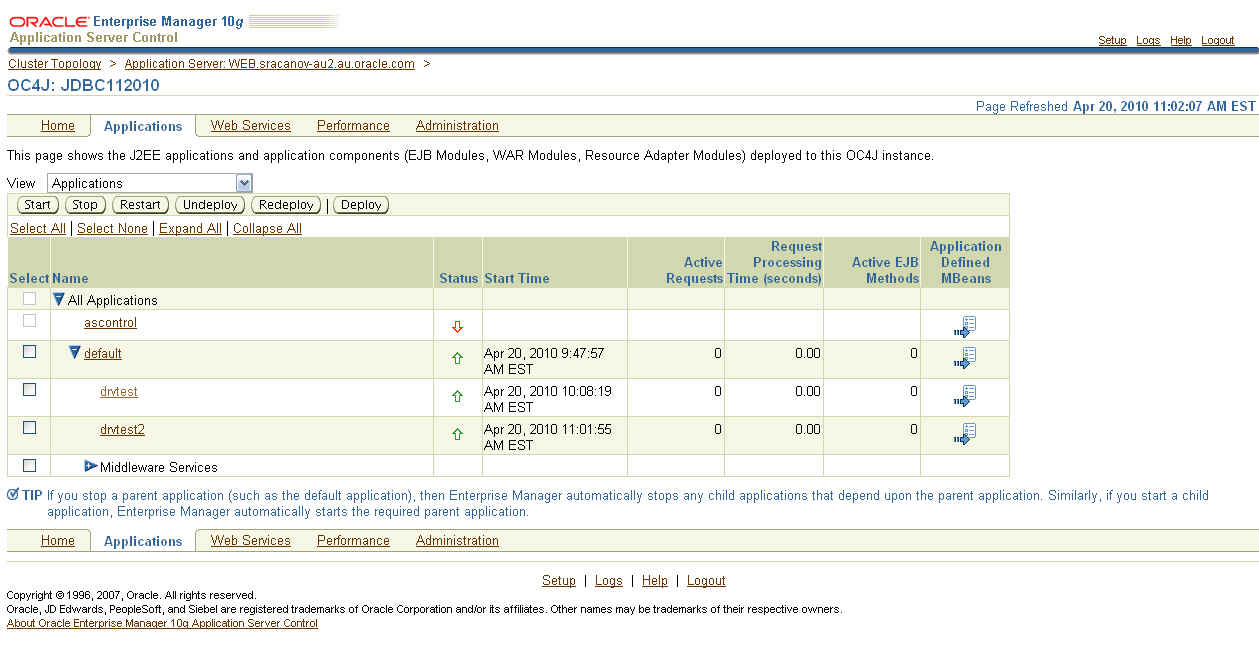
6. I then deploy the following application 'drvtest.ear'

7. I accessed and ran the application from URL - 'http://<server>:<port>/drvtest/dbdetails.jsp'

I completed my database details and clicked on the 'Submit' button.


The current JDBC details are displayed:

=============
JDBC Driver Name is ........ Oracle JDBC driver
JDBC Driver Version is ..... 10.1.0.5.0
JDBC Driver Major Version is 10
JDBC Driver Minor Version is 1
=============

8. I then continued to followed Doc ID 420303.1 to upgrade the JDBC Driver.

In point 7 of the document, I entered

Shared Library Name : oracle.jdbc
Shared Library Version : 11.2.0.1.0


NOTE: The name must be 'oracle.jdbc'

9. In point 15 of the document, I first created a backup of 'system-applications.xml'. I then entered


NOTE: The name must be 'oracle.jdbc'. The version details must match version enter in step 8.

10. After restarting the instance, I then accessed the test application again. 'http://<server>:<port>/drvtest/dbdetails.jsp'

I completed my database details and clicked on the 'Submit' button.

This is the results I received

=============
JDBC Driver Name is ........ Oracle JDBC driver
JDBC Driver Version is ..... 11.2.0.1.0
JDBC Driver Major Version is 11
JDBC Driver Minor Version is 2
=============


I can now see and confirm the JDBC Driver upgrade worked successfully.

11. Then created the datasource. You can do this following document 456270.1 - Creating a datasource in Application Server Control (ASC)/Enterprise Manager (EM) for 10.1.3.X

Here is how my connection pool looks like in 'data-sources.xml':


NOTE: You must use a managed datasource with oracle.jdbc.OracleDriver factory class. Can not use native data source. The pool properties there do not implement the encryption properties from oracle.jdbc.OracleConnection interface.

The XXX_TYPES should match the setting as configure in the database. Step 1


12. Download and deploy this application EAR file 'drvtest2.ear' which you will then connect to this connection pool.


Access the URL 'http://<server>:<port>/drvtest2/dbdetails.jsp' and enter the JNDI of the pool and click 'Submit'.


Your results should look something like:

System Information

JDK Details

=============
JDK Vendor is ... Sun Microsystems Inc.
JDK Version is ... 1.5.0_06
=============

JDBC Driver Details

=============
JDBC Driver Name is ........ Oracle JDBC driver
JDBC Driver Version is ..... 11.2.0.1.0
JDBC Driver Major Version is 11
JDBC Driver Minor Version is 2
=============

Database Details

=============
Database Product Name is ... Oracle
Database Product Version is Oracle Database 11g Enterprise Edition Release 11.2.0.1.0 - 64bit Production
With the Partitioning, OLAP, Data Mining and Real Application Testing options

Secure Algorithm Details

=============
Encryption algorithm is: RC4_256
Data Integrity algorithm is: MD5


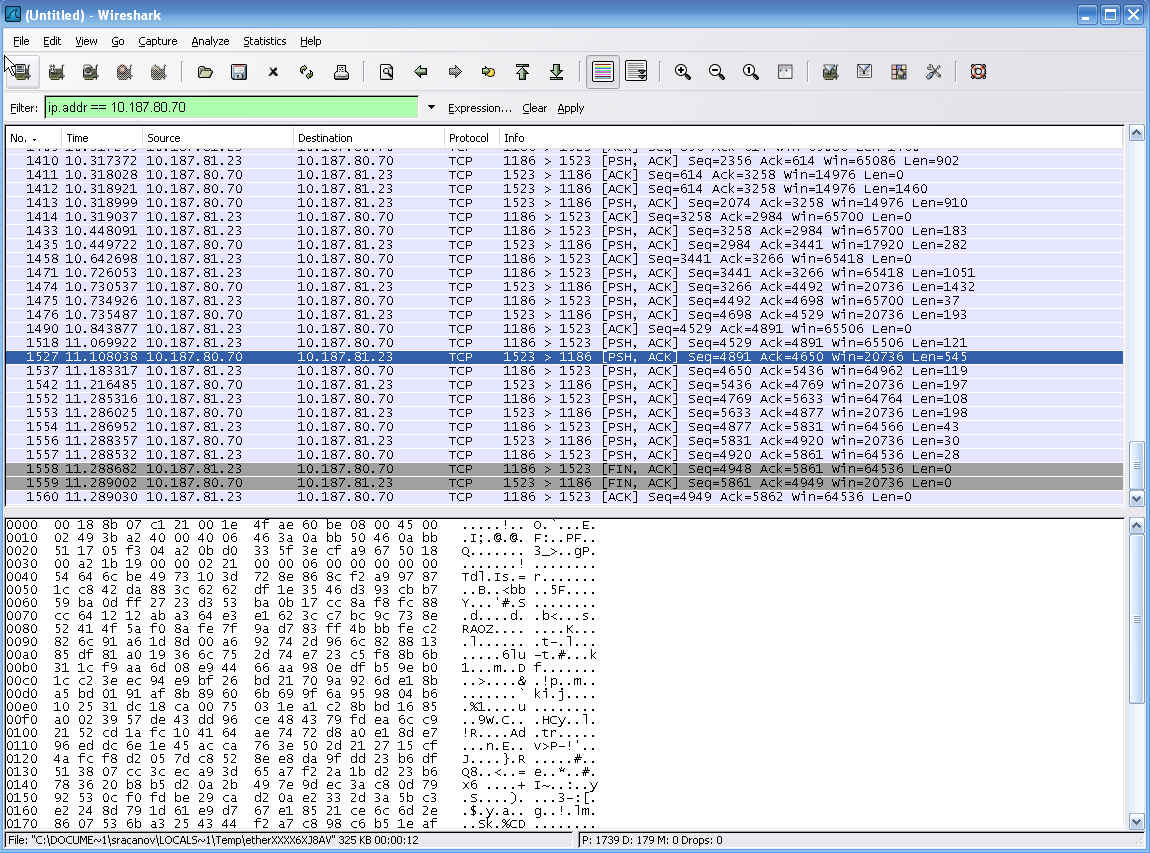
Now I can see the encryption & data integrity algorithm used in this connection. You can further download a tool like wireshark - http://www.wireshark.org/ and run it on the application server to monitor this connection pool and confirm the message are encrypted and unreadable.


You can download the JDev workspace from here

Example of using JDBC Timezone

Posted by Steve Racanovic | Posted in | Posted on 11:46 AM

0

Recently I was working on a timezone issue there the values returned on the daylight saving change over where incorrect. Here is the example and steps to reproduce this problem.

There sql script looks like:

connect / as sysdba

drop user timezoneuser cascade;

grant connect,resource to timezoneuser identified by timezoneuser;

connect timezoneuser/timezoneuser

create table jdbc_test (
sequence_id number(2),
cbt timestamp,
cbt_utc timestamp);

alter session set NLS_DATE_FORMAT = 'MM/DD/YYYY HH24:MI:SS';
alter session set NLS_TIMESTAMP_TZ_FORMAT ='MM/DD/YYYY HH24:MI:SS';
alter session set NLS_TIMESTAMP_FORMAT = 'MM/DD/YYYY HH24:MI:SS';

select * from nls_session_parameters;

insert into jdbc_test values(1,'04/05/2009 00:00:00','04/04/2009 13:00:00');
insert into jdbc_test values(2,'04/05/2009 01:00:00','04/04/2009 14:00:00');
insert into jdbc_test values(3,'04/05/2009 02:00:00','04/04/2009 15:00:00');
insert into jdbc_test values(4,'04/05/2009 02:00:00','04/04/2009 16:00:00');
insert into jdbc_test values(5,'04/05/2009 03:00:00','04/04/2009 17:00:00');
insert into jdbc_test values(6,'04/05/2009 04:00:00','04/04/2009 18:00:00');
insert into jdbc_test values(7,'04/05/2009 05:00:00','04/04/2009 19:00:00');
insert into jdbc_test values(8,'04/05/2009 06:00:00','04/04/2009 20:00:00');
insert into jdbc_test values(9,'04/05/2009 07:00:00','04/04/2009 21:00:00');
insert into jdbc_test values(10,'04/05/2009 08:00:00','04/04/2009 22:00:00');
insert into jdbc_test values(11,'04/05/2009 09:00:00','04/04/2009 23:00:00');
insert into jdbc_test values(12,'04/05/2009 10:00:00','04/05/2009 00:00:00');
insert into jdbc_test values(13,'04/05/2009 11:00:00','04/05/2009 01:00:00');
insert into jdbc_test values(14,'04/05/2009 12:00:00','04/05/2009 02:00:00');
insert into jdbc_test values(15,'04/05/2009 13:00:00','04/05/2009 03:00:00');
insert into jdbc_test values(16,'04/05/2009 14:00:00','04/05/2009 04:00:00');
insert into jdbc_test values(17,'04/05/2009 15:00:00','04/05/2009 05:00:00');
insert into jdbc_test values(18,'04/05/2009 16:00:00','04/05/2009 06:00:00');
insert into jdbc_test values(19,'04/05/2009 17:00:00','04/05/2009 07:00:00');

column seq format 999
column cbt format a20
column cbt_utc format a20
column difference format a30

select sequence_id as seq,cbt ,cbt_utc , cbt - cbt_utc as difference from jdbc_test;
and the java looks like:
package example;

import java.sql.Connection;
import java.sql.DriverManager;
import java.sql.PreparedStatement;
import java.sql.ResultSet;
import java.sql.Timestamp;

import java.util.Date;
import java.util.Properties;

public class JDBCTimeStamp {

private void queryDatabase() {
Connection conn = null;

String DRIVER = "oracle.jdbc.driver.OracleDriver";
String connectionName = "jdbc:comp:env:sys";
String URL_NAME = "jdbc:oracle:thin:@celcsol1.us.oracle.com:1521:tarsr3";
String userName = new String("timezoneuser");
String password = new String("timezoneuser");
Properties prop = new Properties();
prop.put("user", userName);
prop.put("password", password);
prop.put("connectionName", connectionName);
try {
try {
Class.forName(DRIVER);
} catch (Exception e) {
System.out.println("Exception in Class.forName : " + e);
}
try {
conn = DriverManager.getConnection(URL_NAME, prop);
} catch (Exception e) {
System.out.println("Exception in creating the connection : " + e);
}

String sqlString = " SELECT SEQUENCE_ID,CBT,CBT_UTC" + " FROM JDBC_TEST ";

PreparedStatement ps = conn.prepareStatement(sqlString.toString());
ResultSet rs = null;
try {
ps = conn.prepareStatement(sqlString);
rs = ps.executeQuery();
String sequenceId = null;
Timestamp cbtTimeStamp = null;
Timestamp cbtUtcTimeStamp = null;
long longValueOfUtc;
long longValueOfCbt;
Date cbtDateValueFromLong;
Date utcDateValueFromLong;

System.out.println("ID \tCBT(local time) \t\t\tCBT_UTC(GMT) \t\t\tTime Difference");
while (rs.next()) {
sequenceId = rs.getString(1);
cbtTimeStamp = rs.getTimestamp(2);
cbtUtcTimeStamp = rs.getTimestamp(3);
longValueOfUtc = cbtUtcTimeStamp.getTime();
longValueOfCbt = cbtTimeStamp.getTime();
cbtDateValueFromLong = new Date(longValueOfCbt);
utcDateValueFromLong = new Date(longValueOfUtc);
System.out.println(sequenceId + "\t" + cbtDateValueFromLong + "\t\t" + utcDateValueFromLong + "\t\t" + ((longValueOfCbt - longValueOfUtc) / 3600000));
}
} finally {
if (ps != null)
ps.close();
if (rs != null)
rs.close();
}
} catch (Exception e) {
System.out.println("Exception :::" + e);
e.printStackTrace();
}
}

public static void main(String[] args) {
JDBCTimeStamp main = new JDBCTimeStamp();
main.queryDatabase();
}
}
Upon running the java code using JDK 1.6 and 11g JDBC drivers (ojdbc6.jar), the following results are show:
ID   CBT(local time)                     CBT_UTC(GMT)                        Time Difference
1 Sun Apr 05 00:00:00 EST 2009 Sat Apr 04 13:00:00 EST 2009 11
2 Sun Apr 05 01:00:00 EST 2009 Sat Apr 04 14:00:00 EST 2009 11
3 Sun Apr 05 02:00:00 EST 2009 Sat Apr 04 15:00:00 EST 2009 12
4 Sun Apr 05 02:00:00 EST 2009 Sat Apr 04 16:00:00 EST 2009 11
5 Sun Apr 05 03:00:00 EST 2009 Sat Apr 04 17:00:00 EST 2009 11
6 Sun Apr 05 04:00:00 EST 2009 Sat Apr 04 18:00:00 EST 2009 11
7 Sun Apr 05 05:00:00 EST 2009 Sat Apr 04 19:00:00 EST 2009 11
8 Sun Apr 05 06:00:00 EST 2009 Sat Apr 04 20:00:00 EST 2009 11
9 Sun Apr 05 07:00:00 EST 2009 Sat Apr 04 21:00:00 EST 2009 11
10 Sun Apr 05 08:00:00 EST 2009 Sat Apr 04 22:00:00 EST 2009 11
11 Sun Apr 05 09:00:00 EST 2009 Sat Apr 04 23:00:00 EST 2009 11
12 Sun Apr 05 10:00:00 EST 2009 Sun Apr 05 00:00:00 EST 2009 11
13 Sun Apr 05 11:00:00 EST 2009 Sun Apr 05 01:00:00 EST 2009 11
14 Sun Apr 05 12:00:00 EST 2009 Sun Apr 05 02:00:00 EST 2009 10
15 Sun Apr 05 13:00:00 EST 2009 Sun Apr 05 03:00:00 EST 2009 10
16 Sun Apr 05 14:00:00 EST 2009 Sun Apr 05 04:00:00 EST 2009 10
17 Sun Apr 05 15:00:00 EST 2009 Sun Apr 05 05:00:00 EST 2009 10
18 Sun Apr 05 16:00:00 EST 2009 Sun Apr 05 06:00:00 EST 2009 10
19 Sun Apr 05 17:00:00 EST 2009 Sun Apr 05 07:00:00 EST 2009 10
This because the table was not created with local timezone. The column in the database is TIMESTAMP - which holds a non timezone specified value.

When jdbc extracts values from a TIMESTAMP column into a java.sql.Timestamp via the getTimestamp method, it ensures that the value, when printed, shows the same DATE/TIME as that stored in the database.

The correct way to create the table would be:
create table jdbc_test (
sequence_id number(2),
cbt TIMESTAMP WITH LOCAL TIME ZONE,
cbt_utc TIMESTAMP WITH TIME ZONE);
Now that I am using 'WITH LOCAL TIME ZONE', I need change my java code to include the timezone in the connection like '((OracleConnection)conn).setSessionTimeZone("Australia/Victoria");'

So the java code would now look like:
...
try {
conn = DriverManager.getConnection(URL_NAME, prop);
} catch (Exception e) {
System.out.println("Exception in creating the connection : " + e);
}

((OracleConnection)conn).setSessionTimeZone("Australia/Victoria");
String sqlString = " SELECT SEQUENCE_ID,CBT,CBT_UTC" + " FROM JDBC_TEST ";

PreparedStatement ps = conn.prepareStatement(sqlString.toString());
ResultSet rs = null;
...
Now when I run the java class, the correct results are shown:
ID   CBT(local time)                     CBT_UTC(GMT)                        Time Difference
1 Sun Apr 05 01:00:00 EST 2009 Sat Apr 04 14:00:00 EST 2009 11
2 Sun Apr 05 02:00:00 EST 2009 Sat Apr 04 15:00:00 EST 2009 11
3 Sun Apr 05 02:00:00 EST 2009 Sat Apr 04 16:00:00 EST 2009 11
4 Sun Apr 05 02:00:00 EST 2009 Sat Apr 04 17:00:00 EST 2009 10
5 Sun Apr 05 03:00:00 EST 2009 Sat Apr 04 18:00:00 EST 2009 10
6 Sun Apr 05 04:00:00 EST 2009 Sat Apr 04 19:00:00 EST 2009 10
7 Sun Apr 05 05:00:00 EST 2009 Sat Apr 04 20:00:00 EST 2009 10
8 Sun Apr 05 06:00:00 EST 2009 Sat Apr 04 21:00:00 EST 2009 10
9 Sun Apr 05 07:00:00 EST 2009 Sat Apr 04 22:00:00 EST 2009 10
10 Sun Apr 05 08:00:00 EST 2009 Sat Apr 04 23:00:00 EST 2009 10
11 Sun Apr 05 09:00:00 EST 2009 Sun Apr 05 00:00:00 EST 2009 10
12 Sun Apr 05 10:00:00 EST 2009 Sun Apr 05 01:00:00 EST 2009 10
13 Sun Apr 05 11:00:00 EST 2009 Sun Apr 05 02:00:00 EST 2009 10
14 Sun Apr 05 12:00:00 EST 2009 Sun Apr 05 02:00:00 EST 2009 10
15 Sun Apr 05 13:00:00 EST 2009 Sun Apr 05 03:00:00 EST 2009 10
16 Sun Apr 05 14:00:00 EST 2009 Sun Apr 05 04:00:00 EST 2009 10
17 Sun Apr 05 15:00:00 EST 2009 Sun Apr 05 05:00:00 EST 2009 10
18 Sun Apr 05 16:00:00 EST 2009 Sun Apr 05 06:00:00 EST 2009 10
19 Sun Apr 05 17:00:00 EST 2009 Sun Apr 05 07:00:00 EST 2009 10

Example of OracleDatabaseMetaData using OAS datasources to display table and view data

Posted by Steve Racanovic | Posted in , | Posted on 3:10 PM

0

A simple example of using oracle database metadata (from JDBC) with Oracle Application Server 1013x datasources to display the data.

1. My data-sources.xml looks like:

<managed-data-source connection-pool-name="scottPool2" jndi-name="jdbc/ScottDS2"
name="jdbc/ScottDS2"/>

<connection-pool name="scottPool2">
   <connection-factory factory-class="oracle.jdbc.pool.OracleDataSource"
user="scott" password="tiger" url="jdbc:oracle:thin:@//sracanov-au2.au.oracle.com:1522/orcl"/>

</connection-pool>

2. My java code in jdev looks like:

package examples;

import java.sql.Connection;

import java.sql.ResultSet;

import java.util.Properties;

import javax.naming.Context;
import javax.naming.InitialContext;

import javax.sql.DataSource;

import oracle.jdbc.OracleDatabaseMetaData;

public class TestOracleDatabaseMetaDataDataSource {
public static void main(String[] args) throws Exception {
Properties props = new Properties();
props.put(Context.PROVIDER_URL,
"opmn:ormi://sracanov-au2.au.oracle.com:6005:OC4J_Apps/default");
props.put(Context.INITIAL_CONTEXT_FACTORY,
"oracle.j2ee.rmi.RMIInitialContextFactory");
props.put(Context.SECURITY_PRINCIPAL, "oc4jadmin");
props.put(Context.SECURITY_CREDENTIALS, "welcome1");
Context ctx = new InitialContext(props);
DataSource ds = (DataSource)ctx.lookup("jdbc/ScottDS2");
Connection conn = ds.getConnection();
OracleDatabaseMetaData dbmd =
(OracleDatabaseMetaData)conn.getMetaData();
ResultSet rs =
dbmd.getTables(null, "%", "%", new String[] { "TABLE", "VIEW" });
while (rs.next()) {
System.out.println(" " + rs.getString(3) + " : " +
rs.getString(4));
}
}

}
3. Ensure the following libraries are in the project:

* JDBC driver
* Apache Ant
* JSP Runtime

4. Run the class and the results are displayed:
      DR$NUMBER_SEQUENCE : TABLE
DR$OBJECT_ATTRIBUTE : TABLE
DR$POLICY_TAB : TABLE
RLM$PARSEDCOND : TABLE
OGIS_GEOMETRY_COLUMNS : TABLE
OGIS_SPATIAL_REFERENCE_SYSTEMS : TABLE
....
....
....
WM$REPLICATION_INFO : VIEW
WM$TABLE_NEXTVERS_VIEW : VIEW
WM$TABLE_PARVERS_VIEW : VIEW
WM$TABLE_VERSIONS_IN_LIVE_VIEW : VIEW
WM$TABLE_WS_PARVERS_VIEW : VIEW
WM$VERSIONS_IN_LIVE_VIEW : VIEW
WM$VER_BEF_INST_NEXTVERS_VIEW : VIEW
WM$VER_BEF_INST_PARVERS_VIEW : VIEW
WM_EVENTS_INFO : VIEW
PATH_VIEW : VIEW
RESOURCE_VIEW : VIEW
Results of the output have been truncated.

Using useFetchSizeWithLongColumn and verifying prefetch returns the expected number of rows

Posted by Steve Racanovic | Posted in | Posted on 1:18 PM

0

The following is a simple example that uses 'useFetchSizeWithLongColumn' on a long column where a the row prefetch is set to 15.

I confirm it returns 15 rows on each trip to the database by tracing the session and checking the trc file on the database.

My code looks at follows:

--------------------------------------------------------------------------------------------------------


package project1;

import java.sql.Connection;
import java.sql.DriverManager;
import java.sql.ResultSet;
import java.sql.SQLException;
import java.sql.Statement;

import oracle.jdbc.OracleDriver;

public class TestFetchSizeWithLongColumn {

private Connection conn = null;
private Statement stmt = null;
private Statement altstmt = null;
private ResultSet rset = null;

final String traceSQL =
"select c.value || '/' || d.instance_name || '_ora_' || " +
"to_char(a.spid, 'fm99999') || '.trc' " +
"from v$process a, v$session b, v$parameter c, v$instance d " +
"where a.addr = b.paddr " + "and b.audsid = userenv('sessionid') " +
"and c.name = 'user_dump_dest'";

public static void main(String[] args) throws SQLException {
new TestFetchSizeWithLongColumn().run();
}

public void run() {
try {

Connection conn = getConnection();

altstmt = conn.createStatement();
stmt = conn.createStatement();

altstmt.execute("alter session set events '10046 trace name " +
"context forever, level 12'");
ResultSet rset =
stmt.executeQuery("select search_condition,rownum" +
"from dba_constraints");
altstmt.execute("alter session set events '10046 trace " +
"name context off'");
displayTraceFileName(conn);
// while (rset.next())
// System.out.println(rset.getInt(2));

} catch (SQLException sqle) {
//sqle.printStackTrace();
System.out.println("sqlexception");
} finally {
try {
if (rset != null)
rset.close();
if (stmt != null)
stmt.close();
if (altstmt != null)
altstmt.close();
if (conn != null)
conn.close();
} catch (Exception ex) {
ex.printStackTrace();
System.out.println("fatal error");
}
}
}

public static Connection getConnection() throws SQLException {
String url =
"jdbc:oracle:thin:@(DESCRIPTION=(ADDRESS=(PROTOCOL=tcp)" +
"(HOST=sracanov-au2.au.oracle.com)(PORT=1522))" +
"(CONNECT_DATA=(SERVICE_NAME=orcl)))";
java.util.Properties props = new java.util.Properties();

props.setProperty("user", "system");
props.setProperty("password", "welcome1");
props.setProperty("defaultRowPrefetch", "15");
props.setProperty("useFetchSizeWithLongColumn", "true");

DriverManager.registerDriver(new OracleDriver());
Connection conn = DriverManager.getConnection(url, props);
return conn;
}

public void displayTraceFileName(Connection conn) throws SQLException {
Statement stmt = conn.createStatement();
ResultSet rset = stmt.executeQuery(traceSQL);
rset.next();
String fileName = rset.getString(1);
System.out.println("TRACE FILE NAME : " + fileName);
}
}


--------------------------------------------------------------------------------------------------------

Now run the class as follows:

[stever@STEVER-8500 C]$ java -version
java version "1.5.0_06"
Java(TM) 2 Runtime Environment, Standard Edition (build 1.5.0_06-b05)
Java HotSpot(TM) Client VM (build 1.5.0_06-b05, mixed mode)

[stever@STEVER-8500 C]$ javac -cp .;"D:\My Contents\My Software\Oracle\JDBC Drivers\10.2.0.4\ojdbc14.jar" TestFetchSizeWithLongColumn.java

[stever@STEVER-8500 C]$ java -cp .;"D:\My Contents\My Software\Oracle\JDBC Drivers\10.2.0.4\ojdbc14.jar" TestFetchSizeWithLongColumn
TRACE FILE NAME : /u01/programs/oracle/product/10.2.0/db_1/admin/orcl/udump/orcl_ora_7002.trc

[stever@STEVER-8500 C]$

The result returned is the location of my trace file on the database.

Upon checking the trace file, the following is shown:

=====================
PARSING IN CURSOR #1 len=51 dep=0 uid=5 oct=3 lid=5 tim=1221750605502677 hv=1856978345 ad='2bdf40f8'
select search_condition,rownum from dba_constraints
END OF STMT
PARSE #1:c=0,e=108,p=0,cr=0,cu=0,mis=0,r=0,dep=0,og=1,tim=1221750605502672
BINDS #1:
EXEC #1:c=0,e=98,p=0,cr=0,cu=0,mis=0,r=0,dep=0,og=1,tim=1221750605502850
WAIT #1: nam='SQL*Net message to client' ela= 2 driver id=1952673792 #bytes=1 p3=0 obj#=-1 tim=1221750605502898
FETCH #1:c=232965,e=227064,p=0,cr=7679,cu=0,mis=0,r=15,dep=0,og=1,tim=1221750605730008
WAIT #1: nam='SQL*Net message from client' ela= 77131 driver id=1952673792 #bytes=1 p3=0 obj#=-1 tim=1221750605807896
=====================

The line:

FETCH #1:c=232965,e=227064,p=0,cr=7679,cu=0,mis=0,r=15,dep=0,og=1,tim=1221750605730008

Contains 'r=15'. 15 rows are prefetched.

java.sql.SQLException: Io exception: The Network Adapter

Posted by Steve Racanovic | Posted in | Posted on 11:50 AM

1

When using JDBC 10.2.0.3 to connect from java standalone client to the database I get the following error:

D:\Oracle\jdev\10134-prod\jdk\bin\javaw.exe -client -classpath "D:\Oracle\jdev\10134-prod\jdev\mywork\MyApplications\JDBC-SSL2\classes;D:\My Contents\My Software\Oracle\JDBC Drivers\10.2.0.3\ojdbc14_g.jar;D:\Oracle\jdev\10134-prod\jlib\oraclepki.jar" jdbcssl2.SSLEncryptionAuthenication
Exception in thread "main" java.sql.SQLException: Io exception: The Network Adapter could not establish the connection
at oracle.jdbc.driver.DatabaseError.throwSqlException(DatabaseError.java:145)
at oracle.jdbc.driver.DatabaseError.throwSqlException(DatabaseError.java:190)
at oracle.jdbc.driver.DatabaseError.throwSqlException(DatabaseError.java:363)
at oracle.jdbc.driver.T4CConnection.logon(T4CConnection.java:401)
at oracle.jdbc.driver.PhysicalConnection.(PhysicalConnection.java:466)
at oracle.jdbc.driver.T4CConnection.(T4CConnection.java:165)
at oracle.jdbc.driver.T4CDriverExtension.getConnection(T4CDriverExtension.java:35)
at oracle.jdbc.driver.OracleDriver.connect(OracleDriver.java:839)
at java.sql.DriverManager.getConnection(DriverManager.java:525)
at java.sql.DriverManager.getConnection(DriverManager.java:140)
at jdbcssl2.SSLEncryptionAuthenication.getConnection(SSLEncryptionAuthenication.java:57)
at jdbcssl2.SSLEncryptionAuthenication.run(SSLEncryptionAuthenication.java:39)
at jdbcssl2.SSLEncryptionAuthenication.main(SSLEncryptionAuthenication.java:62)
Process exited with exit code 1.

The "java.sql.SQLException: Io exception: The Network Adapter could not establish the connection" is very generic and can mean a number of different issue. Also the stack error is not very detailed.

Try using JDBC 11.1.0.7 and enable "-Djavax.net.debug=ssl" java property when you run your client to allow for a detailed stack error to help you find the problem.

Performance using Bind Variables in Java Application

Posted by Steve Racanovic | Posted in , | Posted on 1:03 PM

1

The advantage of using bind variables within your Java application, it that provides greater application performance and uses less of the shared pool from the database.

This is illustrated in the following 2 examples.

Example 1: Using Bind variables.


package bindvariables;

import java.sql.Connection;
import java.sql.PreparedStatement;
import java.sql.ResultSet;
import java.sql.SQLException;
import java.util.Date;
import bindvariables.JDBCUtil;

public class Bind {

public static void main(String[] args) throws SQLException {

ResultSet rs = null;
Connection conn = null;
PreparedStatement pstmt = null;

try {
// Get Connection
conn = JDBCUtil.getConnection();
// Create statement
pstmt = conn.prepareStatement("SELECT ? FROM dual");
System.out.println("Start: " + new Date());
for (int i = 1; i < 100000; i++) {
// Use bind variable for subsitution
pstmt.setString(1, String.valueOf(i));
// Execute the query
rs = pstmt.executeQuery();
//if (i % 1000 == 1)
// System.out.println("Print: " + i);
}
System.out.println("End: " + new Date());

} catch (SQLException se) {
System.out.println("SQL Exception:");
se.printStackTrace();
}
finally {
// Close the result set, statement and the connection
JDBCUtil.close(rs,pstmt,conn);
}
}
}


Running this application returns the following:

Start: Mon Mar 31 11:36:04 EST 2008
End: Mon Mar 31 11:36:51 EST 2008

It shows the application being executed within less than a minute.

Now the second example does not use bind variables and force the use of Hard Parse on the database.

Example 2: Not using bind variables.


package bindvariables;

import java.sql.Connection;
import java.sql.ResultSet;
import java.sql.SQLException;
import java.sql.Statement;
import java.util.Date;

public class NonBind {

public static void main(String[] args) throws SQLException {

ResultSet rs = null;
Connection conn = null;
Statement stmt = null;

try {
// Get Connection
stmt = (JDBCUtil.getConnection()).createStatement();
System.out.println("Start: " + new Date());
for (int i = 0; i < 100000; i++) {
// Execute Statement
rs = stmt.executeQuery("SELECT " + i + " FROM dual");
//if (i % 1000 == 1)
// System.out.println("Print: " + i);
}
System.out.println("End: " + new Date());
} catch (SQLException se) {
System.out.println("SQL Exception:");
se.printStackTrace();
}
finally {
// Close the result set, pstatement and the connection
JDBCUtil.close(rs,stmt,conn);
}
}
}


Running this application returns the following:

Start: Mon Mar 31 11:31:45 EST 2008
End: Mon Mar 31 11:35:34 EST 2008

It shows the application being executed over 4 minutes.

As you can see, ensure you use bind variables for performance when coding your application.

My JDBCUtil class method look like:

...

public static void close(ResultSet resultSet, Statement statement,
Connection connection) {
try {
if (resultSet != null)
close(resultSet);
if (statement != null)
close(statement);
if (connection != null)
close(connection);
} catch (Exception e) {
e.printStackTrace();
}
}

public static void close(ResultSet resultSet, PreparedStatement pstatement,
Connection connection) {
try {
if (resultSet != null)
close(resultSet);
if (pstatement != null)
close(pstatement);
if (connection != null)
close(connection);
} catch (Exception e) {
e.printStackTrace();
}
}

public static Connection getConnection() throws SQLException {
String username = "scott";
String password = "tiger";
String thinConn =
"jdbc:oracle:thin:@sracanov-au2.au.oracle.com:1522:orcl";
DriverManager.registerDriver(new OracleDriver());
Connection conn =
DriverManager.getConnection(thinConn, username, password);
conn.setAutoCommit(false);
return conn;
}
}


...